


Surface Laptop for Business, 13-inch | Intel
Why buy from Microsoft Store
We offer free shipping, 60-day returns, and one-on-one product expert help in finding the best solution for your small business. If you buy a physical product and we lower the price within 60 days from delivery, contact us and we’ll refund you the difference. Terms apply.Learn more
Starting From CAD $1,849.99
Business financing available.
Spread out the cost of your purchase with low monthly payments.Get started
Free standard delivery. Free returns.
Image shown is for illustration purposes only. Please check technical specifications for details on the keyboard you are ordering.
Need Surface for Business at enterprise scale? Find authorized resellers
Portability without compromise
Power through tasks with Intel®


Ultra light and ultra durable

Unplug with up to 22 hours of battery
-
Fast, reliable wireless connections
Enhance productivity with lightning-fast speeds, ultra-low latency and stable, secure connections with WiFi 7 and Bluetooth® Core 5.4.5
-
Dock to create a full workstation
13-inch Surface Laptop for Business supports up to two external displays.6 Quickly transfer files and dock with two USB-C® ports and connect to additional accessories with the USB-A and 3.5 mm audio jack.
-
Accelerate AI experiences
Enable Copilot+ PC AI experiences on your device with the Intel® AI Boost NPU with 47 TOPS.7,19



Designed for everyday work

See better in virtually any lighting

A display designed for viewing comfort
-
Unparalleled typing comfort
Optimal key travel ensures comfort and swift, accurate typing. Engage Copilot quickly with a dedicated key.9
-
Inclusive by design
Adaptive touch mode on the precision touchpad empowers users with limited mobility to easily adjust the touchpad to their preference.
-
Interact your way
Designed to adapt to the way you want to interact, with high-quality Dual Studio Mics for dictation and a touchscreen display that supports multi-touch gestures.10



Better video calling


Bring focus to meetings
Portrait blur tunes the background blur effect to your surroundings and uses depth-based sensing to bring focus to you.

Stay centred on screen
Automatic framing keeps you centred and visible, even if you move around or if your camera is at an angle.

Be heard more clearly
Enhanced voice focus removes background noise for maximum clarity on calls and lets the Studio Mics focus on your voice.12

Boost call engagement
Eye contact technology helps you appear focused and connected with your audience, even while consulting notes.
Secured by default to help keep your business safe

Designed with a Zero Trust mindset
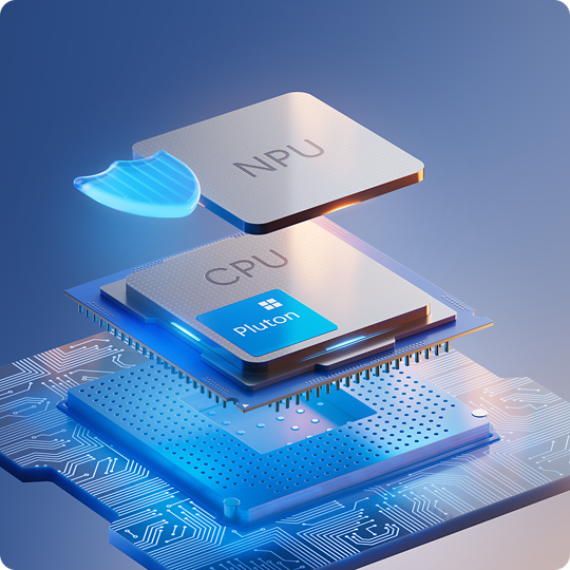
Out-of-the-box protections

Sign in without a password

Built for security above all else
Built-in AI productivity for smarter work
Interact with Copilot your way


Get more done with Microsoft 365 Copilot

Quickly find what you’re looking for

Stay in your flow with Click to Do

Connect across languages with live captions

Customize your Copilot
Microsoft Protection Plans for added peace of mind

Frequently asked questions
-
A Copilot+ PC is a PC built for AI experiences, with a powerful NPU that can run AI tasks on the device. This helps enable faster, more efficient AI features while keeping work moving smoothly, even when you’re multitasking or on the go.
-
Devices with less than 16 GB of memory are designed for everyday tasks like browsing, streaming, schoolwork, and productivity apps, delivering a smooth and responsive experience for common use. Devices with 16 GB or more of memory are built for heavier multitasking, more demanding applications, while also enabling Copilot+ PC experiences, including advanced on-device AI features. All configurations include Windows 11 Pro and Copilot, with AI assistance available through cloud-based experiences
-
A 16 GB or higher memory configuration unlocks Copilot+ PC experiences on supported devices. In addition to capabilities available across all configurations—such as Windows 11 Pro, Copilot in Windows, and Windows Studio Effects—you gain access to advanced AI-powered experiences like Click to Do, and Live Captions with translation, Cocreator in Paint, Improved Windows Search and Image Creator in Photo. These experiences use on-device AI processing to help you find information faster, take action more efficiently, and communicate across languages with greater ease.
-
Microsoft Surface for Business, including Surface Laptop for Business and Surface Pro for Business, are Copilot+ PCs that deliver built-in laptop encryption and endpoint protection for enterprises. TPM 2.0 and BitLocker help encrypt data, while Windows Secure Boot, Secured-core PC, Windows Hello and Microsoft Defender protect endpoints from chip to cloud, helping safeguard devices, data and identities.
-
You can buy Surface business laptops directly from Microsoft Store. Availability of business laptop financing and payment options may vary by region and seller, allowing organisations to choose purchasing options that fit their budget and procurement needs.
-
Intel and Qualcomm Snapdragon® processors differ mainly in architecture and efficiency. Intel Core Ultra processors are widely used in traditional Windows PCs and are known for broad software compatibility and performance. Qualcomm Snapdragon® processors use ARM technology, prioritising power efficiency and battery life. Both run Windows, but they can deliver different performance, battery and feature experiences depending on the device.
-
Yes. On Surface devices running Windows 11 Pro, you can manage Copilot and AI experiences in Windows Settings, including hiding Copilot from the taskbar and adjusting privacy settings for your device. You can choose which experiences you use, so you stay in control.
-
Recall is available on Copilot+ PCs. If you’re shopping, confirm the device is labeled Copilot+ PC, since standard Windows 11 PCs don’t include Recall. Availability can vary by market/region, and you may need the latest Windows updates to see it on your device.
-
Consumer Surface devices are designed for personal use, while Surface for Business models are built for work environments and come with Windows 11 Pro preinstalled. Business devices may also offer business‑only configurations such as 5G, extended warranty and service options, and enhanced support for security and IT management, including easier deployment, device controls and long‑term support for organisations.
-
Contact Microsoft Support to troubleshoot the issue, check your warranty coverage and submit a repair or service request. From there, you can select your device, review service options and track repair status or order details to get back up and running quickly.
-
First, find your device model in Settings > System > About (Surface users can also check the Surface app). Then review the accessory’s product page under Specs, Compatibility or Works with to confirm it supports your model. For some accessories, also check fit (screen size) or connection type (USB-C, Bluetooth etc.).
-
Yes. Microsoft Store offers flexible payment options for eligible purchases, including instalment plans and pay-over-time options where available. To use one, select an eligible item, add it to your basket and, if offered, choose a payment plan during checkout to split your purchase into manageable payments.
Shop other products

Surface Laptop for Business, 13.8 and 15-inch (8th Editio...
From CAD $2,729.99
Intel® Core™ Ultra Series 3 processors deliver the performance you need to handle...
Surface Pro for Business, 13-inch (12th Edition) | Intel
From CAD $2,729.99
Laptop performance and tablet flexibility, all in one ultra-portable device. Intel...
Surface Laptop for Business, 13-inch | Intel
From CAD $1,849.99
The most portable Surface Laptop delivers built-in AI experiences and impressive...
Surface Pro for Business, 13-inch (11th Edition) | Intel
From CAD $2,349.99
Surface Pro for Business, 11ᵗʰ Edition, the first Copilot+ PC¹ built exclusively for...
Surface Laptop for Business, 13.8 and 15-inch (7th Editio...
From CAD $2,349.99
Surface Laptop for Business, 7ᵗʰ Edition, the first Copilot+ PC¹ built exclusively for...
Surface Laptop for Business, 13.8 and 15-inch (8th Editio...
From CAD $2,369.99
The latest Snapdragon® X2 processors deliver the performance you need to handle...
Surface Pro for Business, 13-inch (12th Edition) | Snapdr...
From CAD $2,359.99
Laptop performance, tablet flexibility—all in one ultra-portable device. The latest...
Surface Pro for Business, 13-inch (11th Edition) | Snapdr...
From CAD $2,109.99
Buy the 13-inch Surface Pro for Business (11th Edition). This 2-in-1 tablet to laptop...
Surface Laptop for Business, 13.8 and 15-inch (7th Editio...
From CAD $2,109.99
Buy the 13.8 or 15-inch Surface Laptop for Business (7th Edition) with the Snapdragon...
Surface Pro for Business, 12-inch | Snapdragon
From CAD $1,789.99
Buy Surface Pro for Business from Microsoft Store. Features tablet to laptop...
Why shop at Microsoft Store for your business

Free shipping

Free 60-day returns
Some exclusions apply.*
60-day price protection
Exclusions apply.*

Work worry-free with extended coverage
*See Microsoft Store Price Protection for full terms and full list of eligible retailers. Microsoft reserves the right to modify or discontinue offers at any time.
Price Adjustments: Price Adjustment must be requested within 60 days after the customer receives the product and cannot be completed at time of purchase. Customer is eligible only if the product is in stock for purchase at Microsoft Store or a Microsoft Experience Centre. Customer must contact Microsoft to request the adjustment. For purchases from Microsoft Store, contact Microsoft Store Sales and Support and provide any information requested by a representative. For purchases from a Microsoft Experience Centre, you must return to the location with your receipt. Limit 1 price adjustment per product. Excludes Surface Hub, HoloLens, and Windows DevKit.
Microsoft Store Price Adjustment: Valid on purchases of qualifying physical consumer products and Surface for Business devices made at Microsoft Store and Microsoft Experience Centers in select markets for 60 days from the date product is received. Price adjustments for Surface for Business devices can be made via credit card for purchases made on Microsoft.com website only.
Eligible Retailer Price Adjustment: Valid on purchases of qualifying new consumer physical products from Microsoft Store and Microsoft Experience Centers in select markets for 60 days from the date product is received. Excludes ROG Xbox Ally, ROG Xbox Ally X, Surface for Business devices and accessories, and refurbished products. An Eligible Retailer Price Adjustment cannot be requested at time of purchase. Microsoft reserves the right to verify an eligible retailer’s advertised price and availability of the product. The product sold by the eligible retailer must be identical to the product sold by Microsoft and must be in stock for purchase at the eligible retailer at the reduced price. Exclusions apply.
- [1] Surface Laptop display has rounded corners within a standard rectangle. When measured as a standard rectangular shape the screen is 13 inches diagonally (actual viewable area is less).
- [2] Based on local video playback test. Battery life varies significantly with settings, usage, ambient lighting, and other factors. See Surface battery performance.
- [3] MIL-STD 810H establishes a methodology for testing products against environmental stresses under controlled laboratory conditions. Such testing is not a guarantee of future performance under these test conditions. Abuse, like that contained in MIL-STD 810H testing, is not covered under Microsoft’s standard warranty. Learn more at Surface hardware environmental test results.
- [4] Fast charging is supported with minimum 60W USB Type-C® PD charger or higher (sold separately). Testing conducted by Microsoft in February 2026. For details on fast charging see - USB-C® and Fast Charging for Surface - Microsoft Support.
- [5] 6GHz band not available in all regions.
- [6] Support for two 4K monitors requires compatible displays, cables and accessories. See tested peripherals page for compatibility information.
- [7] Copilot+ PC experiences vary by device and region and may require updates continuing to roll out; timing varies.
- [8] The Surface Laptop for Business, 13-inch with Intel display has been designed to minimize unwanted reflections and has been certified by TÜV SÜD to meet the requirements of ISO 9241-307.
- [9] Copilot key feature availability varies by market, see Keyboard shortcuts in Windows.
- [10] Optimised for touch interaction only. Pen input and compatibility with Surface Pen, Surface Slim Pen or similar accessories is not supported.
- [11] Copilot+ PCs feature. Requires built-in camera; available effects vary by device. See Copilot+ PC FAQs.
- [12] Voice focus requires activation, requires Windows 11 and is available in apps which use integrated device microphones and certain Windows audio processing modes.
- [13] Microsoft 365 Copilot licence required. Supports multiple languages; some features only available in English. See What’s new in Voice Access.
- [14] Requires eligible Microsoft 365 licence. File upload and image generation limits apply.
- [15] Improved Windows search works with specific text, image and document formats only; optimised for select languages [English, Chinese (Simplified), French, German, Japanese and Spanish].
- [16] Copilot+ PC feature. Image actions now available across devices; other actions vary by device, region, language and character sets. Subscription required for some actions. Some actions require a subscription See Copilot+ PC FAQs.
- [17] Translation for video and audio subtitles into English from 40+ languages and from 27 languages into Chinese (Simplified).
- [18] Requires Microsoft 365 along with tenant and per user licensing.
- [19] Copilot+ PC features available only on select configurations with 16 GB+ RAM; additional system requirements may apply. See more at Windows 11 Specs and System Requirements | Microsoft Windows.
Processor |
Intel® Core™ Ultra 5 processor 325 (Series 3)
|
NPU |
Intel® AI Boost with 47 TOPS
|
Graphics |
Intel® Graphics
|
Memory and storage3 |
|
Display |
|
Size and Weight7 |
|
Battery life |
|
Security |
Firmware
|
Cameras |
|
Audio |
|
Ports and charging |
|
Network and connectivity |
|
Software |
|
Accessibility |
|
Sustainability |
Surface Laptop for Business, 13-inch with Intel is designed with sustainability in mind Recycled materials
Thoughtful packaging
Energy efficient
Repairability
In January 2020, Microsoft committed to be carbon negative, water positive, and achieve zero waste by 2030. Learn more about how we design with sustainability in mind at Microsoft Surface Sustainability |
Serviceability |
Replacement components include:22
|
Exterior |
|
Sensors |
Ambient colour sensor
|
What’s in the box |
|
Keyboard layout |
|
Warranty24 |
1-year limited hardware warranty
|
Battery Capacities7 |
|
- [2] Based on local video playback test. Battery life varies significantly with settings, usage, ambient lighting, and other factors. See Surface battery performance.
- [3] System software uses significant storage space. Available storage is subject to change based on system software updates and apps usage. 1GB = 1 billion bytes. 1TB = 1,000 GB. See Surface storage options for more details.
- [4] Drive Retention is only available on Microsoft Surface devices in which the Drive is marketed as removable in the technical specifications. Devices returned without a drive may incur a replacement fee unless covered by a Drive Retention benefit (sold separately). Available plans and options may vary by device and region. See Surface Warranty, Protection Plans & Support – Microsoft Surface for Business for details.
- [5] Optimised for touch interaction only. Pen input and compatibility with Surface Pen, Surface Slim Pen or similar accessories is not supported.
- [6] The Surface Laptop for Business, 13-inch with Intel display has been designed to minimize unwanted reflections and has been certified by TÜV SÜD to meet the requirements of ISO 9241-307.
- [7] Might vary depending on manufacturing processes.
- [8] Based on local video playback test. Testing conducted by Microsoft April 2026 using preproduction software and preproduction Surface Laptop, 13 with Intel® Core™ Ultra 5, 16GB, 256GB devices. Testing consisted of full battery discharge during video playback of a .mov file through the Windows Media Player application in 1080p at 24 FPS. All settings were default except screen brightness set to 150 nits with Auto-brightness disabled. WiFi was connected to a network. Battery life varies significantly with settings, usage, and other factors.
- [9] Based on a web browsing test. Testing conducted by Microsoft April 2026 using preproduction software and preproduction Surface Laptop, 13 with Intel® Core™ Ultra 5, 16GB, 256GB devices. Testing consisted of full battery discharge while accessing twelve popular websites over multiple open tabs through the browser. All settings were default except screen brightness set to 150 nits with Auto-Brightness disabled. WiFi was connected to a network. Battery life varies significantly with settings, usage, and other factors.
- [10] Voice focus requires activation and Windows 11 and is available in apps which use integrated device microphones and certain Windows audio processing modes.
- [11] Support for two 4K monitors requires compatible displays, cables and accessories. See tested peripherals page for compatibility information.
- [12] In select markets, only specific configurations come with Surface 45W USB-C Wall Charger. Fast charging is supported with minimum 60W USB Type-C® PD charger or higher (sold separately). Testing conducted by Microsoft in February 2026. For details on fast charging see - USB-C® and Fast Charging for Surface - Microsoft Support.
- [13] 6GHz band not available in all regions.
- [14] Sold separately. Software licence required for some features.
- [15] Activation required. If your device is managed by your organisation’s IT department, contact your IT administrator for activation. After 30 days, you will be charged the applicable monthly or annual subscription fee. Credit card required. Cancel any time to stop future charges. See M365 Business Trial Info.
- [16] Sold separately.
- [17] Device (excluding power supply), contains 3.5% recycled content, consisting of 100% recycled rare earth metals in magnets, 100% recycled tin in solder, 100% recycled copper and 100% recycled gold in the motherboard. Based on validation performed by Underwriters Laboratories, Inc. using Environmental Claim Validation Procedure (ECVP) for Recycled Content, UL ECVP-2809-2, Second Edition, dated June, 2024. Recycled Content is defined in accordance with ISO 14021.
- [18] Device (excluding power supply), contains 3.4% recycled cobalt, consisting of 100% recycled cobalt in the battery cell. Based on validation performed by Underwriters Laboratories, Inc. using Environmental Claim Validation Procedure (ECVP) for Recycled Content, UL ECVP-2809-2, Second Edition, dated June, 2024. Recycled Content is defined in accordance with ISO 14021.
- [19] Applies to sales packaging. Based on internal analysis using IEEE Std 1680.1-2018. IEEE Standard for Environmental and Social Responsibility Assessment of Computers and Displays. 4.7.3.1 Required – recycled content in wood-based fibre packaging.
- [20] Sources must be Forest Stewardship Council certified.
- [21] Rating is based on EPEAT 1.0. Please refer to the EPEAT registry for current ratings. Ratings can vary by country, may change over time, and products are eventually archived.
- [22] Replacement components available through Surface Commercial authorised device resellers. Components can be replaced on-site by a skilled technician following Microsoft’s Service Guide. Microsoft tools (sold separately) may also be required. Availability of replacement components and service options may vary by product, by market and over time. See Surface service options – Surface | Microsoft Learn. Opening and/or repairing your device can present electric shock, fire and personal injury risks and other hazards. Use caution if undertaking do-it-yourself repairs. Unless required by law, device damage caused during repair will not be covered under Microsoft’s Hardware Warranty or protection plans.
- [23] Copilot key feature availability varies by market, see Key Support.
- [24] Microsoft’s Limited Warranty is in addition to your consumer law rights.
- [27] Copilot+ PC features available only on select configurations with 16 GB+ RAM; additional system requirements may apply. See more at Windows 11 specs, features, and computer requirements.

Designed with sustainability in mind

Recycled materials
Surface Laptop for Business features 100% recycled rare earth metals in magnets and 100% recycled copper in the motherboard, reducing virgin metals and copper required in those components.3,7

Thoughtful packaging
Our wood-based fiber packaging is made from 78% recycled content. Plus, 100% of the virgin paper we source comes from responsibly managed forests.4,5

Energy efficient
Unplug longer with the freedom of all-day battery life.2 Settings like Auto Keyboard Backlight can help reduce power usage.

Easy repair with replacement parts
Intuitive visual icons and built-in QR codes direct technicians to the right tools and service guides for easy repair and replacement of components like battery, SSD and touchpad.6
- [2] Based on local video playback test. Battery life varies significantly with settings, usage, ambient lighting, and other factors. See Surface Battery Performance.
- [3] Device (excluding power supply) contains 3.5% recycled content, consisting of 100% recycled rare earth metals in magnets, 100% recycled tin in solder, 100% recycled copper and 100% recycled gold in the motherboard. Based on validation performed by Underwriters Laboratories, Inc. using Environmental Claim Validation Procedure (ECVP) for Recycled Content, UL ECVP-2809-2, Second Edition, dated June, 2024. Recycled content is defined in accordance with ISO 14021.
- [4] Applies to sales packaging. Based on internal analysis using IEEE Std 1680.1-2018. IEEE Standard for Environmental and Social Responsibility Assessment of Computers and Displays. 4.7.3.1 Required – recycled content in wood-based fibre packaging.
- [5] Sources must be Forest Stewardship Council certified.
- [6] Replacement components available through Surface Commercial authorised device resellers. Components can be replaced on-site by a skilled technician following Microsoft’s Service Guide. Microsoft tools (sold separately) may also be required. Availability of replacement components and service options may vary by product, by market and over time. See Surface service options – Surface | Microsoft Learn. Opening and/or repairing your device can present electric shock, fire and personal injury risks and other hazards. Use caution if undertaking do-it-yourself repairs. Unless required by law, device damage caused during repair will not be covered under Microsoft’s Hardware Warranty or protection plans.
- [7] Device (excluding power supply), contains 3.4 % recycled cobalt, consisting of 100% recycled cobalt in the battery cell. Based on validation performed by Underwriters Laboratories, Inc. using Environmental Claim Validation Procedure (ECVP) for Recycled Content, UL ECVP-2809-2, Second Edition, dated June, 2024. Recycled Content is defined in accordance with ISO 14021.

Accessible by design, built for you

Free accessibility support
- [2] Based on local video playback test. Battery life varies significantly with settings, usage, ambient lighting and other factors. See Surface battery performance.
Choose the right device configuration for your business


Surface Laptop for Business, 13-inch | Intel
- Processor: Intel® Core™ Ultra 5 processor 325 (Series 3)
- Memory: 8 GB, 16 GB or 24 GB (LPDDR5x RAM)
- Storage: removable solid-state drive (Gen 4 SSD) 256 GB, 512 GB or 1 TB3,4
- Battery life: up to 22 hours of local video playback2
- NPU: Intel® AI Boost (47 TOPS)

Surface Laptop for Business, 13.8 and 15-inch (8th Edition) | Intel
- Processor: Intel® Core™ Ultra 5 processor 335 (Series 3), Intel® Core™ Ultra 7 processor 366H (Series 3) or Intel® Core™ Ultra X7 processor 368H (Series 3)
- Memory: 16 GB, 32 GB or 64 GB (LPDDR5x RAM)
- Storage: removable solid-state drive (Gen 4) 256 GB, 512 GB or 1 TB3,4
- Battery life: 13.8-inch: up to 23 hours of local video playback, 15-inch: up to 21 hours of local video playback2
- NPU: Intel® AI Boost (up to 50 TOPS)

Surface Laptop for Business, 13-inch | Snapdragon
- Processor: Snapdragon® X Plus
- Memory: 16 GB or 24 GB (LPDDR5x RAM)
- Storage: removable 256 GB (UFS), 512 GB (UFS) or removable solid-state drive 1 TB (Gen 4 SSD)3,4
- Battery life: Up to 23 hours of local video playback2
- NPU: Qualcomm® Hexagon™ (45 TOPS)
- [2] Based on local video playback test. Battery life varies significantly with settings, usage, ambient lighting, and other factors. See Surface battery performance.
- [3] System software uses significant storage space. Available storage is subject to change based on system software updates and apps usage. 1GB = 1 billion bytes. 1 TB = 1,000 GB. See Surface storage options for more details.
- [4] Drive Retention is only available on Microsoft Surface devices in which the Drive is marketed as removable in the technical specifications. Devices returned without a drive may incur a replacement fee unless covered by a Drive Retention benefit (sold separately). Available plans and options may vary by device and region. See Surface Warranty, Protection Plans & Support – Microsoft Surface for Business for details.