Windows is the only platform with a customer commitment to investigate reported security issues and proactively update impacted devices as soon as possible. And we take this responsibility very seriously.
Recently, the activity group that Microsoft Threat Intelligence calls STRONTIUM conducted a low-volume spear-phishing campaign. Customers using Microsoft Edge on Windows 10 Anniversary Update are known to be protected from versions of this attack observed in the wild. This attack campaign, originally identified by Google’s Threat Analysis Group, used two zero-day vulnerabilities in Adobe Flash and the down-level Windows kernel to target a specific set of customers.
We have coordinated with Google and Adobe to investigate this malicious campaign and to create a patch for down-level versions of Windows. Along these lines, patches for all versions of Windows are now being tested by many industry participants, and we plan to release them publicly on the next Update Tuesday, Nov 8.
We believe responsible technology industry participation puts the customer first, and requires coordinated vulnerability disclosure. Google’s decision to disclose these vulnerabilities before patches are broadly available and tested is disappointing, and puts customers at increased risk.
To address these types of sophisticated attacks, Microsoft recommends that all customers upgrade to Windows 10, the most secure operating system we’ve ever built, complete with advanced protection for consumers and enterprises at every layer of the security stack. Customers who have enabled Windows Defender Advanced Threat Protection (ATP) will detect STRONTIUM’s attempted attacks thanks to ATP’s generic behavior detection analytics and up-to-date threat intelligence.
-Terry
STRONTIUM: A brief history
Microsoft aggregates the details of threat activity—malware, infrastructure, victim classes, and attacker techniques—into activity groups to improve our readers’ ability to understand the reasons behind cyber attacks. STRONTIUM is an activity group that usually targets government agencies, diplomatic institutions, and military organizations, as well as affiliated private sector organizations such as defense contractors and public policy research institutes. Microsoft has attributed more 0-day exploits to STRONTIUM than any other tracked group in 2016. STRONTIUM frequently uses compromised e-mail accounts from one victim to send malicious e-mails to a second victim and will persistently pursue specific targets for months until they are successful in compromising the victims’ computer. Once inside, STRONTIUM moves laterally throughout the victim network, entrenches itself as deeply as possible to guarantee persistent access, and steals sensitive information.
The exploits
STRONTIUM must accomplish three objectives in order for the attack to succeed:
- Exploit Flash to gain control of the browser process
- Elevate privileges in order to escape the browser sandbox
- Install a backdoor to provide access to the victim’s computer
Microsoft has several threat prevention and exploit mitigation features available to counter these steps.
Adobe Flash exploitation: CVE-2016-7855
Based on the analysis performed by the Windows Defender ATP Exploit research team and the Microsoft Security Response Center (MSRC), the vulnerability in Adobe Flash leveraged by STRONTIUM was found to be a use-after-free issue affecting ActionScript runtime code. Adobe has since released an update to fix this vulnerability. Microsoft is actively partnering with Adobe to implement additional mitigations against this class of exploit.
Elevation of privileges
The Windows kernel vulnerability targeted by STRONTIUM’s EoP exploit is present in Windows Vista through Windows 10 Anniversary Update. However, prior to this attack, Microsoft implemented new exploit mitigations in the Windows 10 Anniversary Update version of the win32k kernel component. These Windows 10 Anniversary Update mitigations, which were developed based on proactive internal research, stop all observed in-the-wild instances of this exploit.
Backdoor installation
Following successful elevation of privilege, a backdoor is downloaded, written to the file system, and executed into the browser process. However, the backdoor DLL (along with any other untrusted software) can be blocked by implementing strict Code Integrity policies. Microsoft Edge natively implements Code Integrity to prevent this common post-exploitation step. Users of Internet Explorer and other browsers can also be protected through the use of Device Guard.
Detecting the attack with Windows Defender ATP
Multiple behavioral and machine learning detection rules alert on various elements of the kill chain throughout STRONTIUM’s current attack. Windows Defender ATP can generically detect, without any signature, multiple stages of the attack such as the creation of uncommon DLL libraries on disk from the browser process, unexpected changes of process token and integrity levels (EoP), and the loading of recently created DLL libraries under abnormal process conditions (Figure 3).
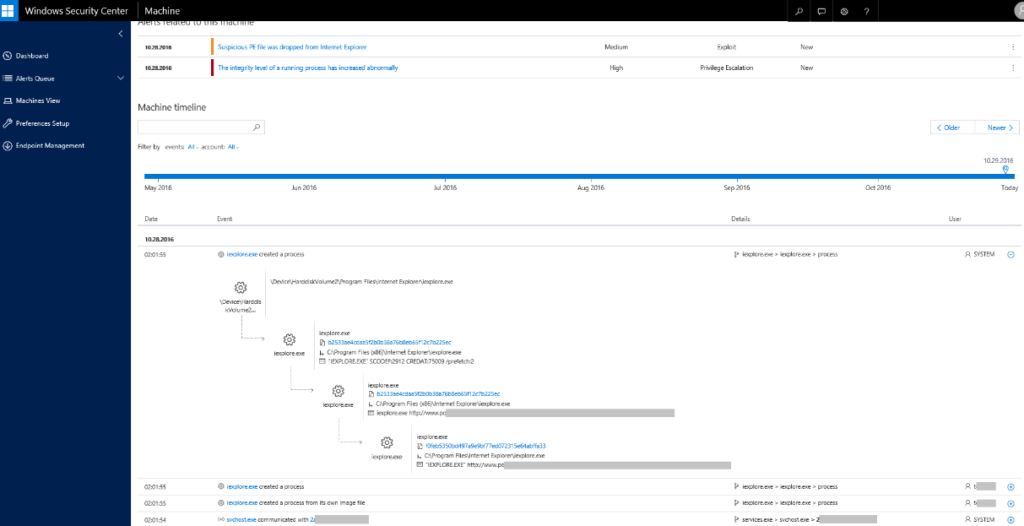
Windows Defender ATP Detection of Kernel EOP used by STRONTIUM
Additionally, threat intelligence and IOCs specific to this attack unearthed by Microsoft Threat Intelligence have been added to Windows Defender ATP and Office 365 ATP. These alerts work alongside the existing threat summary and in-depth profiles on STRONTIUM available in the Windows Defender ATP customer portal.
For more information, check out the features and capabilities of the Windows Defender ATP service in Windows 10.
Special thanks to Neel Mehta and Billy Leonard of Google’s Threat Analysis Group for their assistance in investigating these issues.