
We are happy to announce the general availability of endpoint detection and response (EDR) in block mode in Microsoft Defender for Endpoint. EDR in block mode turns EDR detections into real-time blocking of malicious behaviors, malware, and artifacts. It uses Microsoft Defender for Endpoint’s industry-leading visibility and detection capabilities and Microsoft Defender Antivirus’s built-in blocking function to provide an additional layer of post-breach protection in cases where the primary antivirus misses a threat.
EDR in block mode extends the behavioral blocking and containment capabilities in Microsoft Defender for Endpoint, thwarting attack chains that could allow attackers to gain a foothold on a device and, consequently, a network. For each malicious behavior or malware blocked, EDR in block raises an alert in Microsoft Defender Security Center, enabling security teams to perform additional investigation and hunting and comprehensively resolve attacks.
Since being available for public preview in August, EDR in block mode has helped customers to stop a wide range of threats, especially in cases where Microsoft Defender Antivirus isn’t the primary antivirus. Below we describe an IcedID campaign, one of many attacks foiled by EDR in block mode. In this incident, the organization’s non-Microsoft antivirus solution missed the malware, but Microsoft Defender for Endpoint picked up the malicious behavior. EDR in block mode kicked in and protected the device from a series of malicious activities that include evasive attacker techniques like process hollowing and steganography that lead to the deployment of the info-stealing IcedID malware.
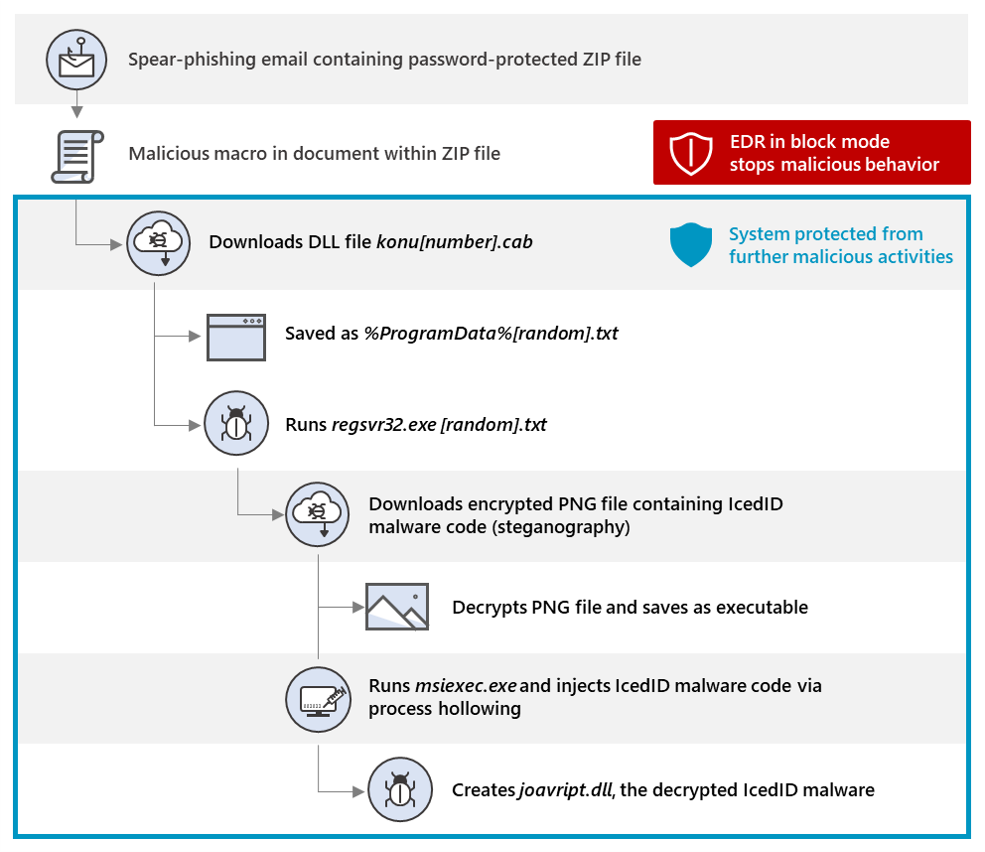
Figure 1. IcedID attack chain stopped by EDR in block mode
How EDR in block mode stopped an IcedID attack
On October 13, attackers launched a new campaign to distribute the IcedID malware. IcedID is a banking trojan that remains in memory, monitors traffic to banking domains and financial websites, and steals sensitive financial information. It has also been observed to modify site content to redirect traffic to malicious sites for the same purpose.
As in many past IcedID campaigns, this attack started with an email carrying a malicious attachment, in this case, a password-protected archive file. The emails used the fake reply technique and contained the password to the archive file.
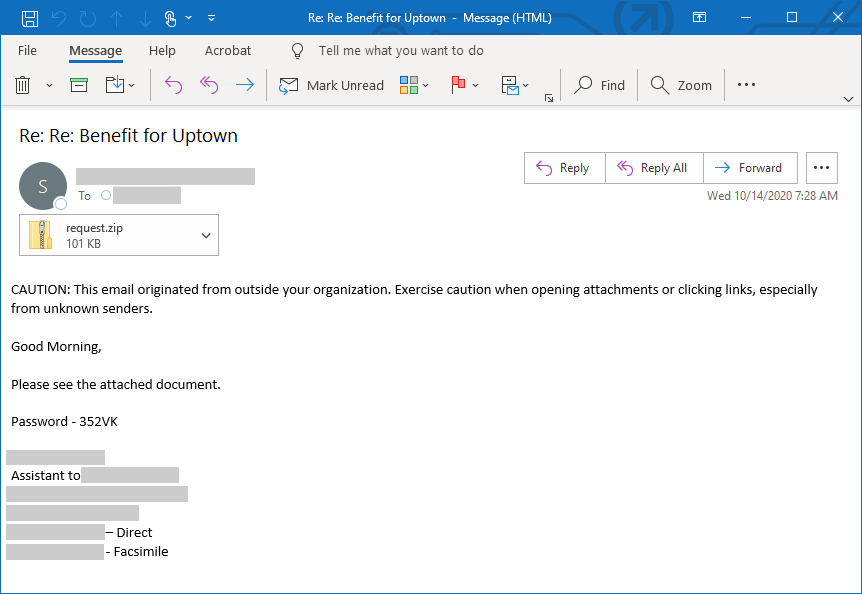
Figure 2. Spear-phishing email used in the IcedID campaign
The archive file contained a document with malicious obfuscated macro code. When enabled, the malicious macro connects to a remote site to attempt to download the IcedID loader, which would in turn download and run the main IcedID malware.
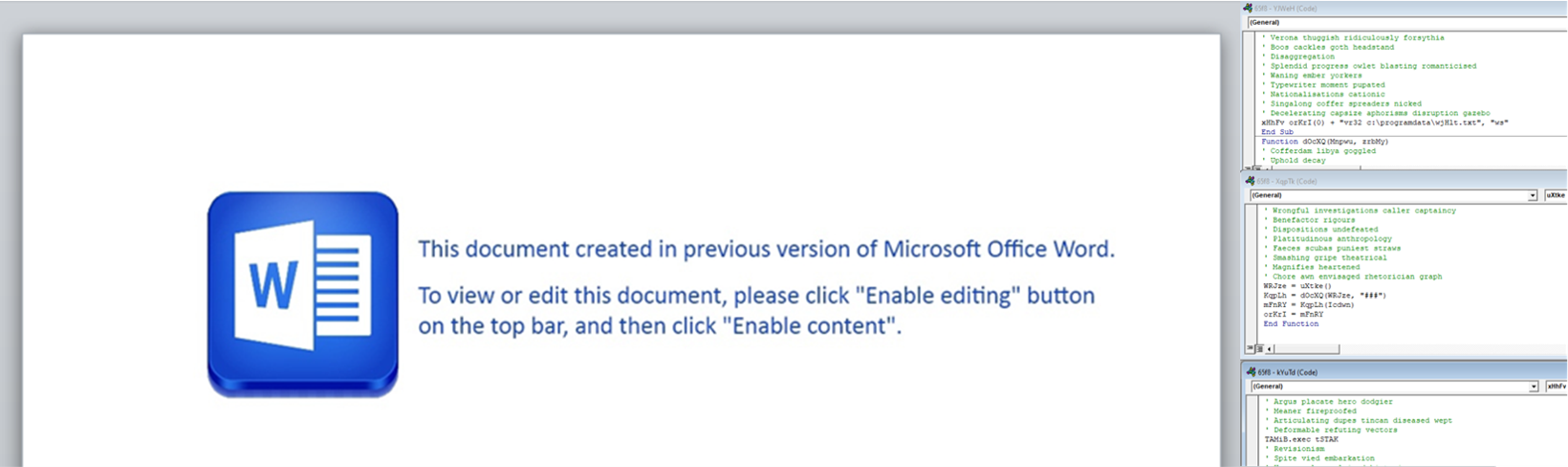
Figure 3. Document with malicious macro
In customer environments protected by Microsoft for Defender Endpoint with Microsoft Defender Antivirus as the primary antivirus, the attack was blocked. Microsoft Defender for Endpoint uses Anti-malware Scan Interface (AMSI) and specialized machine learning classifiers on the client and in the cloud to detect malicious macro behavior.
In one environment that wasn’t using Microsoft Defender Antivirus, the primary antivirus solution missed the campaign, so when the user opened the document and enabled the macro, the malicious code started connecting to the command-and-control (C2) server. Microsoft Defender for Endpoint’s EDR capabilities, however, detected the malicious macro behavior.
EDR in block mode, which was enabled on the environment, kicked in and instantly blocked the malicious document, preventing a chain of evasive attacker activities that could have led to the IcedID malware being installed.
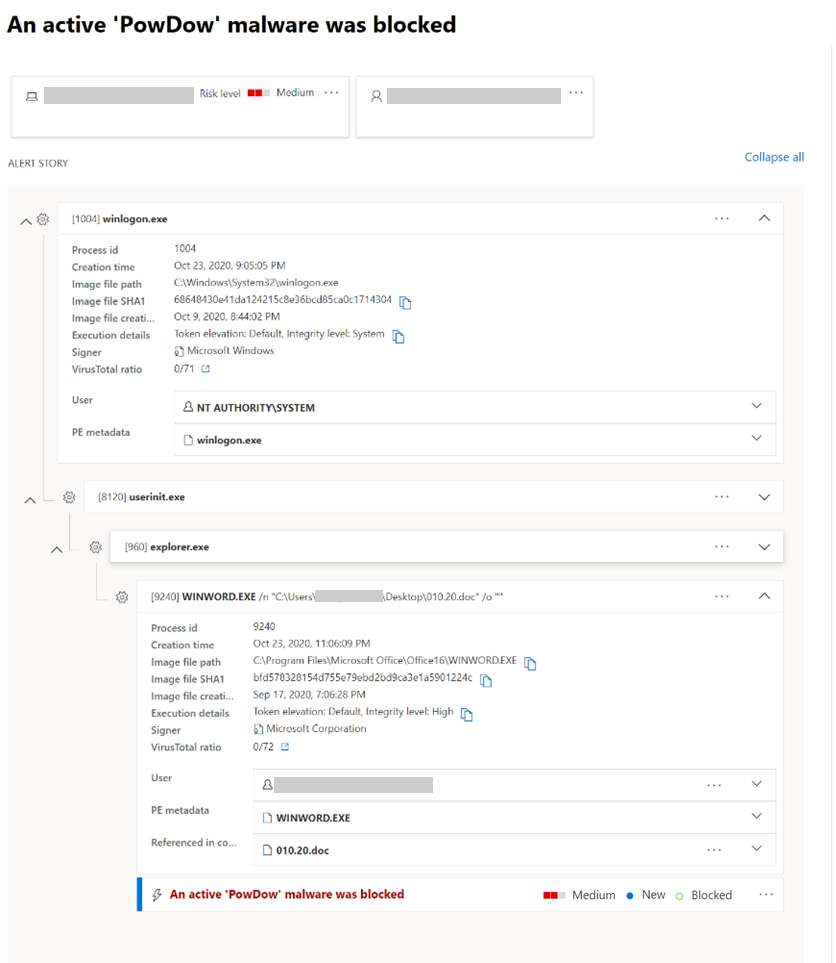
Figure 4. Microsoft Defender Security Center alert for the blocked IcedID malware
The attack that could have been
This IcedID campaign shows why blocking malicious behavior and attacks in real time, especially in the earlier stages of the attack, is critical in preventing the full impact of threats. After gaining access to a device, attackers bring in sophisticated tools and utilize advanced techniques to operate stealthily on a system.
For example, if the IcedID macro isn’t blocked from running, it downloads a DLL file disguised as a CAB file from hxxp://h4dv4c1w[.]com/ryfu/bary[.]php?l=konu13[.]cab. This DLL file is saved as [random].txt and is executed using regsvr32.exe. The DLL then downloads jazzcity.top, an encrypted PNG file that contains malware code. This technique of hiding malicious code in image files, called steganography, is used by attackers to evade detection.
When decrypted, the PNG file creates an msiexec.exe process and uses process hollowing, a stealthy cross-process injection technique, to inject malicious code. The hollowed-out msiexec.exe process then creates the file joavript.dll, which is the decrypted IcedID malware.
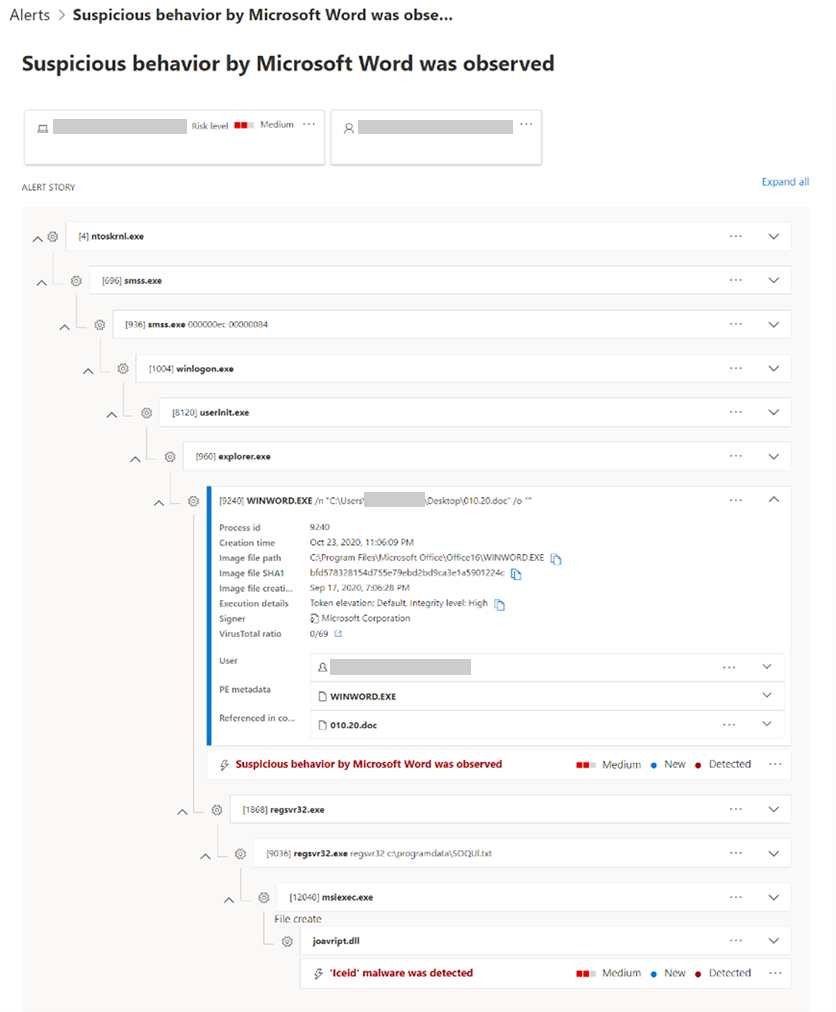
Figure 5. Microsoft Defender Security Center alert for the detection of IcedID malware
Once in memory, the IcedID malware acts as the middleman between the browser and the banking site. It does this by creating a self-signed certificate and by hooking the browser to accept this certificate. This allows IcedID to monitor HTTPS traffic to online banking sites and manipulate and steal information.
EDR in block mode: Transforming EDR visibility into real-time blocking
With endpoint and detection response (EDR) in block mode, now generally available, Microsoft Defender for Endpoint provides another layer of post-breach protection when attacks manage to slip past the primary antivirus solution. An extension of the behavioral blocking and containment capabilities, EDR in block mode stops attacks cold when it detects malicious behavior, malware implant, and other artifacts. It stops and blocks malicious behavior in real-time, even if a threat has started running, helping ensure that attacks are not allowed to proceed and achieve their endgame.
EDR in block mode can be enabled thru the advanced settings in Microsoft Defender Security Center. Organizations that have not enabled this feature will also get security recommendation to do so via the threat and vulnerability management feature. To learn more, read the EDR in block mode documentation.

Figure 6. Enable EDR in block mode in advanced features in Microsoft Defender Security Center
EDR in block mode is part of the comprehensive endpoint protection provided by Microsoft Defender for Endpoint, which delivers preventative protection, post-breach detection, automated investigation, and response. Learn how you can secure your organization with Microsoft Defender for Endpoint.
Talk to us
Questions, concerns, or insights on this story? Join discussions at the Microsoft 365 Defender tech community.
Read all Microsoft security intelligence blog posts.
Follow us on Twitter @MsftSecIntel.