
Today, following the 25th year anniversary of Microsoft Sysinternals, we are announcing the general availability of a new Microsoft Sysmon report in VirusTotal.
Whether you’re an IT professional or a developer, you’re probably already using Microsoft Sysinternals utilities to help you manage, troubleshoot, and diagnose your Windows systems and applications. The powerful logging capabilities of Sysinternals utilities became indispensable for defenders as well, enabling security analytics and advanced detections. The System Monitor (Sysmon) utility, which records detailed information on the system’s activities in the Windows event log, is often used by security products to identify malicious activity.
The new behavior report in VirusTotal includes extraction of Microsoft Sysmon logs for Windows executables (EXE) on Windows 10, with very low latency, and with Windows 11 on the roadmap. This is the latest milestone in the long history of collaboration between Microsoft and VirusTotal. Microsoft 365 Defender uses VirusTotal reports as an accurate threat intelligence source, and VirusTotal uses detections from Microsoft Defender Antivirus as a primary source of detection in its arsenal. Microsoft Sysinternals Autoruns, Process Explorer, and Sigcheck tools integrate VirusTotal reports, and VirusTotal itself uses Sigcheck to report details on Windows portable executable files.
The security industry has long recognized the value of Microsoft Sysmon. Last year, the United Kingdom National Cyber Security Center (NCSC) published a tutorial on basic logging requirements for security, Logging Made Easy (LME), and cited Microsoft Sysmon as the solution for security host-based logging. Security professionals are building solutions on Microsoft Sysmon. Microsoft Azure Sentinel includes several solutions based on Microsoft Sysmon, including parsing and normalizing data. Meanwhile, TrustedSec has released a very useful community guide for Sysmon configuration, noting how the tool provides security value to customers. Splunk also released a blog post that highlights how Sysmon events can be used for threat hunting.
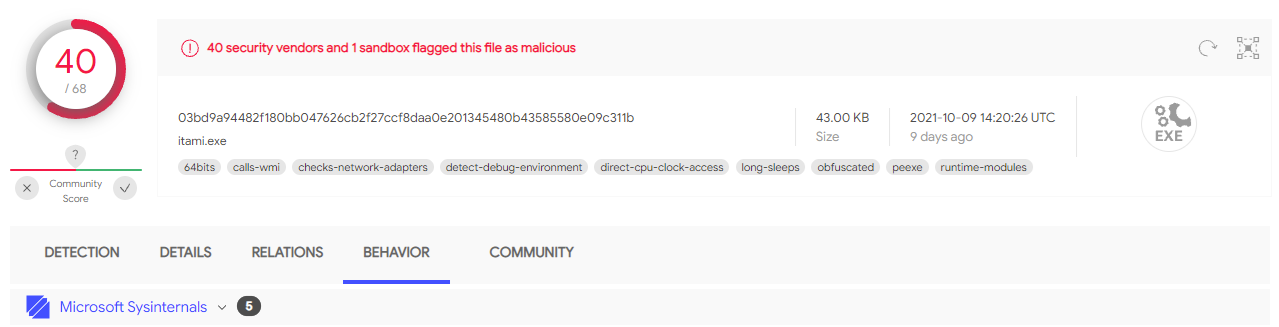
Figure 1: Microsoft Sysinternals report in VirusTotal.
Adding the unique capabilities of Microsoft Sysmon to VirusTotal expands the intelligence available for the whole security community to consume, analyze, and inform solutions—resulting in better security for all.
“We are really excited about this new collaboration with Microsoft that reinforces our long partnership to keep our world a little bit safer. VirusTotal is based on industry and community collaboration. We scan users’ submissions with a variety of tools to correlate and further characterize files, URLs, IP addresses, and domains to highlight suspicious signals. We also run executables uploaded to VirusTotal in a controlled environment, resulting in the discovery of the network infrastructure used by attackers, registry keys providing persistence on infected machines, and other valuable indicators of compromise. The integration of Microsoft Sysmon is an important added value to the already existing behavior analysis solutions in the VirusTotal Multisandbox project that will benefit the entire cybersecurity community.”—Karl Hiramoto, Senior Software Engineer, VirusTotal
A look at the Microsoft Sysmon report
Sysmon’s logging capabilities cover important system events such as process activity, complete with command line, activity on the filesystem and registry, network connections, and more. The Sysmon documentation provides an exhaustive description of all the available events and security features.
The Sysmon logs in the new behavior report in VirusTotal include an extraction of a rich set of indicators of compromise (IoCs) and system metadata from Microsoft Sysmon security events.
For example, the activity of a coin miner malware is captured in Sysmon and exposed in the detonation report. The process activity is captured in the Process Tree, as well as in the Processes Created and Processes Terminated sections:
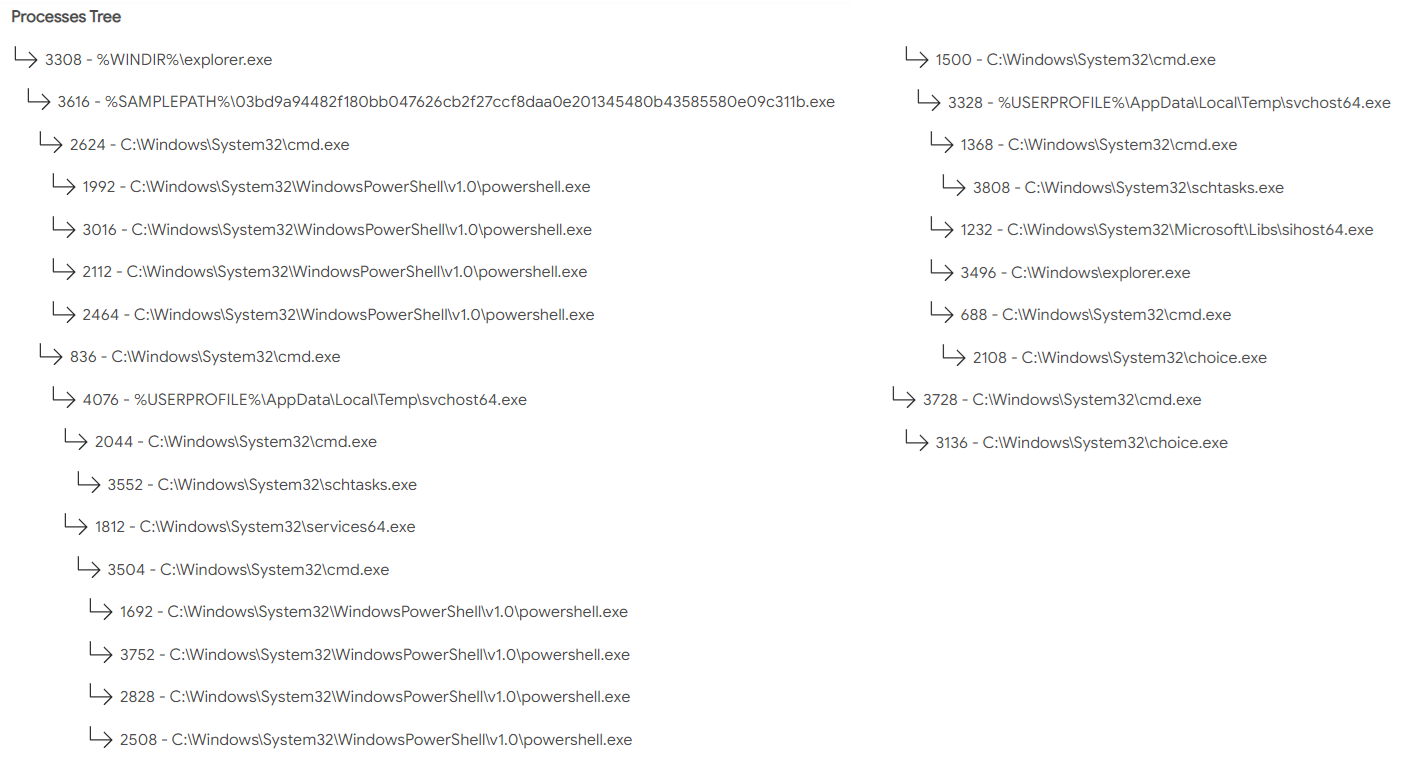
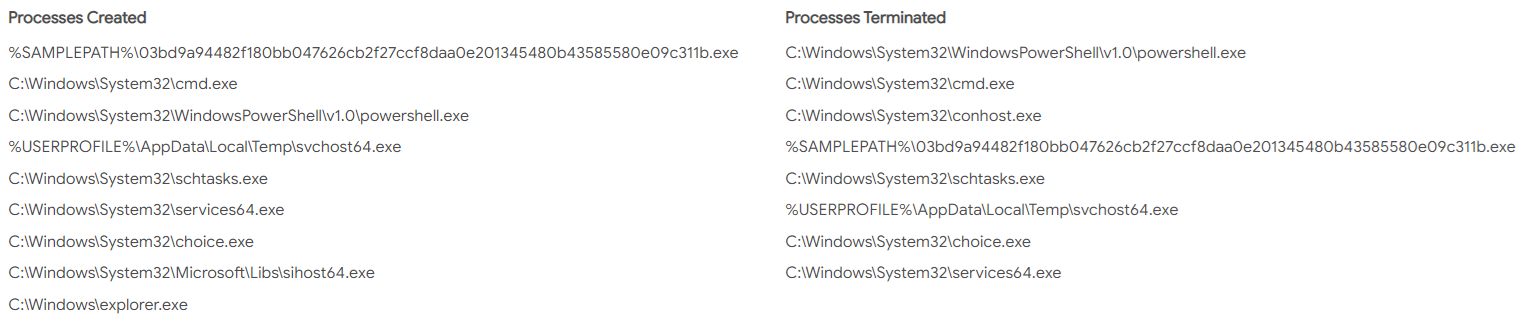
Figure 2: Process tree, process created, and process terminated info in Microsoft Sysinternals report.
Network events show the malware communication to the miner’s server:
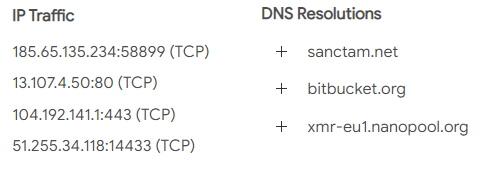
Figure 3: IP traffic and DNS resolutions info in Microsoft Sysinternals report.
The rest of the sections contain information about files, registry artifacts, and more. For example, the dropped files are captured and registry keys are logged:
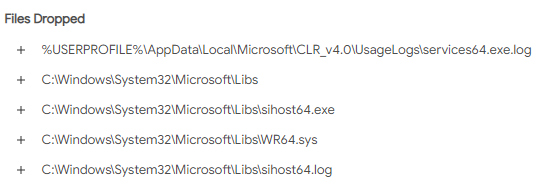
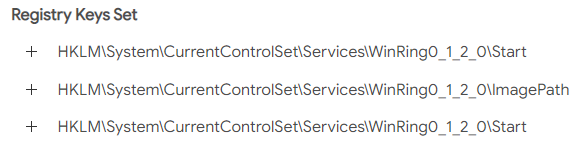
Figure 4: Dropped files and registry modification info in Microsoft Sysinternals report.
Some of the shell commands clearly identify the threat as a coin miner:
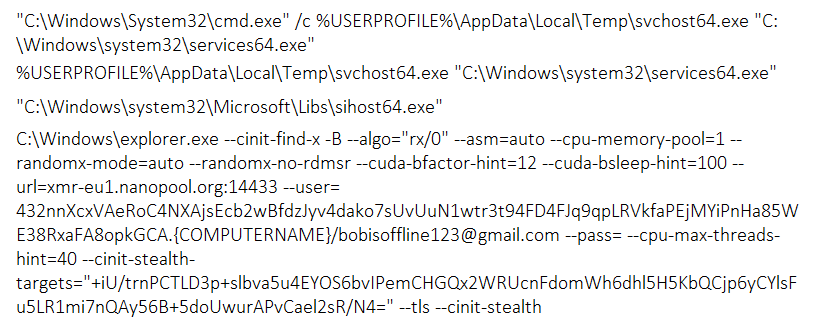
Figure 5: Shell commands info in Microsoft Sysinternals report.
Better community threat intelligence results, better security for all
We discussed in a past blog entry how to use the MSTICPy Threat Intelligence APIs to query information about IOCs and how to build relationships and graphs from them. Now we are publishing a new notebook to explore file detonation data from VirusTotal. This new notebook lets researchers:
- Query and browse VirusTotal summary and detonation data for a given file hash.
- Visualize detonation process trees with command lines.
- Look up related IOCs (in VirusTotal and other providers).
- Generate sample queries for Azure Sentinel to search for indicators from the detonation data.
These new features allow researchers to find stronger and more accurate relationships between detonation samples and campaigns that may be active in their own organizations.
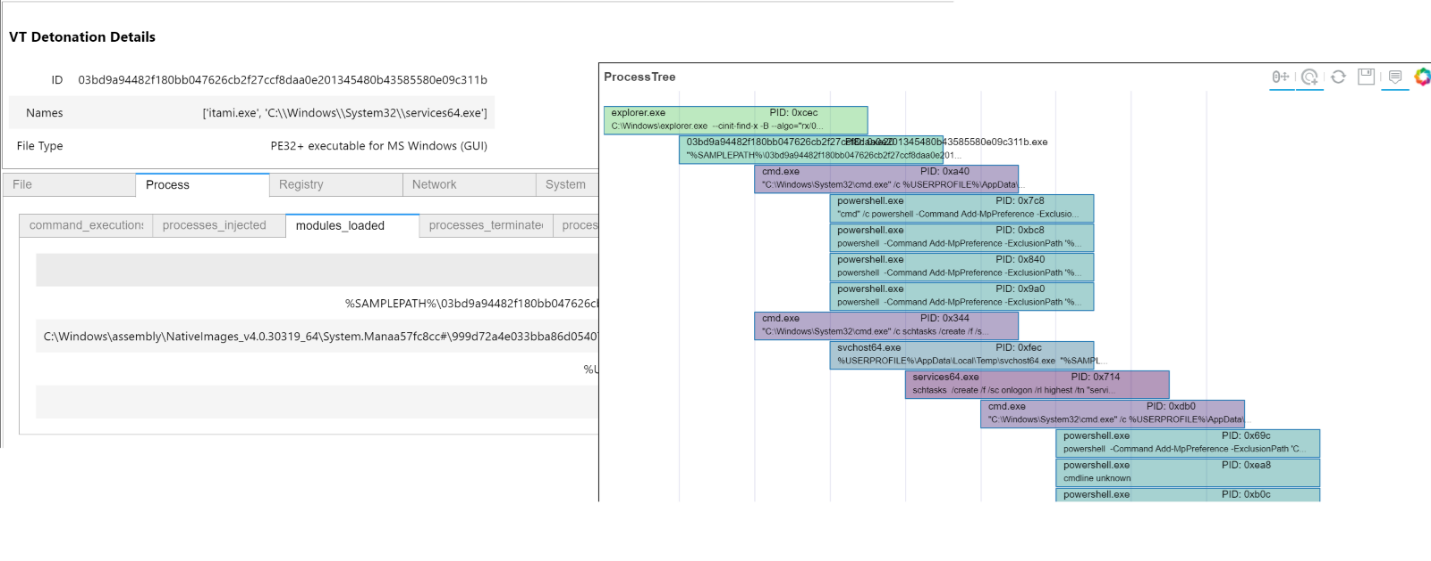
Figure 6: Browsing detonation data and displaying the process tree.
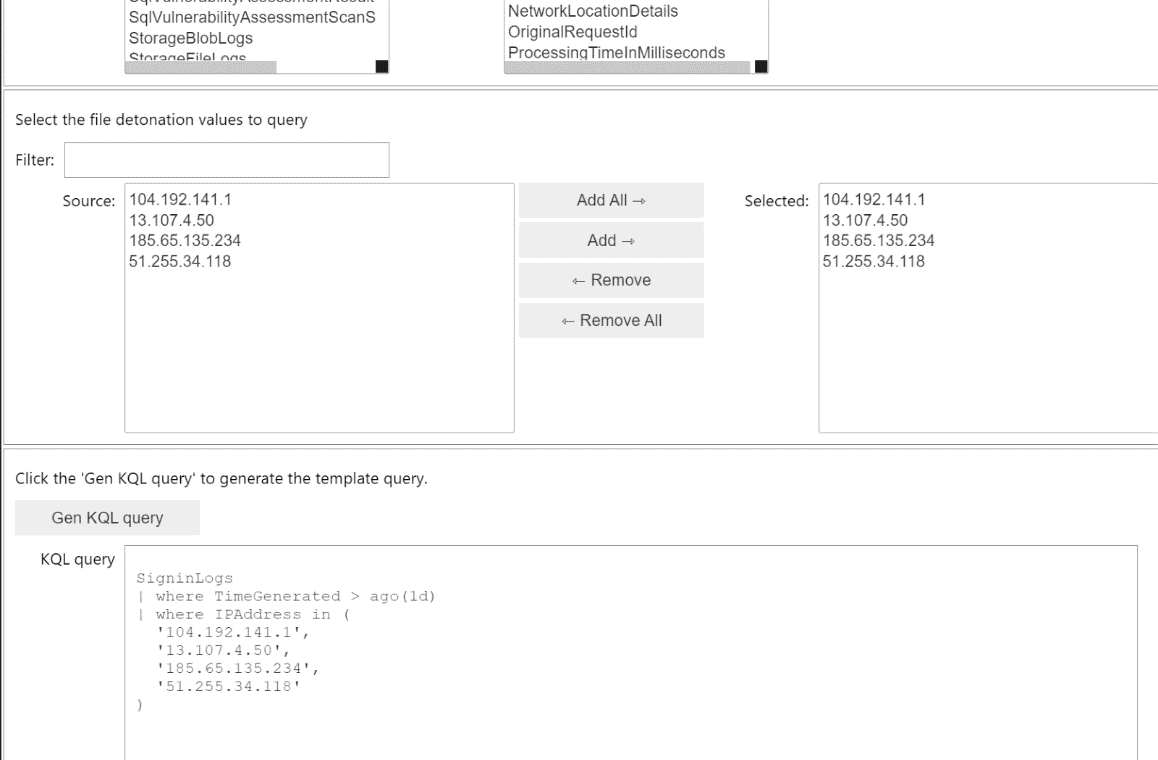
Figure 7: Generating a query to hunt for indicators from the detonation sample.
Learn more
In closing, the events captured by Microsoft Sysmon logs identify valuable behaviors and IoCs leveraged for detections and threat hunting.
The incorporation of Sysmon reports in VirusTotal provides cybersecurity experts with an additional, valuable source of information to perform malware analysis and threat hunting. We recommend any field expert to make full use of the rich and accurate IoCs provided by Sysmon reports for their daily duties. Please email us your feedback, we look forward to hearing from the security community.
To learn more about Microsoft Security solutions, visit our website. Bookmark the Security blog to keep up with our expert coverage on security matters. Also, follow us at @MSFTSecurity for the latest news and updates on cybersecurity.