
Instead of believing everything behind the corporate firewall is safe, the Zero Trust model assumes breach and verifies each request as though it originates from an uncontrolled network. Regardless of where the request originates or what resource it accesses, Zero Trust teaches us to “never trust, always verify.”
At Microsoft, we consider Zero Trust an essential component of any organization’s security plan based on these three principles:
- Verify explicitly: Always authenticate and authorize based on all available data points, including user identity, location, device health, service or workload, data classification, and anomalies.
- Use least privileged access: Limit user access with just-in-time (JIT) and just-enough-access (JEA), risk-based adaptive policies, and data protection to protect both data and productivity.
- Assume breach: Minimize blast radius and segment access. Verify end-to-end encryption and use analytics to get visibility, drive threat detection, and improve defenses.
In this article, we will focus on the third principle (assume breach) and how encryption and data protection play a significant role in getting prepared for a potential breach in your data center.
Protect data with end-to-end encryption
As part of a comprehensive security posture, data should always be encrypted so that in the event where an attacker is able to intercept customer data, they are unable to decipher usable information.
End-to-end encryption is applied throughout the following three stages: at rest, in transit, and in use.
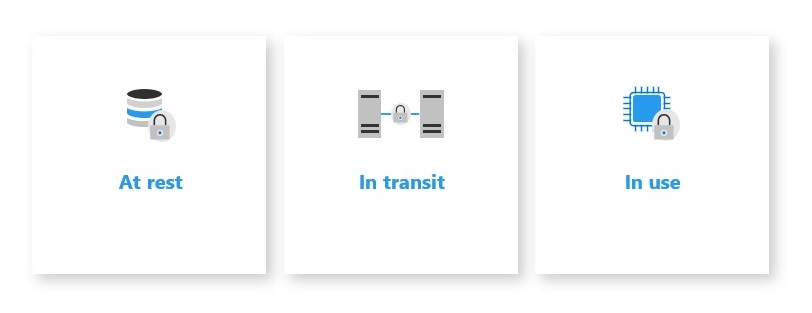
Data protection is critical across all three of these stages, so let’s dive a little deeper into how each stage works and how it can be implemented.
Protect data at rest
Encryption at rest provides data protection for stored data (at rest). Attacks against data at rest include attempts to obtain physical access to the hardware on which the data is stored, and then compromising the contained data. In such an attack, a server’s hard drive may have been mishandled during maintenance allowing an attacker to remove the hard drive. Later the attacker would put the hard drive into a computer under their control to attempt to access the data.
Encryption at rest is designed to prevent the attacker from accessing the unencrypted data by ensuring the data is encrypted when on disk. If an attacker obtains a hard drive with encrypted data but not the encryption keys, the attacker must defeat the encryption to read the data. This attack is much more complex and resource-consuming than accessing unencrypted data on a hard drive. For this reason, encryption at rest is highly recommended and is a high priority requirement for many organizations.
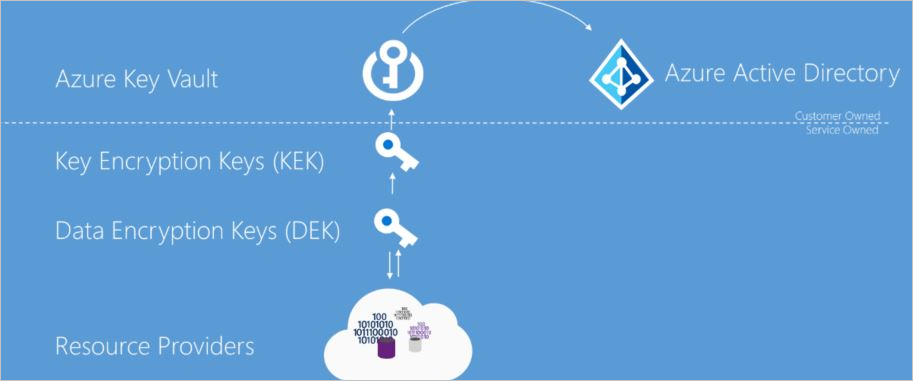
At rest, it is important that your data is protected through disk encryption which enables IT administrators to encrypt your entire virtual machine (VM) or operating system (OS) disks.
One of the concerns that we hear from customers is how can they reduce the chances that certificates, passwords, and other secrets may accidentally get leaked. A best practice is to use central storage of application secrets in a secured vault to have full control of their distribution. When using a secured vault, application developers no longer need to store security information in their applications, which reduces risk by eliminating the need to make this information part of the code.
Data encryption at rest is a mandatory step toward data privacy, compliance, and data sovereignty. These Microsoft Azure security services are recommended for this purpose:
- Azure Storage Service Encryption: Microsoft Azure Storage uses server-side encryption (SSE) to automatically encrypt your data when it is persisted to the cloud. Azure Storage encryption protects your data to help you to meet your organizational security and compliance commitments.
- SQL Server Transparent Database Encryption (TDE): Encryption of a database file is done at the page level with Transparent Data Encryption. The pages in an encrypted database are encrypted before they’re written to disk and are decrypted when read into memory.
- Secrets management: Microsoft Azure Key Vault can be used to securely store and tightly control access to tokens, passwords, certificates, API keys, and other secrets.
- Key management: Azure Key Vault can also be used as a key management solution. Azure Key Vault makes it easy to create and control the encryption keys used to encrypt your data.
- Certificate management: Azure Key Vault lets you easily provision, manage, and deploy public and private Secure Sockets Layer/Transport Layer Security (SSL/TLS) certificates for use with Azure and your internal connected resources.
- Hardware security modules (HSM): Store and protect your secrets and keys either by software or FIPS 140-2 Level 2, which validates HSMs.
Protect data in transit
A “data in transit” condition exists when data is transferred within the data center between different network elements or data centers.
Organizations that fail to protect data in transit are more susceptible to man-in-the-middle attacks, eavesdropping, and session hijacking. These attacks can be the first step attackers use to gain access to confidential data.
For example, the recent NOBELIUM cyberattacks show that no one can be 100 percent protected against a breach. During this attack, 18,000 SolarWinds customers were vulnerable, including Fortune 500 companies and multiple agencies in the US government.
Data in transit should cover two independent encryption mechanisms:
- Application layer—the HTTPS and TLS encryption that takes place between the client and server node.
- Data link layer—encryption that takes place on the frames transferred over the Ethernet protocol, just above the physical connections
It is recommended customers not only encrypt data on the application layer but also have visibility into their data in transit by using TLS inspection capabilities.
These Microsoft Azure network security services are recommended for this purpose:
- Microsoft Azure Firewall Premium: Next-generation firewall with advanced security capabilities required for highly sensitive and regulated environments.
- Microsoft Azure Front Door: Scalable and secure entry point for the fast delivery of global web applications.
- Microsoft Azure Application Gateway: Web traffic load balancer that enables you to manage traffic to your web applications.
As part of the TLS inspection, the above network services perform full decryption and encryption of the traffic, give the ability to utilize intrusion detection and prevention systems (IDPS), as well as providing customers with visibility into the data itself.
To provide customers double encryption when sending data between regions, Azure provides data link layer encryption utilizing media access control security (MACSec).
MACSec is a vendor-independent IEEE Standard (802.1ae), which provides data link layer, point-to-point encryption of traffic between network devices. The packets are encrypted/decrypted on the hardware before being sent and are designed to prevent even a physical “man-in-middle” attack. Because MACSec uses line rate encryption, it can secure data without the performance overhead and complexity of IP encryption technologies such as IPSec/GRE.
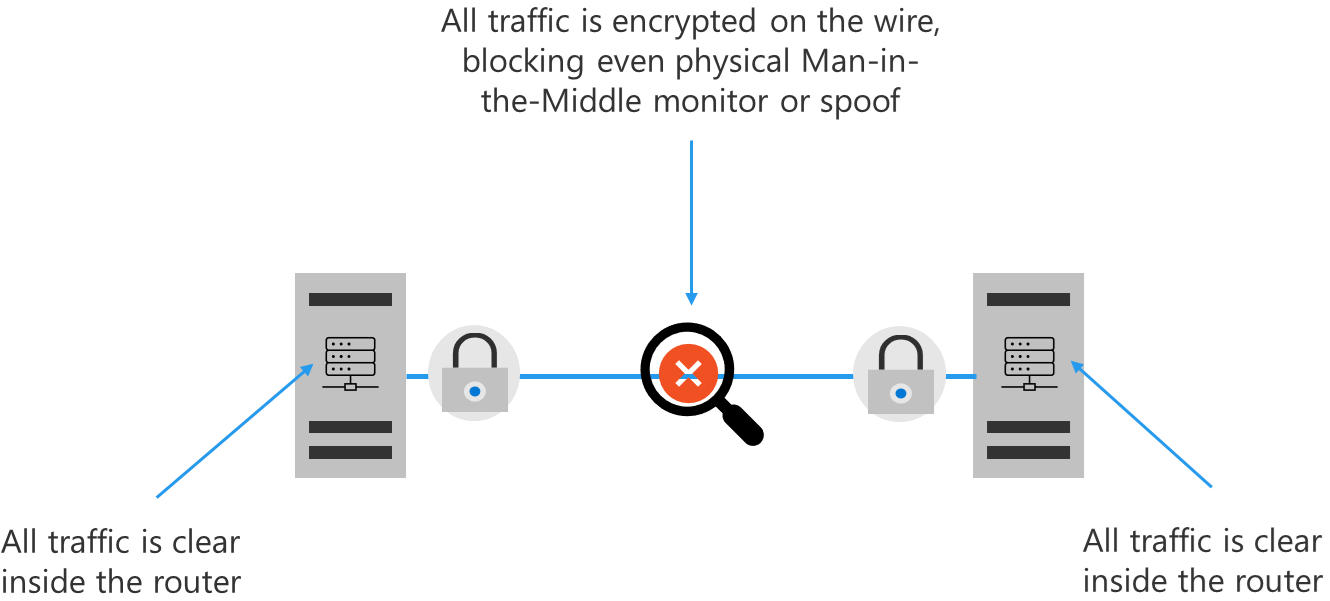
Whenever Azure customer traffic moves between Azure datacenters—outside physical boundaries not controlled by Microsoft (or on behalf of Microsoft)—a data link layer encryption method using the IEEE 802.1AE MAC Security Standards is applied from point-to-point across the underlying network hardware. The packets are encrypted and decrypted on the devices before being sent and applied by default for all Azure traffic traveling within a region or between regions.
Protect data in use
We often hear from customers that they are concerned about moving extremely sensitive IP and data to the cloud. To effectively protect assets, not only must data be secured at rest and in transit, but data must also be protected from threats while in use.
To protect data in use for services across your software-as-a-service (SaaS), platform-as-a-service (PaaS), and infrastructure-as-a-service (IaaS) cloud models, we offer two important capabilities: Azure confidential computing and centralized storage of application secrets.
Azure confidential computing encrypts data in memory in hardware-based trusted execution environments (TEEs) and only processes it once the cloud environment is verified, preventing data access from cloud operators, malicious admins, and privileged software such as the hypervisor. By protecting data in use, organizations can achieve the highest levels of data privacy and enable secure multi-party data analytics, without giving access to their data.
These Azure services are recommended to be used for data in use protection:
- Application Enclaves: You can optimize for confidentiality at the application level by customizing your app to run in confidential virtual machines with Intel SGX application enclaves, or lift and shift existing applications using an independent software vendor (ISV) partner.
- Confidential Virtual Machines: You can optimize for ease of use by moving your existing workloads to Azure and making them confidential without changing any code by leveraging encryption across the entire virtual machine with AMD SEV-SNP or Intel SGX with total memory encryption (TME) technologies.
- Trusted Launch: Trusted Launch with Secure boot and vTPMs ensure your virtual machines boot with legitimate code, helping you protect against advanced and persistent attack techniques such as rootkits and bootkits.
- Confidential Containers: Azure Kubernetes Services (AKS) worker nodes are available on confidential computing virtual machines, allowing you to secure your containers with encrypted memory.
- Confidential Services: We are continuing to onboard Azure confidential services to leverage within your solutions, now supporting—Azure confidential ledger in preview, Azure SQL Always Encrypted, Azure Key Vault Managed hardware security modules (HSM), and Microsoft Azure Attestation, all running on Azure confidential computing.
Strengthening your organization’s data protection posture
Protecting your data throughout its lifecycle and wherever it resides or travels is the most critical step to safeguard your business data.
To learn more about the end-to-end implementation of data protection as a critical part of your Zero Trust strategy, visit our Deployment Center.
To see how your organization’s data security posture stacks up against the Zero Trust maturity model, take this interactive quiz.
For more information about a Zero Trust security posture, visit the Microsoft Zero Trust website.
To learn more about Microsoft Security solutions, visit our website. Bookmark the Security blog to keep up with our expert coverage on security matters. Also, follow us at @MSFTSecurity for the latest news and updates on cybersecurity.