
Today, we announced the general availability of Microsoft Defender Experts for Hunting to support organizations and their cybersecurity employees with proactive threat hunting.
Defender Experts for Hunting was created for customers who have a robust security operations center but want Microsoft to help them proactively hunt threats using Microsoft Defender data. Defender Experts for Hunting is a proactive threat hunting service that goes beyond the endpoint to hunt across endpoints, Microsoft Office 365, cloud applications, and identity. Our experts will investigate anything they find, then hand off the contextual alert information along with remediation instructions so you can quickly respond. Our Defender Experts for Hunting explainer video walks you through how it works.
Capabilities include:
- Threat hunting and analysis—Defender Experts look deeper to expose advanced threats and identify the scope and impact of malicious activity associated with human adversaries or hands-on-keyboard attacks.
- Defender Experts Notifications—Notifications show up as incidents in Microsoft 365 Defender, helping to improve your security operations’ incident response with specific information about the scope and method of entry.
- Experts on Demand—Click the “Ask Defender Experts” button in the Microsoft 365 Defender portal to get expert advice about threats your organization is facing. You can ask for help on a specific incident, nation-state actor, or attack vector.
- Hunter-trained AI—Defender Experts share their learning back into the automated tools they use to improve threat discovery and prioritization.
- Reports—An interactive report summarizing what we hunted and what we found.
Bridgewater Associates, the world’s largest hedge fund and one of Microsoft’s first customers to implement a Zero Trust framework, helped Microsoft develop Defender Experts for Hunting, contributing decades of knowledge on how to keep intellectual property and investment data secure. The firm now uses Defender Experts for Hunting to extend its security teams so they can focus on the most complex and immediate security issues. Igor Tsyganskiy, Chief Technology Officer at Bridgewater Associates, believes in working together to protect one another from threats.
“Cybersecurity is a cooperative rather than a competitive area,” he said. “It takes a village to keep us all safer…We are living in a digital world that is completely interconnected, and protecting ourselves singularly, separately from each other, is not going to work.”
More threats—not enough defenders
Modern adversaries are well-organized and possess skills and resources that can challenge even organizations without open cybersecurity roles. These adversaries are also relentless. Microsoft Security blocked more than 9.6 billion malware threats and more than 35.7 billion phishing and malicious emails in 2021. They’ve extended their attack focus from endpoints to identity, cloud apps, and email.
It’s getting harder every day for organizations to build and maintain a full security team, let alone one with the ever-expanding skillset required to meet the range of today’s security demands. Proactive threat hunting—one of the best ways to identify and respond to security threats—is time-consuming, and most security teams are too busy with alert triage and security posture improvement efforts to spend time on proactive hunting.
Additionally, organizations are struggling to recruit top security talent—more important than ever since cybercrime is expected to cost the world USD10.5 trillion a year by 2025 (a 75 percent increase from the USD6 trillion in 2021).1 With one in three security jobs in the United States unfilled, cybersecurity employees often face huge workloads once hired. As a result, the average detection of a breach has been pushed out to 287 days as the number and impact of attacks continue to grow.2
Technology alone is not enough to fight cybercrime
Many companies don’t face daily security attacks but need deep experience with threat hunting when they do, according to Tsyganskiy.
“To manage security on its own, a company must sustain a very large and growing team,” he said. “It’s like trying to maintain your own police force. Given the low frequency of the most sophisticated attacks, this is an insane misallocation of resources 90 percent of the time.”
Microsoft is uniquely positioned to help customers meet today’s security challenges. We secure devices, identities, apps, and clouds—the fundamental fabric of our customers’ lives—with the full scale of our comprehensive multicloud, multiplatform solutions. Plus, we understand today’s security challenges because we live this fight ourselves every single day.
Now, our security expertise is your security expertise.
How Microsoft Defender Experts for Hunting works
Every day at Microsoft, threat hunters work alongside advanced systems to analyze billions of signals, looking for threats that might affect customers. Due to the sheer volume of data, we’re meticulous about surfacing threats that customers need to be notified about as quickly and accurately as possible.
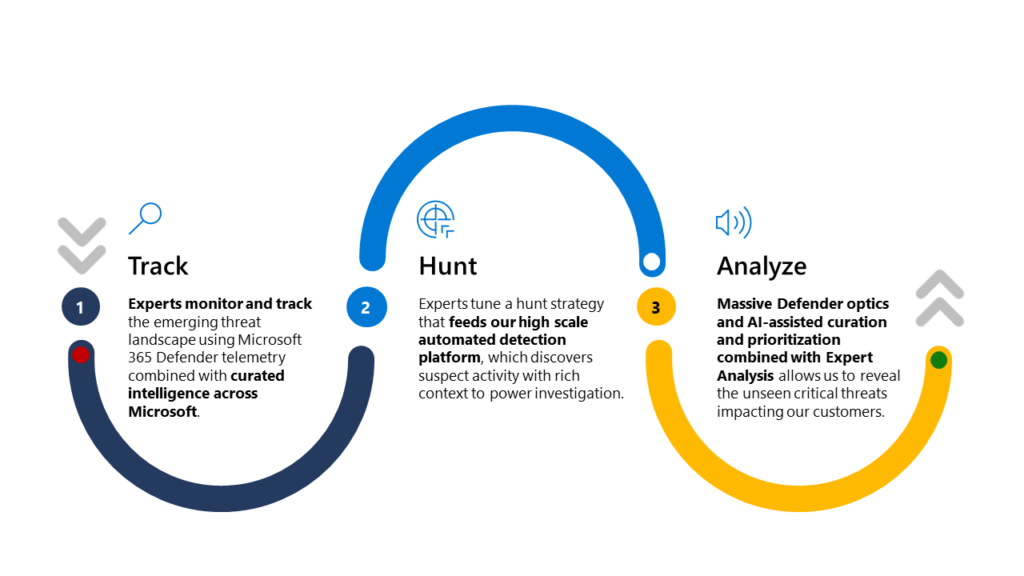
How we hunt:
- Step 1: Microsoft Defender Experts monitor telemetry and look for malicious activity across the Microsoft 365 Defender platform associated with human adversaries or hands-on-keyboard attacks.
- Step 2: If a threat is found to be valid, analysts conduct a deep-dive investigation, harnessing machine learning and gathering threat details, including scope and method of entry, to help protect your organization’s endpoints, email, cloud apps, and identities.
- Step 3: Our AI system and human hunters prioritize threat signals. Defender expert notifications appear in Microsoft 365 Defender, alerting you to the threat and sharing threat details.
Get started
To start your proactive threat hunting journey with Microsoft Defender Experts for Hunting, please complete the customer interest form to request a follow-up from our field team. To learn more, visit the Defender Experts for Hunting product page, download the datasheet, or watch a short video.
To learn more about Microsoft Security solutions, visit our website. Bookmark the Security blog to keep up with our expert coverage on security matters. Also, follow us at @MSFTSecurity for the latest news and updates on cybersecurity.
1Cybercrime To Cost The World USD10.5 Trillion Annually By 2025, Steve Morgan. November 13, 2020.
2Cost of a Data Breach Report 2021, IBM. 2021.