

With the expansion of Microsoft Sentinel UEBA (User and Entity Behavior Analytics) into new data sources, spanning multi-cloud (AWS, GCP), identity providers (Okta), and authentication logs (Microsoft Defender for Endpoint DeviceLogon, Microsoft Entra ID Managed Identity, Service Principal sign-ins), defenders can now detect behavioral anomalies across hybrid environments from a single place.
We’ve also expanded AWS coverage with more anomalies, enrichments and insights, so CloudTrail events now arrive with more built-in context at ingestion time. This lets defenders triage suspicious activity faster without building and maintaining large baselines in KQL.
Many defenders analyze CloudTrail activity using thresholds or historical patterns to identify unusual behavior. In dynamic cloud environments, interpreting this activity can be challenging without additional behavioral context.
Microsoft Sentinel UEBA shifts the burden away from query authors by enriching raw AWS logs with simple binary insights (true/false) derived from user, activity, and device behavior patterns – such as first-time geography, uncommon ISP, unusual action, and abnormal operation volume. Detection authors can stack these binary signals or combine them with built-in UEBA anomalies to surface attacker behavior that would otherwise blend into routine CloudTrail activity.
In this post, you’ll learn how binary feature stacking works, how UEBA baselines AWS identities (human and non-human), and how to use UEBA enrichments and built-in anomalies to strengthen AWS detections and triage.
Defenders investigating AWS activity often rely on raw CloudTrail logs, static thresholds, or manually-engineered baselines to differentiate between normal operational patterns and adversary behavior. While CloudTrail captures rich activity data, defenders often need behavioral context – such as historical usage patterns, geography, and device signals – to distinguish routine operations from suspicious behavior. This is where Microsoft Sentinel UEBA adds value.
Microsoft Sentinel UEBA enriches raw AWS logs with simple, binary behavioral insights (true/false) derived from baseline user, peer, and device behavior patterns – such as first-time geography, uncommon ISP, unusual action, and abnormal operation volume. These clear binary signals help establish behavioral context and inform investigation and detection decisions. This post refers to this approach as binary feature stacking.
Under the hood: The tables
Microsoft Sentinel UEBA surfaces AWS behavioral context in two tables: BehaviorAnalytics and Anomalies.
BehaviorAnalytics table
The BehaviorAnalytics table is the primary investigation surface for UEBA-enriched AWS activity. EventSource field identifies the log source (for example, AWSCloudTrail), ActivityType maps to service level AWS EventSource (for example, S3, KMS, or IAM), and ActionType captures the AWS API name (for example, ConsoleLogin or CreateUser). Use these fields to filter and scope specific categories of AWS activity.
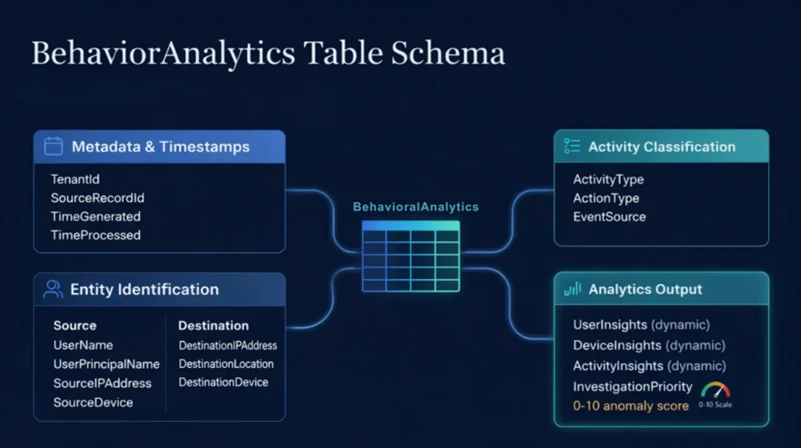
UEBA provides enrichments in three dynamic fields (UserInsights, DeviceInsights and ActivityInsights)– most importantly ActivityInsights, a JSON property bag that contains the binary behavioral features used for baseline-driven profiling. These enrichments are calculated at the user and tenant (AWS AccountId) level, as well as the activity level (for example, uncommon high volume of operations). Each enrichment uses a different baseline window, ranging from 7 days to 180 days.
This data is always available for hunting, even if no alert is fired. Each record includes key fields from the original CloudTrail event alongside enrichments derived from user, activity, and device behavior. The full list of available enrichments and their baseline lookback periods is documented in Entity enrichments – dynamic fields.
Anomalies table
The Anomalies table contains outputs from Microsoft’s pre-trained anomaly detection machine learning models. Six built-in anomalies are currently available for AWS. For more information about these anomalies, see: Anomalies detected by the Microsoft Sentinel machine learning engine.
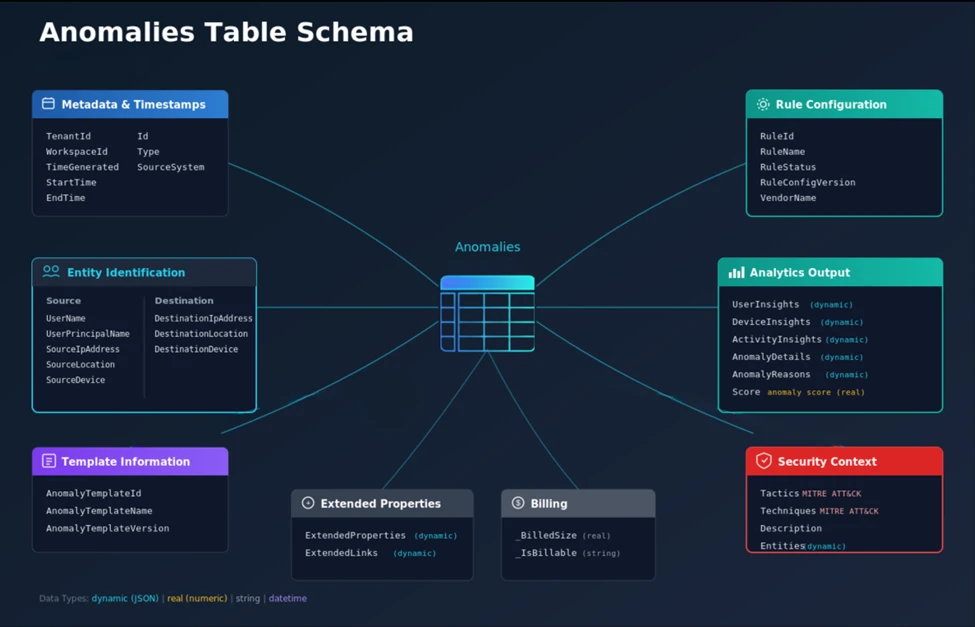
Each anomaly record includes MITRE ATT&CK mappings, behavioral enrichments, an AnomalyScore, and AnomalyReasons, which explains why an event was flagged as an anomaly.
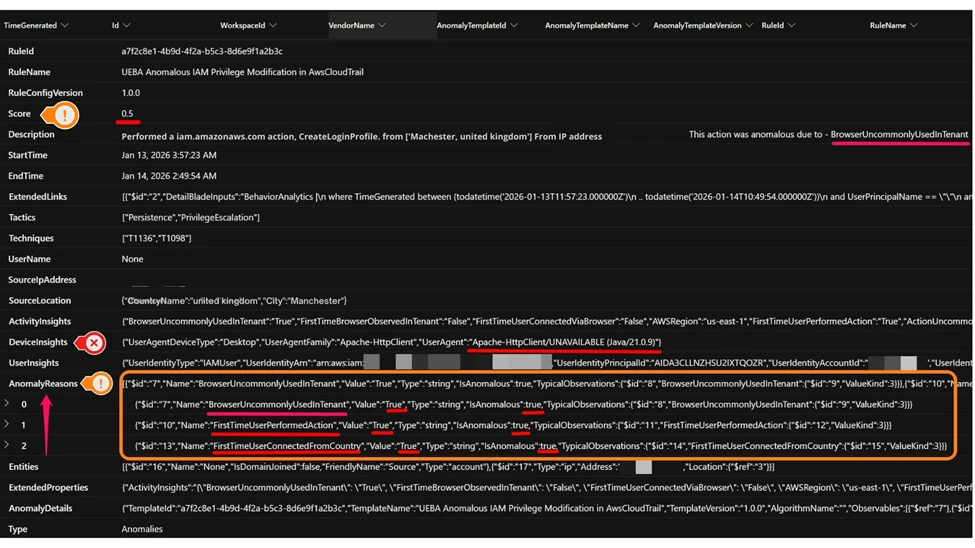
Here’s an example of an AWS IAM Privilege Modification anomaly. In this case, the CreateLoginProfile API was invoked from a previously unseen user agent in a new country. The annotated screenshot illustrates how the anomaly is displayed and how the AnomalyReasons dynamic field provides binary insights that help investigation. In addition to FirstTimeUserPerformedAction and FirstTimeUserConnectedFromCountry, the BrowserUncommonlyUsedInTenant feature indicates a new user agent (Apache-HttpClient/UNAVAILABLE (Java/21.0.9)) not commonly seen in the tenant.
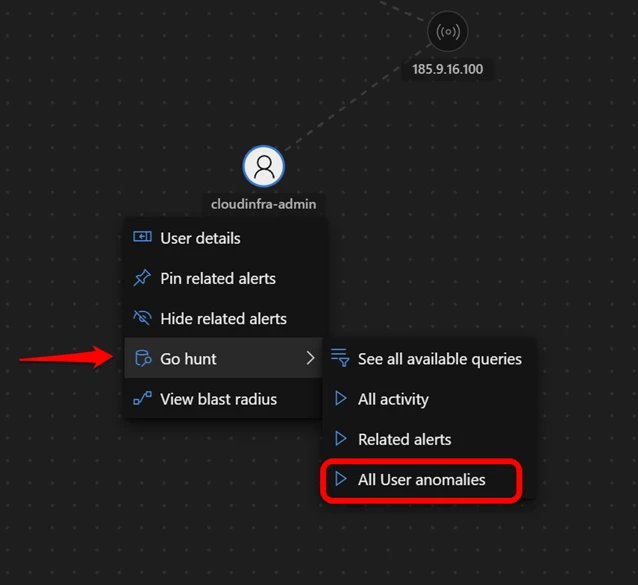
The Defender portal also surfaces UEBA anomalies on user entity pages and incident graphs.
This example highlights the Top UEBA anomalies section in an incident graph, where an Anomalous Logon event is displayed with an anomaly score of 0.8 for the account entity cloudinfra-admin.
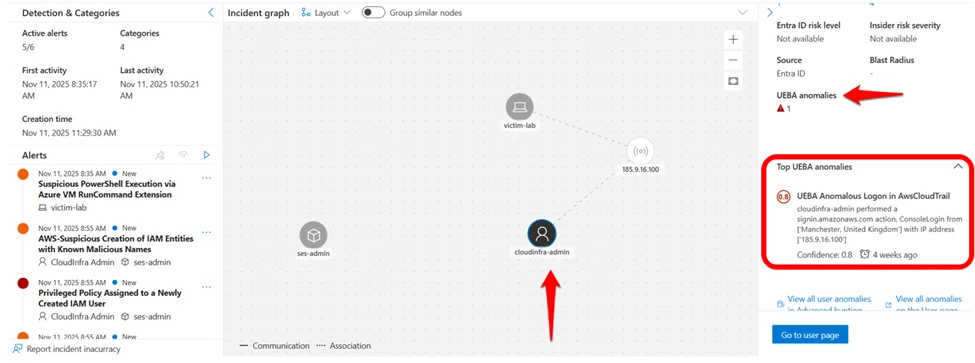
You can run built-in queries directly from incident graphs by selecting Go Hunt All User anomalies queries for immediate context-driven hunting based on UEBA outcomes. For more details, see UEBA integration with Microsoft Sentinel workflows.
Traditional vs. new approach
Let’s look at a classic AWS scenario: Unusual anomalous AWS logons. You want to detect a user’s sign in from an unknown location compared to its historical sign-in patterns.
The hard way: Raw log analytics
CloudTrail telemetry can be analyzed using historical baselines and enrichment logic to understand behavioral patterns such as first‑time sign‑ins from new locations. UEBA complements this approach by providing pre‑computed behavioral indicators that can accelerate investigation workflows.
Here is the KQL example on raw log showing necessary operations to add behavioral context.
// The "Hard Way" - baseline-heavy console sign-in analytics
let baselineStart = ago(14d);
let baselineEnd   = ago(1h);
let userBaseline =    AWSCloudTrail
    | where TimeGenerated between (baselineStart .. baselineEnd)
    | where EventName == "ConsoleLogin" and isempty(ErrorCode)
    | where isnotempty(SourceIpAddress)
    | extend geo = geo_info_from_ip_address(SourceIpAddress)
    | extend Country = tostring(geo["country"])
    | where isnotempty(Country)
    | summarize HistoricalCountries = make_set(Country) by UserIdentityPrincipalid;
AWSCloudTrail
| where TimeGenerated > ago(1h)
| where EventName == "ConsoleLogin" and isempty(ErrorCode)
| where isnotempty(SourceIpAddress)
| extend geo = geo_info_from_ip_address(SourceIpAddress)
| extend Country = tostring(geo["country"])
| where isnotempty(Country)
| join kind=leftouter (userBaseline) on UserIdentityPrincipalid
| extend FirstTimeUserConnectedFromCountry =    iif(isempty(HistoricalCountries) or not(set_has_element(HistoricalCountries, Country)), true, false)
| where FirstTimeUserConnectedFromCountry == true
The problem: This query is computationally expensive, hard to read, and requires you to manually enrich IP addresses with location data. Accurately mapping IP addresses to ASN and ISP often requires additional enrichments and up to date lookup databases. Because different user behaviors have different levels of variability, static thresholds and manually engineered baselines can still produce false positives or low-value alerts, especially in dynamic environments.
The smart way: Binary feature stacking
With Microsoft Sentinel UEBA, the profiling engine has already done the heavy lifting. It learns the user’s sign-in patterns, peer commonality, and tenant-wide behavioral patterns, and outputs the result to the BehaviorAnalytics table as a set of pre-calculated binary features (true/false flags).
KQL Code Snippet:
// The "Smart Way" - leveraging binary features
BehaviorAnalytics
| where ActionType == "ConsoleLogin" and ActivityType == "signin.amazonaws.com"
// The Binary Features
| where ActivityInsights.FirstTimeUserConnectedFromCountry == True
and ActivityInsights.CountryUncommonlyConnectedFromInTenant == True and ActivityInsights.FirstTimeConnectionViaISPInTenant == True
The advantages:
- Readability: It takes just three lines of code to express a complex idea with UEBA features.
- Context: You’re not just looking at uncommon sign ins. You’re stacking user-level and tenant-level indicators – such as location data (FirstTimeUserConnectedFromCountry) and uncommon ISP usage (FirstTimeConnectionViaISPInTenant) – to get a more accurate representation of suspicious behaviors relative to historical patterns.
- Stability: You don’t manage the baseline, lookback, and thresholds in your query. The Microsoft Sentinel UEBA ML engine maintains these automatically with baseline windows that vary by enrichment (ranging from 7 to 180 days).
By relying on these binary features, detection authors stop writing code to discover behavioral signals and instead use UEBA features to express detection intent and how to respond based on severity.
Now let’s look at how these same signals appear during investigation and triage.
Real-world attack scenarios: Microsoft Sentinel UEBA in action
The table below summarizes four attack scenarios using a consistent set of fields:
- Scenario: The threat pattern and where it fits in the kill chain.
- The attack: What the adversary is attempting to do (high-level behavior).
- Common log view: How the activity appears in raw CloudTrail when reviewed event-by-event.
- UEBA signals (binary features): BehaviorAnalytics binary features that provide behavioral context, along with the InvestigationPriority score (0-10) used to tune the severity of deviations.
- Built-in anomaly surfaced: Names of built-in Microsoft Sentinel UEBA anomalies you can pivot to during triage, including AnomalyScore (0–1) and AnomalyReasons in the Anomalies table.
Together, these scenarios illustrate how raw CloudTrail events provide foundational visibility into AWS activity. Combining this telemetry with behavioral enrichment from Sentinel UEBA can improve the interpretability of events during investigation. The same building blocks—successful sign-ins, IAM changes, Secrets or KMS access, and S3 reads—can represent either normal administration or active intrusion.
By combining CloudTrail activity with Sentinel UEBA enrichments in BehaviorAnalytics, defenders can stack multiple high-value signals to hunt for activity patterns that match attacker tradecraft.
This context accelerates investigations by making it easier to explain why an action is suspicious and to pivot directly to correlated entries in the Anomalies table, including risk scores and reasons. For detection engineers, UEBA signals also act as stable building blocks—simplifying KQL, reducing alert noise, and hardening detections over time.
Note: The UEBA signals column lists examples of relevant binary features, not the exact logic that triggers an anomaly. Anomalies are generated by ML models and don’t map one-to-one to individual features. Use AnomalyReasons in the Anomalies table to understand why a specific anomaly was flagged.
Attack scenarios
| Scenario | The attack | Common log view | UEBA signals (binary features) | Built-in anomaly surfaced |
| Initial Access (Federated / SAML Session Hijack) | An attacker gains access to a federated identity session – for example, through a compromised identity provider (IdP) – and uses a SAML or EXTERNAL_IDP flow to perform actions the user rarely performs, from a new location and at an unusual pace. | CloudTrail shows federated authentication activity (UserAuthentication / EXTERNAL_IDP, for example, Okta) followed by successful API calls under an assumed role session; each event is valid in isolation. | FirstTimeUserConnectedFromCountry = True ISPUncommonlyUsedInTenant = True ActionUncommonlyPerformedByUser = True ActionUncommonlyPerformedInTenant = True | UEBA Anomalous Federated or SAML Identity Activity in AwsCloudTrail |
| Initial Access and Persistence | An attacker compromises a developer’s access keys and logs in (for example, through uncommon user agent) to create a backdoor user. | CloudTrail shows a successful ConsoleLogin via SDK or CLI user agent and subsequent IAM action, such as CreateUser, all of which are valid API calls without behavioral context. | FirstTimeUserConnectedFromCountry = True BrowserUncommonlyUsedInTenant = True ActionUncommonlyPerformedByUser = True (CreateUser) ActionUncommonlyPerformedInTenant = True | Examples: UEBA Anomalous Logon in AwsCloudTrail; UEBA Anomalous IAM Privilege Modification in AwsCloudTrail |
| Credential Access & Collection (Secrets / KMS Key Discovery) | After establishing a foothold with valid credentials, an attacker queries Secrets Manager and KMS to list keys and retrieve secret values, often starting with discovery (ListSecrets/ListKeys) then access (GetSecretValue), sometimes at unusually high frequency. | CloudTrail shows a GetSecretValue, ListSecrets, or ListKeys activity which can look like legitimate automation and make static allowlists and thresholds brittle. | FirstTimeUserPerformedAction = True ActionUncommonlyPerformedInTenant = True UncommonHighVolumeOfOperations = True ISPUncommonlyUsedInTenant = True | UEBA Anomalous Secret or KMS Key Access in AwsCloudTrail |
| Data Exfiltration (the “low-and-slow” S3 drain) | A compromised admin account performs a burst of repeated S3 GetObject operations—representing a high volume of similar operations within the same service—often targeting multiple objects or prefixes in quick succession to stage data for exfiltration while staying below traditional volume thresholds. | If S3 data events are enabled, CloudTrail shows a high frequency of GetObject API calls across multiple objects or buckets in a short time window. Each request appears legitimate in isolation, and overall data transfer may remain below static thresholds, making the activity difficult to detect using traditional methods. | UncommonHighVolumeOfOperations = True CountryUncommonlyPerformedInTenant = True ActionUncommonlyPerformedByUser = True (S3 GetObject) ISPUncommonlyUsedInTenant = True | UEBA Anomalous Data Transfer from Amazon S3 |
Table 1: Examples of Microsoft Sentinel UEBA enrichments in real-world attack scenarios
Built-in Microsoft Sentinel UEBA anomaly MITRE ATT&CK coverage
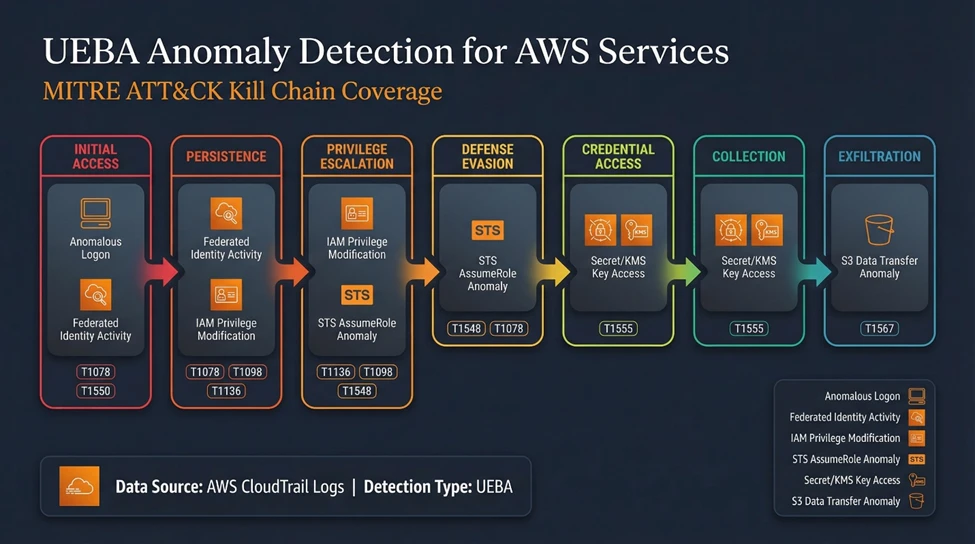
The visual below illustrates how Microsoft Sentinel UEBA’s AWS anomaly coverage maps across multiple stages of the kill chain:
- Initial access: UEBA Anomalous Federated or SAML Identity Activity in AwsCloudTrail
- Initial access/privilege escalation: UEBA Anomalous STS AssumeRole Behavior in AwsCloudTrail
- Persistence/privilege escalation: UEBA Anomalous IAM Privilege Modification in AwsCloudTrail
- Credential access/collection: UEBA Anomalous Secret or KMS Key Access in AwsCloudTrail
- Collection/data exfiltration: UEBA Anomalous Data Transfer from Amazon S3
Together, these anomaly detections provide defenders with end-to-end visibility – from suspicious authentication through sensitive access and data movement – with binary feature enrichments that add high-value behavioral context during investigations.
Practical implementation: Getting started
Before you begin
Before you run the queries, ensure the following are in place:
Baseline establishment period completed
Allow sufficient time for UEBA to establish user, activity, and device baselines. In most environments, this typically requires 7–14 days of steady telemetry.
AWS environment onboarded to Microsoft Sentinel UEBA
Ensure that AWS CloudTrail (management events and, where applicable, object-level data) is connected, and UEBA is enabled for the AWS data source.
CloudTrail data is flowing consistently
Confirm that AWS CloudTrail events are being ingested into Microsoft Sentinel and visible in Advanced Hunting.
Starter query
Ready to start hunting? Open Advanced Hunting in Microsoft Sentinel and run the following query to explore the BehaviorAnalytics table and inspect enriched AWS behavioral signals. This query intentionally keeps the logic lightweight. The goal is not to “detect” anomalous activity immediately, but to understand how binary behavioral features surface in your environment.
// Starter query – explore UEBA-enriched AWS behavioral signals
BehaviorAnalytics
| where EventSource == "AWSCloudTrail" or ActivityType endswith "amazonaws.com"
| where isnotempty(ActivityInsights)
| where ActivityInsights.FirstTimeUserConnectedFromCountry == true
   or ActivityInsights.ActionUncommonlyPerformedByUser == true
   or ActivityInsights.UncommonHighVolumeOfOperations == true
| project
    TimeGenerated,
    UserName,
    ActionType,
    EventSource,
    ActivityType,
    ActivityInsights
| order by TimeGenerated desc
What to look for
When reviewing the results, focus on:
- Binary feature combinations
Individual binary indicators may be benign. Risk emerges when multiple features align (for example: first-time geography and uncommon action). - User-centric deviations
Pay attention to activity that is unusual for that specific identity, even if the action itself is common across the tenant. - Low-volume but persistent activity
UEBA often highlights slow, methodical behavior (for example, repeated S3 reads or Secrets/KMS access) that stays below static thresholds but persists over time. - Candidates for anomaly pivoting
Events that exhibit multiple binary features warrant further investigation by pivoting to the Anomalies table, where UEBA may have already produced a correlated anomaly record with supporting context and reasoning.
Common false positives (and how to filter them)
- Legitimate automation or CI/CD pipelines
Why it happens: Service roles or automation accounts may perform actions infrequently or from new infrastructure locations.
How to filter: Exclude known accounts or IAM roles used exclusively for automation once validated. Be sure to filter only specific types of activities, rather than applying blanket exclusions. - New administrators or role changes
Why it happens: First‑time admin activity naturally triggers “first‑time” and “uncommon” indicators depending on the baseline.
How to filter: Correlate with recent user creation or role assignment changes before suppressing. - Planned operational changes
Why it happens: Migrations, incident response, or large‑scale maintenance can temporarily skew baselines.
How to filter: Use time‑bounded filters or change‑window context rather than permanently suppressing signals.
Next steps
Once you are comfortable interpreting enriched behavior:
- Stack binary features intentionally (especially User and Tenant level) in detection logic rather than alerting on single indicators.
- Pivot to UEBA anomalies to leverage Microsoft’s pre-trained models across MITRE ATT&CK tactics.
- Promote successful hunts into detections with minimal additional KQL, relying on UEBA to maintain baselines over time.
This approach lets detection authors focus on behavioral intent, not baseline math – turning raw AWS telemetry into actionable security signals.
Limitations and constraints
Microsoft Sentinel UEBA can substantially reduce detection complexity, but it’s important to account for coverage boundaries and the conditions under which enrichments and scores are most reliable:
Coverage is selective (not “every API”).
- UEBA does not ingest or model every API call for every AWS service. CloudTrail can be extremely high-volume, so the Microsoft Sentinel UEBA pipeline focuses on the event sources and API actions that are most useful for behavior modeling and that are most commonly correlated with anomalous activity (for example, authentication, identity and permission changes, sensitive data access, and high-impact operations). You can always check the up-to-date list of in-scope event sources, APIs, and data sources in the UEBA data sources reference document (GCPAuditLogs, Okta log sources are also supported). We’re continually adding APIs and event sources.
Enrichments vary by event type.
- Not all enrichments are populated for all actions. For example, UncommonHighVolumeOfOperations is unlikely to apply to specific types of rare APIs, and location/ISP-related enrichments typically require the original source event to include a valid IP address.
Cross-cloud identity baselines are calculated independently.
- UEBA profiles identities per data source, which means behavior across cloud platforms is baselined separately. Correlation across environments can be performed manually using the BehaviorAnalytics table when required.
Use scores for prioritization, not direct alerting without retroactive lookup.
- Treat the AnomalyScore (0-1) and InvestigationPriority (0-10) values as investigation signals to help rank what to look at first – not as sole triggers for alerts. The highest score may not always be the highest priority investigation for your organization. Validate patterns in your environment and use a combination of enrichments, scores, and repeat behavior over time before finalizing alert logic.
Anomaly support in the UI is currently for UPN-based entities.
- AWS UEBA anomalies are currently surfaced in the UI only on the Account entity, which assumes an identity mapped to a UPN. This works well for environments that use Microsoft Entra ID (or another IdP) with UPN identifiers, but it might not apply to AWS IAM users or AWS resource entities that do not map cleanly to a UPN. To be clear – anomalies are triggered and available for all identity types (with UPN and without UPN), but are only shown in the UI for entities with a UPN.
Some insights depend on identity and user agent fidelity.
- DeviceInsights rely on parsing UserAgent strings and may be unreliable if user agents are spoofed or manipulated in the original log. Some UserInsights enrichments also depend on identity inventory and metadata snapshots being available. Microsoft identity data from Microsoft Entra is synchronized automatically to the IdentityInfo table – other identity providers are not currently supported, so they might have more limited enrichment coverage.
From raw logs to behavioral context
CloudTrail provides detailed activity data. Sentinel UEBA enhances this telemetry with behavioral context, such as first‑time geography or uncommon ISP usage, to support investigation and detection workflows. A single failed console login is often low signal on its own. That same event becomes far more meaningful when it’s paired with behavioral context, such as a first-time country, an unusual ISP, or activity on a rarely used admin account.
By shifting our focus from writing complex queries to leveraging Microsoft Sentinel UEBA’s binary feature stacking, we gain three practical advantages:
- Efficiency: We replace baseline-heavy, maintenance-prone queries with simpler, more readable logic.
- Accuracy: We reduce false positives and better tune severity by requiring multiple binary features to align before alerting.
- Visibility: We uncover the low-and-slow attacks that static thresholds often miss.
For the modern SOC, the goal is not only to collect logs—it’s to understand behavior. Use the BehaviorAnalytics table as your starting point to understand what “normal” looks like in your environment, then pivot to related Anomalies when you need model-driven prioritization. In practice, this shifts investigations from “What happened?” to “Is this consistent with expected behavior?”
Ready to start hunting? Onboard your AWS environment to Microsoft Sentinel UEBA, open Advanced Hunting, and run the starter query in the Practical implementation section to explore the BehaviorAnalytics and Anomalies tables in your environment.
References
- UEBA onboarding and setting documentation
- Identify threats using UEBA
- UEBA enrichments and insights reference
- Anomalies detected by the Microsoft Sentinel machine learning engine
Learn more
Learn about the UEBA Behaviors Layer for AWS CloudTrail and other data sources.
The Microsoft Sentinel UEBA Essentials solution provides additional built-in queries.