
Planning ahead for Windows Server 2016 end of support
In accordance with the Microsoft Lifecycle Policy, extended support for Windows Server 2016 will end on January 12, 2027.
 Windows Server


This post was authored by Subhasish Bhattacharya, Program Manager, Windows Server.
In our discussions with customers, we learned that a key consideration for private cloud deployments is the capital expenditure (CapEx) required to go into production. We also learned that customers added redundancy to their private clouds, thereby increasing CapEx, to avoid under-capacity during peak traffic in production. The need for redundancy is driven by unbalanced private clouds where some nodes are hosting more Virtual Machines (VMs) and others are underutilized (such as a freshly rebooted server).
During the lifecycle of your private cloud, certain operations (such as rebooting a node for patching) results in the VMs in your clusters being moved. This ultimately results in an unbalanced cluster. System Center Virtual Machine Manager (SCVMM) has a feature called Dynamic Optimization which automatically balances the utilization of your cluster. A consistent and vocal message we heard from you is the need for a similar solution for environments without SCVMM. Node Fairness thus provides an in-box feature in Windows Server to optimize your private cloud utilization.
Load Balancing is a new in-box feature in Windows Server 2016 that allows you to optimize the utilization of nodes in a Failover Cluster. It identifies over-committed nodes and re-distributes VMs from those nodes to under-committed nodes. Some of the salient aspects of this feature are as follows:
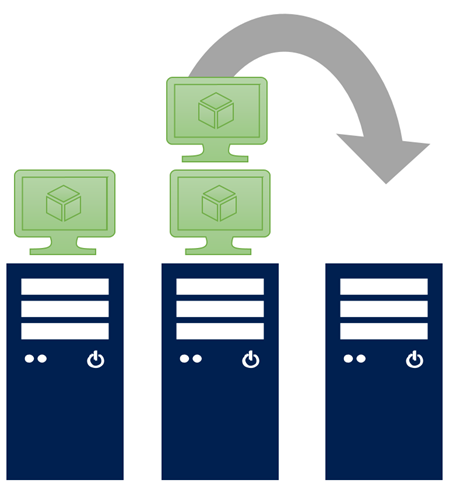
When you add new capacity to your private cloud, the Load Balancing feature automatically balances capacity from the existing nodes in your private cloud, to the newly added capacity. Here is the flow of the steps:
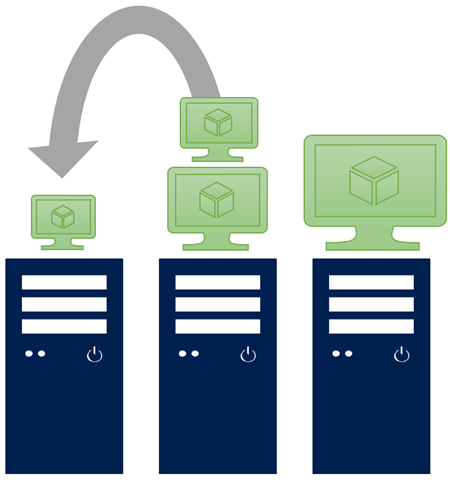
When configured for periodic balancing, the pressure on the cluster nodes is evaluated for balancing every 30 minutes. Alternately, the pressure can be evaluated on-demand. Here is the flow of the steps:
To try this new feature in Windows Server 2016, download the Technical Preview. For additional details, see the feature Cluster blog here.
Check out the series:
In accordance with the Microsoft Lifecycle Policy, extended support for Windows Server 2016 will end on January 12, 2027.

The original Secure Boot certificates introduced in 2011 are approaching the end of their planned lifecycle, with expirations beginning in late June 2026.

As organizations modernize, AD DS continues to be a frequent focus for cyberattacks. This summary outlines six critical threats and provides actionable steps to help detect and reduce risk.