

In a global organization such as Microsoft—with more than 220,000 employees connecting and working together from offices and remote workspaces scattered around the world—we enable our workers to stay productive from almost anywhere, on a wide range of devices.
At Microsoft Digital, the company’s IT organization, we provide our employees with that flexibility while helping keep the devices they use secure, compliant, and supportable at enterprise scale.

“Every digital experience depends on the readiness of the devices our employees use every day. Organizations that treat device management as a strategic lifecycle capability rather than a series of operational tasks are better positioned to adapt to change, reduce risk, and take advantage of new innovations with confidence.”
Brian Fielder, vice president, Microsoft Digital
We balance employee experience, security posture, and operational efficiency as part of modern device management.
This IT playbook explains how we think about device readiness at Microsoft Digital, where we serve as Customer Zero for the company. It covers the tradeoffs we manage, the lifecycle patterns that hold up over time, and the signals we monitor to understand whether we’re reducing risk or quietly accumulating it.
We also share resources you can use to apply modern device management in your own enterprise.
“Every digital experience depends on the readiness of the devices our employees use every day,” says Brian Fielder, vice president of Microsoft Digital. “Organizations that treat device management as a strategic lifecycle capability rather than a series of operational tasks are better positioned to adapt to change, reduce risk, and take advantage of new innovations with confidence.”
Understanding device readiness and lifecycle
Effective device readiness must be sustained across the full device lifecycle, from planning and acquisition through operation, refresh, and retirement. In an enterprise environment, a device is considered ready only when we can:
- Identify it and confirm ownership
- Govern it through identity and policy
- Keep it secure and compliant over time
- Support and recover it when something goes wrong
- Remove it cleanly when its role ends
When these conditions work together, device readiness becomes an operating advantage. We can move employees onto approved devices faster, enforce security and access requirements more consistently, and make lifecycle decisions with better data and less guesswork. The result is a device estate that is manageable, trustworthy, and productive at enterprise scale.
The device lifecycle model
At Microsoft Digital, we use the device lifecycle as a control system for readiness. We connect decisions, standards, and signals across the full lifecycle, so we can manage readiness over time rather than just check on it at isolated points. Each stage reinforces the next, and any issues show up early enough for us to correct them before they spread.
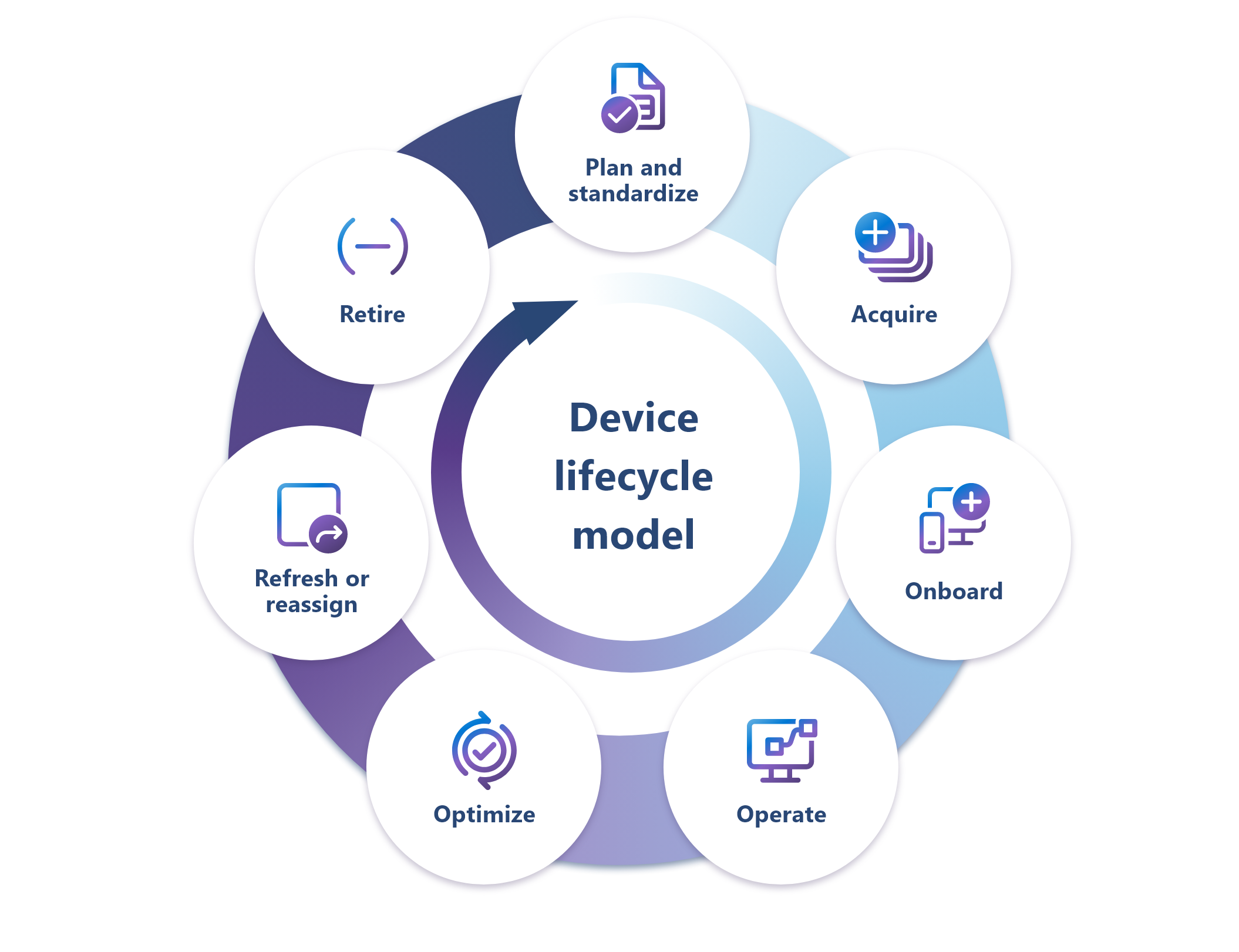
The stages serve specific functions:
- Plan and standardize: Sets the device standards and guardrails that make the rest of the lifecycle workable at scale.
- Acquire: Brings devices in as approved enterprise assets that can be tracked and managed from the start.
- Onboard: Gets employees up and running quickly through automated setup and policy-driven enrollment.
- Operate: Ensures devices are secure, up-to-date, and dependable over time.
- Optimize: Uses telemetry to reduce friction and improve how the lifecycle performs.
- Refresh or reassign: Keeps devices useful longer by replacing or repurposing them before they become a problem.
- Retire: Removes devices cleanly so access is closed off, data is protected, and disposition is complete.
The device lifecycle is a durable operating model that we manage holistically. Weakness in any phase often appears after the original decision was made and far from the point where the issue began.
We describe each lifecycle stage using the following structure:

Readiness question
What must be true at this stage to enable readiness

What good looks like
Our outcome-oriented goals for the stage

Signals
How we identify drift or technical debt

Microsoft Digital operating practices
Systems and processes we use internally to make this stage durable and repeatable

Stakeholder lens
Who contributes or has expectations at this stage
Being Customer Zero
How we stress-test internally in Microsoft Digital and learns at scale
Chapter 1: Plan and standardize
In this stage, we define the standards, controls, and supported patterns that make the rest of the device lifecycle manageable. Good planning reduces downstream exceptions and gives later stages a more stable foundation.
Readiness question
Are our device standards enforceable in practice, and do they reduce downstream cost, risk, and fragmentation?
What good looks like
Clear, role-based device standards limit variance and make onboarding and support repeatable at scale. These standards are grounded in capabilities that our platforms and tools can enforce, not aspirational policy language.
Signals
Signals help us detect when a lifecycle stage is falling out of alignment with its intended outcomes, becoming harder to manage, or creating downstream cost and complexity. These signals include:
Exception rates that grow over time (more devices falling outside supported standards), which later shows up in higher support costs and weaker servicing consistency.
Policies that are documented but not enforced through device health and access controls, including modern management capabilities such as Intune compliance policies and Conditional Access. Some examples are minimum OS requirements, encryption standards, and Microsoft Defender health. Documented but unenforced controls create “paper compliance” instead of true operational compliance.
Device and OS coverage statements that become hard to verify. This could manifest as device counts, OS mix, and ownership mix becoming directional rather than telemetry-backed, which weakens credibility and decision making.
Microsoft Digital operating practices
These practices show how we design the operating model to make the target state durable and repeatable. They represent the baseline decisions we make around rollout control, visibility, and enforcement to help prevent drift before it emerges.
- Early partnership with chip providers such as Intel, AMD, Qualcomm, and NVIDIA enables upstream testing, validation, and feedback on next-generation hardware. As Customer Zero for the Windows product group, our team in Microsoft Digital co-develops and is an early adopter of the Copilot+ PC experience, so readiness, performance, and security are tested and proven before fleet-wide deployment.
- For Windows devices, readiness standards are anchored to enforceable hardware and security capabilities, including TPM 2.0, Secure Boot, Microsoft Pluton, Credential Guard, and Windows Hello for Business compatibility.
- Devices are sourced from approved OEM catalogs and built to order, then validated against supported firmware, BIOS or UEFI, driver configurations, and setup experience. This approach reduces downstream support, servicing risk and providing white-glove device preparation while supporting a consistent, secure out-of-box experience.
- Apple (macOS/iOS) readiness is anchored to managed enrollment, encryption (for example, FileVault on macOS), and phishing-resistant sign-in via Platform SSO and passkeys.
- Android readiness requires Android Enterprise Work Profile support, verified device integrity (not compromised), and minimum OS and security patch levels enforced via MDM posture and Conditional Access.
Stakeholder lens
The following stakeholder groups shape planning, depend on its outcomes, and can detect misalignment quickly when expectations drift:

Employees
Benefit from clear, role-appropriate device expectations.

Endpoint engineering
Defines standards and automation foundations.

Security
Partners on baseline posture and control requirements.

Procurement and finance teams
Influence catalog decisions and lifecycle cost models.
Being Customer Zero
Before broad deployment of new capabilities, enterprise endpoint teams and product groups align on an enterprise readiness contract that spans trust and safety, manageability, and recoverability. We validate identity-bound access and tenant trust boundaries early, so we don’t introduce unmanaged enterprise risk.
Key takeaways
Here are some tips as you approach your own device management planning process:
- Device standards work best when they are enforceable through management, identity, and access controls.
- Approved hardware catalogs, security baselines, and lifecycle expectations reduce downstream exceptions.
- Early Customer Zero validation helps our team in Microsoft Digital test standards before they reach broad deployment.
Learn more
How we did it at Microsoft
Further guidance
Chapter 2: Acquire
In this stage of device lifecycle management, we bring devices into the environment as known, trackable enterprise assets. The goal is to make sure every device enters the lifecycle with the identifiers, registrations, and sourcing controls needed for clean provisioning and management.
Readiness question
Are devices known, owned, and visible before employees need them?
What good looks like
Procurement and asset registration are predictable and integrated, ensuring devices enter the environment as known enterprise assets, already associated with inventory systems and ready for automated provisioning.
Signals
These signals show where breakdowns in sourcing, registration, or asset control can create problems later in the lifecycle.
Procurement lead times cause day-one onboarding delays when devices arrive before they are ready for provisioning.
Inventory and asset records drift from reality, causing organizations to lose a single source of truth for device status, ownership, and lifecycle stage. This can create gaps in offboarding, recovery, and audit evidence.
Devices reach employees before registration is complete, such as when Autopilot or Apple Business Manager registration isn’t done before delivery. This forces catch-up work and introduces exceptions.
Microsoft Digital operating practices
These practices show how we design the operating model to make the target state repeatable:
- Acquisition readiness and zero-touch deployment begin with an integrated sourcing and provisioning model. This model defines how we source and acquire devices globally, apply persona-based configuration, fulfill local language requirements, and preload the latest supported operating system and drivers.
- When devices are delivered, they arrive asset-tagged, bundled, and preregistered with Windows Autopilot. This enables a consistent, secure, hands-off setup experience from first power-on.
- Acquisition readiness is tied to asset registration and inventory accuracy. Corporate devices are registered at purchase, associated with enterprise asset identifiers, and tracked continuously from order through retirement.
Stakeholder lens
These groups influence acquisition decisions and depend on those decisions being accurate, timely, and supportable:
Procurement and finance
Own sourcing and logistics.

IT
Validates compatibility and enterprise readiness.
Security
Advises on supply chain and trust considerations.
Being Customer Zero
Our early adoption program accelerates learning while preserving governance. We operate under explicit guardrails, including security posture, data boundaries, and regulatory requirements, so speed doesn’t bypass enterprise controls.
Key takeaways
Keep these principles in mind during the acquisition phase of the device lifecycle process:
- Acquisition readiness starts before a device ships to an employee.
- Asset tagging, inventory accuracy, and preregistration reduce provisioning exceptions.
- Global sourcing works best when procurement, IT, and security share the same readiness criteria.
Learn more
How we did it at Microsoft
Further guidance
Chapter 3: Onboard
In this stage, we turn a device into a usable, trusted work endpoint through automated setup, enrollment, and policy enforcement. A strong onboarding experience helps employees become productive more quickly without weakening identity or compliance controls.
Readiness question
Can employees be productive on day one, experiencing minimal friction without bypassing identity, policy, or compliance?
What good looks like
Onboarding is fast, predictable, and largely hands-off for IT while remaining identity-bound and policy-driven. Day-one productivity comes through repeatable automation rather than exception handling.
Signals
These signals tell us when onboarding is becoming inconsistent, support-heavy, or harder to scale cleanly:
“Time to productive” increases or varies significantly (the onboarding path is no longer repeatable at broad scale).
Enrollment Status Page (ESP) failures increase (setup blocks, app install delays, and policy install failures).
Enrollment-related support calls or tickets rise during onboarding windows, indicating that friction is shifting from automation to human support.
Post-onboarding surveys and helpdesk ticket analysis show declining satisfaction or repeated “same issue” patterns.
Bring-your-own-device (BYOD) enrollment confusion increases as employees are unclear on what’s managed, what data is collected, or what happens when access is revoked.
Microsoft Digital operating practices
These practices show how the operating model makes the target state repeatable:
- Devices are approved and certified before reaching employees. Corporate Windows and Apple devices are sourced from approved OEM catalogs and registered through Windows Autopilot or Apple Business Manager, then associated with user identities and asset systems.
- For Windows devices, Autopilot registration occurs via OEM or partner APIs whenever possible; manual hardware hash registration is reserved for exceptions. Assigned Autopilot profiles define Entra ID join behavior, Intune enrollment, Out‑of‑Box Experience configuration, required applications, and baseline policies.
- The Enrollment Status Page acts as a gate that can’t be bypassed. Devices cannot be used until required apps, updates, and policies are successfully installed. If setup fails, reset is blocked, and errors are captured for IT remediation.
- Apple Business Manager is used exclusively for corporate‑purchased Apple devices; personally owned Apple and Android devices follow Intune BYOD enrollment paths. Android devices enroll using the Android Work Profile mechanism; Google Zero Touch is not used in this environment.
- Before access to corporate resources is allowed, devices must meet certification requirements, including Intune enrollment, encryption (BitLocker or FileVault), supported OS versions, Defender for Endpoint health, and required hardware security capabilities. Conditional Access enforces these requirements at sign‑in.
- Virtual onboarding options such as Azure Virtual Desktop are used for contractors, regulated roles, or temporary fallback access.
Stakeholder lens
These groups own setup, experience the outcome directly, and rely on tight alignment for onboarding to work smoothly:
Employees
Expect a power-on-and-go experience.
IT
Owns provisioning automation and exceptions.

Identity and security teams
Validate trust and access enforcement.
Being Customer Zero
The readiness contract explicitly validates manageability, zero-touch onboarding readiness, and identity enforcement before capabilities advance beyond early internal cohorts.
Key takeaways
Here are some main points to remember about the onboarding phase of device management:
- Onboarding should be automated, identity-bound, and policy-driven from first power-on.
- Day-one productivity depends on reducing setup friction without weakening compliance controls.
- Enrollment signals and support trends help identify where onboarding needs improvement.
Learn more
How we did it at Microsoft
Further guidance
Chapter 4: Operate
In this stage, we keep devices secure, current, and reliable through ongoing servicing and operational discipline. The aim is to maintain a stable experience over time while minimizing manual intervention and operational noise.
Readiness question
Can devices remain secure, reliable, and current over time without constant manual intervention, and can known vulnerabilities be remediated quickly without manual escalation?
What good looks like
Continuous servicing and support preserve productivity while minimizing operational noise and exposure windows.
Signals
These signals help us see when operations are getting noisier, less predictable, or more reactive than they should be:
Update compliance thresholds are missed, meaning more devices are at risk because of outdated patches or repeat failure patterns.
Rollbacks, pauses, or halted rollouts become frequent, which indicates that the ring and validation strategy isn’t catching issues early enough.
Helpdesk tickets trend upward for update failures or device remediation (operational noise is rising instead of staying quiet).
Firmware- or driver-related instability increases, which requires additional validation, staging, or rollback controls.
Zero-day response requires repeated emergency actions; this signals that baseline update hygiene isn’t consistently holding.
Microsoft Digital operating practices
These practices show how we design the operating model to make the target state durable and repeatable:
- Windows Autopatch: Provides a single, integrated update management experience in Intune. It combines Windows Update for Business policy-based controls with automated, telemetry-driven deployment across staged rollout waves, including built-in issue detection, pause, and rollback capabilities.
- Windows Hotpatch: Helps reduce disruption by applying certain security updates without requiring a restart, which supports continuity for eligible devices.
- Intune Vulnerability Agent: Extends vulnerability visibility and supports coordinated remediation through device management workflows.
- Enterprise App Management: Gives us a structured way to manage application deployment, updates, and policy alignment across managed devices.
- Update Compliance: Via Azure Monitor, it provides insight into installation rates and failure patterns, triggering remediation workflows when thresholds are crossed. Firmware and driver updates are validated with OEM partners and staged using the same ring-based deployment model.
- Minimum OS requirements: Non-Windows devices must meet minimum operating system requirements, encryption standards, and endpoint protection requirements before they can access corporate resources. These are enforced by Intune compliance policies and Conditional Access.
Stakeholder lens
These groups keep the environment running smoothly and depend on that stability every day:
Employees
Experience quiet, predictable updates that minimize disruption and maintain productivity.

IT operations teams
Own reliability and remediation, so updates are delivered safely at scale.
Security teams
Use device compliance and update posture as critical signals for access control and risk reduction.
Being Customer Zero
We use a staged rollout approach to test new updates and features with progressively larger groups of users. This helps us identify issues early, validate performance and reliability at scale, and continuously improve quality before broad deployment across the company.
Key takeaways
Here are a few learnings for keeping your devices secure and reliable throughout the operational phase of the device management lifecycle:
- Operating readiness depends on predictable servicing, staged rollout, and clear rollback controls.
- Telemetry helps our team in Microsoft Digital detect update, firmware, driver, and vulnerability issues before they become widespread.
- Quiet, consistent operations improve security posture while reducing disruption for employees.
Learn more
How we did it at Microsoft
Further guidance
Chapter 5: Optimize
In this stage, we use telemetry and operational insight to improve how the device lifecycle performs. Optimization helps us reduce friction, close recurring gaps, and make better decisions about where to invest effort.
Readiness question
Are fleet health, compliance, and cost improving or merely visible?
What good looks like
Telemetry and automation inform decisions that decrease friction, eliminate compliance gaps, and improve lifecycle efficiency.
Signals
These signals show when optimization has stalled and the environment is absorbing effort without reducing friction or risk:
Known vulnerabilities remain open longer than expected, increasing exposure to risk.
Compliance rates stop improving from one release to the next, despite ongoing remediation efforts.
Routine issues continue to require manual intervention instead of being handled through automation.
Devices repeatedly cycle in and out of compliance, indicating deeper issues in the environment.
Operational reviews spend more time addressing recurring problems and less time improving the overall service.
Microsoft Digital operating practices
These practices help us improve the environment over time and reduce operational overhead. They focus on measuring results, standardizing management, and automating routine work where possible.
- Optimization investments are guided by metrics such as patch compliance, automation coverage, remediation success rates, and operational workload.
- We standardized Windows devices on Microsoft Entra ID join and retired older management models such as Workplace join, Hybrid Azure AD join, and Active Directory join. This reduced complexity, simplified policy enforcement, and created a more consistent management experience across devices.
- Windows Autopatch, Hotpatch, and automated remediation help us keep devices current while minimizing disruption for employees.
- Intune firmware, driver, and Enterprise App Management capabilities extend the same update and deployment discipline beyond the operating system to hardware components and third-party applications.
- Microsoft Security Copilot, Microsoft 365 Copilot, and Copilot in Power BI help our teams analyze Intune and Defender data more quickly, making it easier to identify issues and prioritize remediation efforts.
Stakeholder lens
Optimization in a cloud-native model depends on aligned ownership across engineering, security, and employee experience teams. Modern management gives us a standardized, policy-driven foundation.
Employees
Experience fewer disruptions and faster issue resolution.
Endpoint engineering and modern management teams
Drive standardization, policy enforcement, and continuous fleet health optimization.
Security and CISO partners
Rely on device compliance signals to enforce secure access with minimal manual intervention.

Product groups
Incorporate Customer Zero feedback from our team in Microsoft Digital to improve enterprise readiness.
Being Customer Zero
As Customer Zero for modern management, we validate optimization capabilities at enterprise scale and feeds insights directly to engineering. This helps ensure solutions are designed for real-world scenarios.
- Modern Management transformation (Entra ID–based) simplified management and closed Conditional Access gaps.
- Validation of Autopatch and Hotpatch improves update readiness and rollout quality before broad release.
- AI-powered investigations unified Defender and Intune signals to accelerate issue triage and remediation.
Key takeaways
Here are some things to keep in mind as you consider the optimization aspect of device management:
- Optimization turns lifecycle telemetry into decisions that reduce friction, risk, and operational load.
- Cloud-native management gives our team in Microsoft Digital a consistent foundation for compliance and remediation.
- AI-assisted investigation can help teams move faster from signal discovery to resolution.
Learn more
How we did it at Microsoft
Further guidance
Chapter 6: Refresh or reassign
In this stage, we decide whether a device should continue in service, move to a new owner, or be replaced. When done with intention, refreshing and reassignment extend an asset’s value while reducing avoidable support issues and lowering security risk.
Readiness question
Are devices refreshed or reassigned before they become performance or security debt?
What good looks like
Condition-based refresh and reassignment maximize asset value while minimizing disruption.
Signals
These signals help us see when device reuse, replacement, or support timing is slipping out of a manageable rhythm:
Hardware health telemetry trends indicate looming failures, including battery wear, thermal events, and disk health degradation, which creates unplanned downtime risk.
Firmware or driver update readiness becomes inconsistent across models (this increases the cost of servicing and support).
Refresh timing becomes reactive (devices are replaced after repeated failures instead of during planned lifecycle windows).
Reassignment or reuse requires more manual work (this signals that reset and reprovision flows aren’t consistently repeatable).
Microsoft Digital operating practices
These practices show how we make device refresh and reassignment consistent, scalable, and repeatable. They aren’t reactive steps we take when aging devices, inventory gaps, or fulfillment delays become visible. They’re the standard processes, controls, and decision points we use to keep devices moving through their lifecycle efficiently and to prevent those issues from occurring in the first place.
- Windows lifecycle guardrails: Align firmware servicing and hardware support windows to a 48-month refresh baseline so devices remain within OEM-supported windows for security and firmware updates.
- Condition-based refresh signals: Battery wear, thermal events, disk health, and firmware servicing status are monitored through telemetry to trigger proactive refresh actions before devices become performance or security debt.
- Catalog discipline: Devices are sourced from the approved OEM catalog, with model selection tied to persona, lifecycle stage, and firmware support roadmap. This reduces drift between deployed inventory and supported hardware.
- Defined recovery workflow: Reassignment is supported through a documented recovery workflow where applicable. Previously owned corporate Windows devices are returned to the out-of-box experience using WinRE-based reset initiated locally or through Company Portal, enabling redeployment to new owners through Autopilot. Recovery USB is the documented fallback when WinRE can’t be used.
- Sustainability and cost outcomes: Where possible, devices are reassigned, repurposed, or returned through approved recycling channels. This extends asset value and supports our broader sustainability commitments.
- Structured exception handling: Devices that fall outside refresh windows because of supply, persona, or business constraints follow a documented exception path with a defined review cadence so exceptions don’t become the norm.
Stakeholder lens
These groups help determine whether devices should be refreshed, reassigned, repaired, or retired:
Employees
Need reliable devices that support their work without repeated failure or disruption.
Endpoint engineering and support teams
Use telemetry and recovery workflows to guide refresh and reassignment decisions.
Procurement, finance, and sustainability teams
Balance device value, lifecycle cost, reuse, and responsible disposition.
Being Customer Zero
Our team in Microsoft Digital validates refresh and reassignment workflows at scale across device models, OEMs, and silicon partners before they reach employees. By partnering early with Windows product group, silicon partners, and OEM partners, we test Autopilot re-enrollment, WinRE-based recovery, and Company Portal reset flows in real conditions. We then turn lifecycle telemetry and friction points into direct product feedback as part of our Customer Zero commitment.
Key takeaways
Here are a few things we learned about device refresh and reassignment during our journey:
- Refresh decisions should be driven by lifecycle signals, not simply device age.
- Reassignment works best when reset, recovery, and reprovisioning workflows are documented and repeatable.
- Lifecycle planning supports employee experience, cost management, and sustainability goals.
Learn more
How we did it at Microsoft
Further guidance
Chapter 7: Retire
In this stage, we close the lifecycle cleanly by removing devices from service in a controlled and auditable way. Retirement helps ensure that access is revoked, data is protected, and disposition is complete.
Readiness question
Can devices exit cleanly without leaving behind data, access, or audit gaps?
What good looks like
Offboarding is policy-driven, auditable, and integrated with identity, asset, and sustainability workflows.
Signals
These signals show where offboarding is leaving loose ends that can create exposure, confusion, or audit gaps later:
Orphaned devices appear (devices aren’t tied to an active person or remain enrolled after a lifecycle trigger).
Time to offboard grows (slow decommissioning creates prolonged access and data risk).
Wipe verification and audit artifacts are incomplete (this includes missing wipe confirmation logs, disposition certificates, or chain-of-custody records).
Devices remain enabled in Entra ID or continue to pass access checks after they should be decommissioned (these are access revocation gaps).
People repurpose devices informally, such as loaners or secondary devices, without clarity on what decommissioning means for audit and compliance versus reassignment.
Microsoft Digital operating practices
Offboarding triggers include employee exit, end of warranty, hardware health degradation, or compliance failure. These triggers launch automated workflows using Power Automate and ServiceNow, revoke access through Microsoft Entra ID and Conditional Access, and wipe devices through Intune or Configuration Manager. Data sanitization aligns with NIST 800-88 guidelines, and chain-of-custody controls support secure disposition.
Stakeholder lens
These groups help ensure retirement is controlled, auditable, and complete:
Employees and managers
Return devices and confirm lifecycle events that trigger offboarding.
IT operations and asset teams
Coordinate wipe, recovery, inventory updates, and disposition records.

Security, compliance, and sustainability teams
Validate access removal, data sanitization, chain of custody, and responsible disposition.
Being Customer Zero
Our team in Microsoft Digital validates retirement workflows at scale, including automated offboarding, access revocation, NIST 800-88 sanitization, and chain-of-custody controls across devices. By partnering with Microsoft Entra ID, Windows, and Intune teams, we surface real-world gaps such as orphaned devices, delayed wipes, and residual access. We then translate those gaps into product improvements that strengthen the retirement experience for customers and help keep our own audit and compliance posture durable.
Key takeaways
Here are factors to consider when you are setting up retirement and offboarding standards for the device lifecycle:
- Retirement is a security and compliance process, not just an asset-management task.
- Clean offboarding depends on identity, device management, inventory, wipe verification, and chain-of-custody controls working together.
- Customer Zero validation helps us identify retirement gaps before they become audit or access risks.
Learn more
How we did it at Microsoft
Further guidance
Conclusion
Device readiness is not a one-time milestone. It is a lifecycle discipline that connects planning, sourcing, onboarding, operations, optimization, refresh, and retirement. At Microsoft Digital, we use that lifecycle to keep devices secure, employees productive, and operational decisions grounded in data.

“Device readiness is ultimately about enabling people to do their best work wherever and however they choose to work. By treating the device lifecycle as a strategic capability, we’ve transformed this function from an operational necessity into a source of innovation, resilience, and future growth across our organization.”
Senthil Selveraj, principal group product manager, Microsoft Digital
When every stage has clear standards, measurable signals, and repeatable mechanisms, the device estate becomes easier to manage and safer to scale. That helps us reduce exceptions, improve employee experience, and strengthen enterprise security without relying on manual effort as the default path.
“Device readiness is ultimately about enabling people to do their best work wherever and however they choose to work,” says Senthil Selveraj, a principal group product manager in Microsoft Digital. “By treating the device lifecycle as a strategic capability, we’ve transformed this function from an operational necessity into a source of innovation, resilience, and future growth across our organization.”
Key takeaways
Here are some overall learnings that you should consider as you approach device management at your own organization:
- Treat device management as a lifecycle discipline. Organizations can improve security, operational efficiency and the employee experience by connecting planning, deployment, support, and optimization into a single operating model.
- Build standards that can be enforced through technology. Device requirements become more effective when identity, compliance, access, and security controls automatically validate and enforce them throughout the lifecycle.
- Use automation to reduce friction while maintaining security. Automated provisioning, enrollment, updates, and remediation is essential, helping employees be more productive while ensuring devices remain compliant.
- Make lifecycle thinking the control system for sustained readiness. When every stage of the device journey is connected through shared standards and measurable signals, organizations can manage readiness continuously instead of addressing issues only after they emerge.
- Implement explicit constraints and guardrails. Clear standards, supported device configurations, and enforceable security requirements help reduce exceptions while making the environment easier to secure and manage at scale.
- Rely on telemetry to guide decisions before problems become widespread. Monitoring device health, compliance, update status, and operational trends helps IT teams identify risk early and take proactive action instead of reacting to incidents.
- Adopt a cloud-native management foundation to simplify operations. Standardized, policy-driven device management reduces complexity, improves visibility, and creates a consistent framework for compliance, servicing, and remediation across the enterprise.
- Design every stage of the lifecycle with long-term sustainability and governance in mind. Clear processes for refresh, reassignment, and retirement help organizations maximize device value, reduce operational debt, and maintain strong security and compliance outcomes over time.
Try it out
Learn more
How we did it at Microsoft
- Get seven tips for shifting to a “cloud-native” device management strategy.
- Read about how we’re rethinking device management at Microsoft with AI.
- Learn how we’re implementing a Zero Trust security model at Microsoft.
- See how we’re simplifying device registration internally with an agentic AI assistant.
Further guidance
