

At Microsoft, we’re constantly thinking about the future of work—how the power of AI and agents is transforming the way knowledge workers do their jobs, streamlining workflows, and boosting employee productivity.
These innovations have come in many different forms across every group and function at the company. It’s impossible to capture them all in a single concept or story, but one of the ways that we’ve activated the power of AI for our workforce is Work IQ.
Work IQ isn’t a product.
It’s a shared intelligence layer that enables Microsoft 365 Copilot and AI agents to reason over and understand your organization’s work data, then use that context to generate more relevant responses and actions. This means that the entire Microsoft Graph—including rich unstructured data from your Teams chats and meetings, Outlook emails, Word documents, PowerPoint presentations, and more—is now part of your AI-powered work experience.

“It’s not really a brand-new capability, but more an evolution of what users already know, which is access to the grounding data in their Microsoft tenant. The difference is that Work IQ adds an additional layer to provide more context, allowing for richer and more relevant results.”
Aisha Hasan, principal product manager, Microsoft Digital
Work IQ enables Copilot to not only tailor answers to your role and responsibilities, but also to understand who your most frequent collaborators are, comprehend details about your latest projects, surface deliverables and deadlines, and intuit next steps. Additionally, Work IQ makes it easy for any AI agent to take advantage of the same rich enterprise data to return and act on more contextual results.
“It’s not really a brand-new capability, but more an evolution of what users already know, which is access to the grounding data in their Microsoft tenant,” says Aisha Hasan, a principal product manager in Microsoft Digital. “The difference is that Work IQ adds an additional layer to provide more context, allowing for richer and more relevant results.”
At Microsoft Digital, the company’s IT organization, we’ve seen firsthand how this intelligence layer is accelerating employee adoption of Copilot and agentic AI as outputs become more perceptive and valuable. Work IQ is a foundational step toward a future where AI has moved beyond isolated assistance and become a trusted professional helper—sometimes described as a digital colleague—that carries out tasks and anticipates needs in every aspect of daily work.
How Work IQ impacts everyday work
One of the most instructive aspects of Work IQ’s impact across our organization is that it happened without a traditional deployment. There was no enablement event for employees or operational playbook distributed to administrators. It didn’t require any changes to the application interfaces. Yet over time, our employee Copilot interactions improved in measurable ways.

“There was a period where we weren’t adding new content to Copilot, and yet I noticed our metrics for quality and user satisfaction kept going up. Why was that? It was because of all these incremental improvements that we refer to as Work IQ.”
Dodd Willingham, principal product manager, Microsoft Digital
This was a direct consequence of introducing a shared intelligence layer into a Microsoft environment that was already rich in work signals. Those work signals are extremely valuable data that was difficult to extract meaning from before the advent of AI. As the technology advanced, we could take full advantage of this data to inform and improve agentic responses.
As Customer Zero for the company, Microsoft Digital was at the forefront of measuring the impact of Work IQ. Our employees saw significant gains in relevance, grounding, and answer coherence in Copilot that were visible in the metrics, even during times when the underlying content remained relatively static. That’s the Work IQ difference.
“There was a period where we weren’t adding new content to Copilot, and yet I noticed our metrics for quality and user satisfaction kept going up,” says Dodd Willingham, a principal product manager in Microsoft Digital. “Why was that? It was because of all these incremental improvements that we refer to as Work IQ.”
At a systems level, Work IQ reasons across a broad cross-section of Microsoft 365 data, including:
- Outlook email content, thread structure, and interaction patterns
- Teams chats, channels, and meeting transcripts
- Calendar events and scheduling metadata
- Documents and files across Word, PowerPoint, Excel, OneDrive, and SharePoint
- Signals that show who collaborates with whom, how often, and in what context
Work IQ can also access structured data in tools like Dynamics 365, Power BI, Power Apps, and other business applications. The ability to extract context and interpret structured and unstructured data in a unified intelligence layer is the reason why Work IQ is making such a difference for our employees.
Making Outlook better
Outlook provides a useful lens on how Work IQ functions because it’s both heavily used by our employees and a highly contextual tool. Although the application hasn’t outwardly changed, the way Copilot interacts with inbox and calendar data has evolved, in part due to richer context provided by Work IQ.

“The intelligence works behind the scenes as you use Outlook. Your inbox just gradually feels more relevant. Outlook adapts to your work patterns, making your inbox feel more like an assistant, instead of a filing cabinet of communications.”
Matthew Marzynski, principal product manager, core experiences, Microsoft Digital
Now when you turn to Copilot in Outlook to summarize email threads, it can surface decision points, action owners, and unresolved issues. Instead of treating email as a collection of messages and providing rote summaries, Copilot perceives it as a record of decisions and commitments over time.
Calendar-related experiences are on a similar trajectory. Meeting preparation and follow‑up suggestions are now drawing on prior interactions with the same participants, relevant documents that were previously shared, and historical patterns around similar meetings.
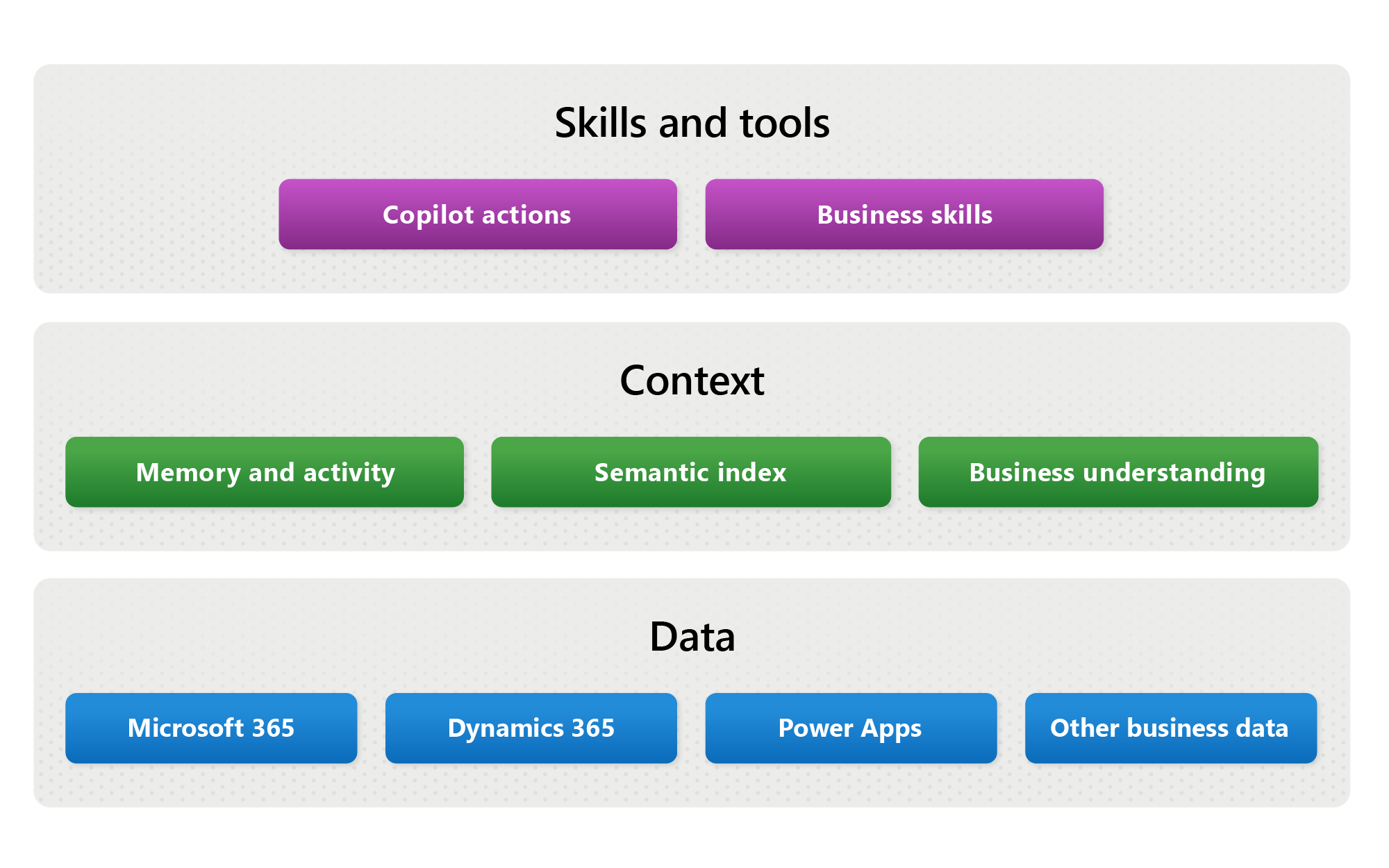
Work IQ isn’t rule-based automation layered on top of Outlook. Users aren’t configuring new filters or workflows. Instead, the system is adapting based on observed patterns, meaning user behavior can remain the same while output quality improves
“The intelligence works behind the scenes as you use Outlook,” says Matthew Marzynski, a principal product manager for core experiences in Microsoft Digital. “Your inbox just gradually feels more relevant. Outlook adapts to your work patterns, making your inbox feel more like an assistant, instead of a filing cabinet of communications.”
Applying persistent memory
Another important aspect of Work IQ is the ability to retain persistent memory of each employee’s role, responsibilities, and work context. Copilot and other agents no longer need to be continually prompted with details about who the user is and what they’re working on. It learns that information and remembers it going forward.
This feature, also called persistent understanding, builds trust and increases efficiency each time an employee turns to AI for help with their work. AI systems that depend on manual context-setting don’t scale well across large organizations, which we at Microsoft Digital learned as we tested and deployed Copilot across the company.
“The user no longer has to tell the agent, ‘I work in this area, so please tailor your response to that’ every time,” says Anishkumar Ramakrishnan, a principal PM manager in Microsoft Digital. “With Work IQ, Copilot and agents recall it going forward. It remembers things that the user doesn’t even remember themselves about their past work and actions. This is the promise of intelligent context.”
From answers to action: Work IQ and AI agents
As organizations move toward integrating AI agents into all aspects of their day-to-day work, the value of Work IQ increases. Any agent—not just a general-purpose agent like Copilot—that can interpret vast amounts of your unstructured work data is going to produce results that are far more relevant than one that simply draws on general knowledge about a topic or process.

“Before, a builder had to go connector by connector and be very prescriptive—calendar read, email read, meeting access—just to build an agent. Now they can simply point the agent to Work IQ, and it gains contextual access across mail, calendar, meetings, and files through a single connector (API or MCP server).”
Naveen Jangir, principal architect, Microsoft Digital
Early agent implementations relied on narrower task-specific access to data. For each agent, a developer would have to build connections to a particular document library, mailbox, or set of calendar data. Each connection required separate consent and management, which generally resulted in a more limited scope.
But with Work IQ, builders can create agents using Microsoft Copilot Studio or other development platforms (such as Microsoft Foundry) that use APIs or Model Context Protocol (MCP) servers to connect to Microsoft Graph data. This enables them to bring the full power of enterprise data to any agentic creation, not just Microsoft 365 agents.
“Before, a builder had to go connector by connector and be very prescriptive—calendar read, email read, meeting access—just to build an agent,” says Naveen Jangir, a principal architect in Microsoft Digital. “Now they can simply point the agent to Work IQ, and it gains contextual access across mail, calendar, meetings, and files through a single connector (API or MCP server).”
This shift doesn’t just simplify agent development—it fundamentally expands what agents are capable of. Instead of operating within narrow, predefined tasks, agents can now reason across a broader work context to deliver better outcomes. For example, an agent supporting a project manager can surface relevant email threads, identify key stakeholders from meeting activity, reference the latest project documents, and highlight upcoming deadlines—all within a single interaction.
Intelligence without bypassing governance
From a governance perspective, Work IQ doesn’t introduce a new security model. Instead, it operates entirely within the existing Microsoft 365 data protection boundaries that our company and our customers already rely on.
The intelligence layer can access this enterprise data, but it does so while honoring permissions, sensitivity labels, access policies, and compliance controls defined at the source. Work IQ can only surface or act on information that the user—or an agent identity acting on the user’s behalf—is already authorized to access.
This inheritance model is intentional. Governance remains rooted in the data layer, not in the AI layer. Work IQ respects established controls such as identity‑based access and tenant policies, which means agents are generally given less access than human users.
“An agent user only gets access to what is explicitly shared with it,” Jangir says. “Human users typically have broader default access. By design in Work IQ, agents can usually see less than people, not more.”
For IT and security teams, this places the emphasis squarely on data discipline and identity controls, which are complementary security layers. Work IQ amplifies the value of well‑governed data and exposes weaknesses where governance is inconsistent. Admins remain in control of access and can turn off APIs and MCP server connections if they want to limit an agent’s data access.
Work IQ, Fabric IQ, and Foundry IQ
As we’ve scaled up Copilot and agentic AI internally, one lesson has become clear: Intelligence works best when it’s part of a layered infrastructure rather than working on its own.
That’s why Work IQ is just one context layer we’re using at Microsoft. We’ve also developed Fabric IQ and Foundry IQ, which are complementary layers in our overall data strategy. Each of these addresses a different aspect of enterprise intelligence.

The three layers serve distinct but connected purposes:
- Work IQ focuses on unstructured productivity data, helping AI understand how people work across email, meetings, documents, and collaboration signals.
- Fabric IQ applies similar reasoning to analytical and structured data, adding context and explanation to metrics, trends, KPIs, and other business signals.
- Foundry IQ provides the foundation for builders to create agents that draw from both worlds, connecting intelligence across Microsoft 365, analytics platforms, and line‑of‑business systems.
Taken together, these layers also contribute to something deeper: the emergence of a shared business ontology. By extracting and aligning business entities—such as people, projects, and processes—from both structured data in Fabric IQ and the unstructured signals captured by Work IQ, the system perceives meaningful connections that previously were hidden. This unified understanding allows agents to reason across domains with greater precision, linking metrics to the real work and making insights more actionable in context.
This architecture matters because it removes artificial seams. Agents shouldn’t need to shift between separate contexts for work content, enterprise data, or application logic. The IQ layers make it possible to deliver a single agentic experience that reasons consistently, applies governance uniformly, and moves with users across environments. Just as importantly, the same controls—identity, permissions, labeling, and policy—flow through each layer, keeping trust intact as capability expands.
At Microsoft, Work IQ and the other context layers are helping Copilot and agents to accelerate beyond AI experimentation. They are now vital operational tools that make everyone more productive across the global enterprise. Context and intelligence in agentic tools are a key part of the future of work, at Microsoft and for our customers as well.

Key takeaways
Here are some things to keep in mind as you prepare your own organization to take full advantage of Work IQ:
- Treat the technology as infrastructure, not a feature. We didn’t formally roll out Work IQ. Its value emerged gradually as it improved Copilot responses and as our agent builders could more easily tap into unstructured enterprise data.
- Expect improvements in AI quality without changes to your data. We saw measurable gains in relevance and user satisfaction even when underlying content remained the same, driven by better contextual reasoning across existing work signals.
- Focus on how employees work, not just what content exists. Work IQ improves AI outcomes by connecting people, relationships, and activity patterns, resulting in more actionable and grounded responses.
- Use Work IQ to move from assistance to action with agents. By giving agents access to contextual enterprise data through a unified layer, we enabled more automated workflows without requiring developers to manage dozens of connectors manually.
- Invest in data governance early to maximize AI value. Because Work IQ inherits permissions and policies from the data layer, its effectiveness—and safety—relies on clear labeling, intentional access design, and disciplined data management.
- Enable self-service collaboration data so it’s available for Work IQ. WorkIQ can only ground on data that is both available and not purposefully hidden. We make sure that our meetings are AI-enabled (and often recorded) and allow self-service in Teams and SharePoint, so the data is not hidden from Work IQ.
- Build toward a unified intelligence model across work and data. Combining Work IQ with Fabric IQ and Foundry IQ means agents can operate seamlessly across different kinds of data and incorporate more intelligence into their output and actions.

Try it out

Related links
- Check out how we’re embracing this agentic moment at Microsoft.
- Explore a Microsoft Learn article for more technical details about how Work IQ works.
- Learn how to get started building agents with Microsoft tools.
- Discover our detailed guide on how we deploy AI agents internally at Microsoft.
- Read an IT playbook for the AI era and learn how we’re becoming a Frontier Firm at Microsoft.
- See how we’re using Model Context Protocol security and governance to protect AI conversations at Microsoft.
