

Improving agentic workplace results with Work IQ
Adding deeper contextual intelligence to Microsoft 365 Copilot responses
Enterprise knowledge is perhaps a company’s most valuable asset, but for AI and agents, it can be difficult to take advantage of. Years of emails, documents, chats, meeting recordings, and workflows have created enormous volumes of rich data, scattered across systems and teams in a fragmented way. This data captures how work actually happens, but harnessing it broadly—especially in ways that support better decision making—has traditionally been almost impossible.
Enter the power of agentic AI tools.
In the modern agentic workplace, employees and teams here at Microsoft and elsewhere are finally able to take advantage of all that rich, unstructured knowledge. Microsoft 365 Copilot and AI agents can now access all this data and not simply retrieve information but also reason over it—learning how work gets done and then providing rich contextual responses and guidance.

“By giving AI the ability to reason across the vast repositories of unstructured data that our enterprise possesses, Work IQ fundamentally changes what’s possible for Copilot, agents, and employees alike.”
Brian Fielder, vice president, Microsoft Digital
We’ve given this new, dynamic way of leveraging your enterprise data to boost productivity a special name: Work IQ.
Work IQ represents a big step forward.
For us, it’s enabling the concept of “intelligence on tap” across our enterprise, making our organizational knowledge and work context accessible in real time, grounded in the signals employees generate every day. This transforms unstructured data from a challenge into a strategic resource—one that can support workflows at scale.
“Work IQ represents the next phase of the agentic workplace of the future—and it’s here,” says Brian Fielder, vice president of Microsoft Digital. “By giving AI the ability to reason across the vast repositories of unstructured data that our enterprise possesses, Work IQ fundamentally changes what’s possible for Copilot, agents, and employees alike.”

“It’s not really a brand-new capability, but more an evolution of what users already know, which is access to the grounding data in their Microsoft tenant. The difference is that Work IQ adds an additional layer to provide more context, allowing for richer and more relevant results.”
Aisha Hasan, principal product manager, Microsoft Digital
Internally here at Microsoft, Work IQ is having a tangible effect on how we work every day. A few simple scenarios that illustrate the power of Work IQ—described in greater detail in Chapter 3—include:
- Helping our employees understand which emails require their immediate attention, so they can focus on what matters
- Connecting meeting transcripts to the people involved in a meeting, accelerating actions through a deeper understanding of the participants and their work patterns
- Enabling our employees to create, organize, and publish Microsoft 365 content more quickly and with higher quality
This is just the beginning. As AI continues to permeate our business workflows, nearly every day-to-day task at Microsoft will be simplified, expedited, and improved by the intelligence of Work IQ. This includes the agents that are managing routine business and operational processes, giving them critical business context that helps their reasoning abilities.
This guide explores the ways that Work IQ is impacting how work gets done at Microsoft, and how Microsoft Digital—the company’s IT organization—has played a key role as Customer Zero, validating how Work IQ behaves under real enterprise conditions. It also examines the challenges and considerations that IT organizations will face as we enter an era where AI agents have access to unstructured data to complete workflows.
Chapter 1: Understanding Work IQ
Providing deeper insights through the power of context
Before we can fully explore the implications of Work IQ, it’s important to start with a clear understanding of what it is.
Work IQ is not a new application or service that users interact with directly. Rather, it’s a shared intelligence layer that continuously interprets work happening across the tenant. Understanding this distinction is critical, because it explains why Work IQ shows up everywhere Microsoft 365 Copilot works—and why it must be treated as foundational infrastructure, not as optional, add‑on functionality.
“It’s not really a brand-new capability, but more an evolution of what users already know, which is access to the grounding data in their Microsoft tenant,” says Aisha Hasan, a principal product manager in Microsoft Digital. “The difference is that Work IQ adds an additional layer to provide more context, allowing for richer and more relevant results.”
Work IQ is built on three layers:
- Data: It unifies signals from files, emails, meetings, chats, and business systems.
- Memory: It builds persistent understanding of how people and teams work.
- Inference: It combines models, skills, and tools to reason and act.
At a high level, Work IQ consists of the systems that collect and interpret signals from everyday work. These signals come from many familiar Microsoft 365 applications—Word, Outlook, PowerPoint, Teams, SharePoint, and more—as well as structured data sources (such as those contained in Power Apps and Dynamics 365 resources).
The fact that Work IQ unifies unstructured and structured data into a shared ontology is a key differentiator from traditional search tools. This combination, referred to as semantic unification, means that it can combine the authoritative data contained in structured sources with the intent, nuance, and narrative found in unstructured data.
Work IQ draws from a broad range of work data from your Microsoft tenant. The unstructured data includes:
- SharePoint sites, files, and other content
- OneDrive activity that reflects individual work and collaboration patterns
- Teams content, including chats, channels, and meeting data
- Outlook emails and attachments
In addition, calendar signals—such as meeting participation, recency, and frequency—add time-based context that helps Work IQ understand priority and relevance of different data. This is what it means to go beyond simple information retrieval.
SharePoint
Example signals: Site membership, document libraries, file creation and sharing, co-authoring activity, linked workflows
Why they matter for context: Reveals shared projects, authoritative content locations, and how teams collaborate over time
OneDrive
Example signals: Individual file creation, sharing behavior, recent edits, collaboration spikes
Why they matter for context: Provides insight into personal work-in-progress and early-stage collaboration patterns
Example signals: Conversation threads, reply frequency, recipients, attachments, urgency signals
Why they matter for context: Shows decision-making flows, stakeholder relationships, and which conversations truly drive work
Teams chat
Example signals: Channel discussions, mentions, reaction patterns, topic recurrence
Why they matter for context: Captures informal collaboration, fast-moving decisions, and cross-team interaction
Teams meetings
Example signals: Transcripts, speakers, shared files, action items, follow-up artifacts
Why they matter for context: Turns live discussions into durable knowledge that can inform future work and agent reasoning
Calendar
Example signals: Meeting frequency, recency, attendance, role of participants
Why they matter for context: Adds time-based priority and relevance, helping agents understand what matters now versus later
When all these are combined, it provides rich context that allows Work IQ to reason across all our employees’ work in a way that would be impossible if each signal were evaluated independently.
In practice, this means that when an employee asks a question about a current work project in Copilot, the tool’s response is not simply informed by the model’s capabilities or general source material. Responses are shaped by Work IQ’s understanding of the employee’s role, recent work, collaboration patterns (who they work with), and the larger enterprise context and conversations surrounding the question.
How our employees interact with and understand Work IQ depends on their role in the organization.
Our personas and their relationship with Work IQ

End user
Gains richer, context-aware agent conversations

IT admin
Enables and governs Work IQ access

Agent builder
Manages data connectors quickly and easily

Security professional
Knows that sensitive data stays protected with Work IQ
AI agents using Work IQ behave similarly. They use the intelligence to ground their reasoning in real organizational data, ensuring that their actions and recommendations are aligned with how work is happening inside the tenant. Although there are differences in how they are configured, all agents in a Microsoft tenant can be set up to take advantage of the power of Work IQ.
The impact of Work IQ on our company has been dramatic—we’re seeing agentic responses and actions that go deeper than surface-level answers. Our ability to reason over both our structured and unstructured data is producing richer, more nuanced contextual results that are boosting our productivity.
As your organization assesses your level of AI readiness, think of Work IQ not as an abstract concept but as critical infrastructure. It’s the key to connecting enterprise knowledge, trust, and productivity in a single, shared foundation.

Work IQ versus Microsoft Graph
Work IQ does not replace what we call the Microsoft Graph, the general term for unified, API-enabling, secure, permission-aware access to Microsoft 365 data, insights, and services. While the Microsoft Graph provides our employees with access to all their work data, Work IQ turns those signals into meaningful context that AI can reason over. In other words, Graph answers the general question “what info exists,” while Work IQ interprets what that information means and weaves it into responses to make them better.

Key takeaways
As you prepare for Work IQ, these points can help frame how to think about its role in your organization:
- Work IQ is foundational infrastructure, not a user-facing feature. It operates as a shared intelligence layer across the tenant, continuously interpreting signals from everyday work.
- Work IQ draws its power from context, not isolated data. By combining signals from email, meetings, documents, calendars, and collaboration patterns, it enables Copilot and agents to reason about work in a way that goes beyond simple search or retrieval.
- Better agentic outcomes depend on Work IQ being in place. When agents and Copilot are grounded in Work IQ, their responses and actions align more closely with real enterprise work, delivering better relevance and measurable productivity gains.

Learn more
How we did it at Microsoft
- Discover how Work IQ is supercharging our AI usage at Microsoft. This post delves into the ways that Work IQ is boosting agentic response and changing the way we work at the company.
- See how we’re embracing this agentic moment at Microsoft. This story covers how we use the power of Copilot and AI agents to boost employee productivity.
- Explore our IT playbook for the AI era and learn how we’re becoming a Frontier Firm. This article shares our journey as an IT organization toward the AI-powered future.
Further guidance for you
- Learn more about Work IQ with this post from the Microsoft 365 Copilot Blog.
- Check out this Microsoft Learn overview of the different Work IQ agent tools.
- Read all about the Microsoft Graph on the Microsoft Learn site.
Chapter 2: Establishing trust: How we govern Work IQ
Building on an existing foundation of solid governance and security
Like all Microsoft products, Work IQ was built with security foremost in mind. As the IT team at Microsoft, it is our responsibility to work in tandem with the product groups to ensure that all data that Work IQ has access to is well governed and secure.
The fact that Work IQ does not introduce new data into Microsoft 365 makes meeting this commitment easier. Embedded directly into the Microsoft 365 intelligence stack, Work IQ inherits the same compliance, security, and access controls that already govern the tenant.

“With great power comes great responsibility, and it’s up to your IT team to think about what it means to give your users full access to all this Work IQ data. It can greatly accelerate what people can build and what they can do.”
David Johnson, principal PM architect, Microsoft Digital
For Microsoft 365 Copilot–native agents, Work IQ is enabled to provide governed, context‑aware access to Microsoft 365 work data without requiring developers to build or manage individual data connectors.
As our governance experts note, this represents an inherent trade-off. Giving an agent access only to certain isolated data types reduces risk but also limits its value. Granting access through Work IQ means an agent can reason across everything the employee can access. This simplifies enablement but also requires stronger confidence in governance foundations.
Microsoft 365 intelligence stack
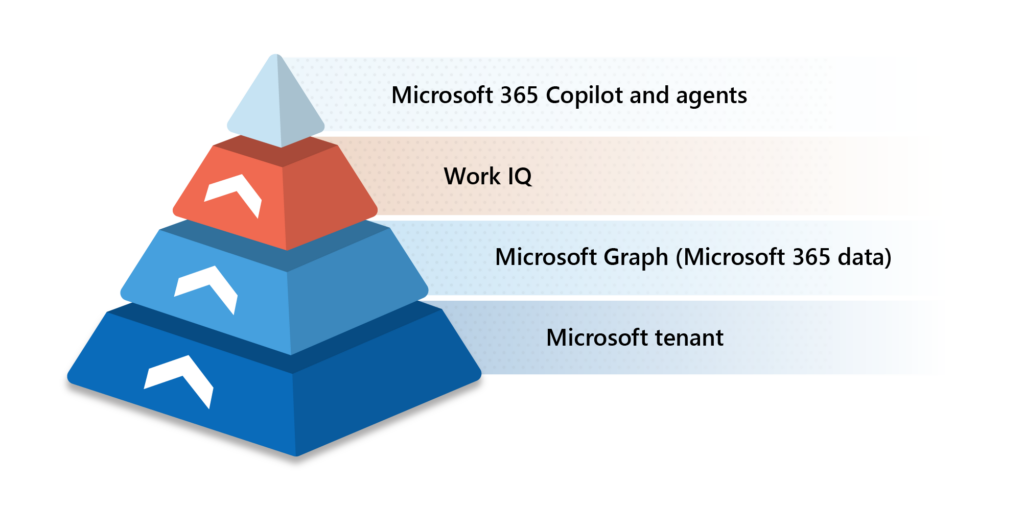
As our governance experts note, this represents an inherent trade-off. Giving an agent only access to certain isolated data types limits risk, but it also limits its value. Granting access through Work IQ means an agent can reason across everything the employee can access. This simplifies enablement but also requires stronger confidence in governance foundations.
“With great power comes great responsibility, and it’s up to your IT team to think about what it means to give your users full access to all this Work IQ data,” says David Johnson, a principal PM architect in Microsoft Digital. “It can greatly accelerate what people can build and what they can do. At the same time, organizations will want to think about the downstream implications of access.”
Exposing underlying governance issues
Our overall solution was to anchor Work IQ to our governance and security policies that already existed for our data. Sensitivity labels, data protection rules, and data-loss prevention policies remain the primary guardrails, as they do for all data across our enterprise. All these controls live at the data layer.
A critical aspect of this governance model is how sensitivity labels propagate through Work IQ experiences. In Microsoft 365, the label that is applied to a source document determines the label of any derived outputs, including summaries, insights, or AI-generated responses. This ensures that users have immediate context about the information’s sensitivity and how it should be handled. The label effectively travels with the data, reinforcing both user awareness and policy enforcement.
Labels also play a key role in controlling access beyond simple permissions. Even if a user has baseline access to a location, sensitivity labels can further restrict whether content can be extracted, shared, or surfaced through AI experiences. In some cases, organizations can configure policies so that content with specific labels is not returned at all in Work IQ or Copilot responses. This gives IT teams an additional layer of control to prevent exposure of particularly sensitive information.
These labeling principles extend across collaboration scenarios as well. For example, meeting labels determine the classification of all downstream artifacts—including recordings, transcripts, and notes. Sensitive discussions remain governed consistently, even as Work IQ helps make them more discoverable and actionable.
For example, even with Work IQ enabled, a document labeled Highly Confidential cannot be exposed through Copilot to someone without access, even if it is referenced in a Teams meeting transcript or included in an AI-generated summary. Copilot may understand that the document played a role in a particular decision, but it cannot extract or reveal its contents beyond what permissions allow.
This distinction—discoverable versus extractable—proved critical in our deployment of Work IQ. The intelligence layer makes data relationships visible, but it does not override protection. In one internal scenario, a sensitive document was found to be accessible through a Copilot query. The root cause was not Work IQ, but a missing sensitivity label—the AI tool simply honored what governance allowed. We treated the incident as a governance signal and corrected labeling at the source.
Remember that Work IQ can only access data that:
- Exists inside your Microsoft 365 tenant or is explicitly connected via approved connectors
- The current user already has permission to access
- Is allowed by tenant‑level admin policy, compliance, and sensitivity controls
The security and governance considerations also extend to how new agents are released across our enterprise. For example, an agent created for use within one internal team has lighter governance controls than one that is published to our internal Microsoft agent portal, which offers companywide access. The latter requires additional review, approval, and monitoring as part of our due diligence for governance and security.
Ultimately, Work IQ adheres to all of the security and governance policies and procedures in our tenant, preserving the trust that our security-first approach creates and maintains.
Key takeaways
The following are important considerations for data governance and security when you consider adopting Work IQ for your organization:
- With Work IQ, governance and security are top-line priorities. We made sure that Work IQ would always inherit the same compliance, access controls, and data protection policies that already govern Microsoft 365 data.
- Work IQ doesn’t introduce new data access—it changes how existing access functions. By packaging tenant data into a single intelligence layer, it facilitates easier agent builder access to the data you already have in your Microsoft 365 tenant.
- The distinction between discoverable and extractable data is central to safe AI deployment. Copilot and other agents can understand how work information is connected and referenced without exposing protected content beyond existing permissions.
- IT admins and leaders should consider the ramifications to their tenant. Work IQ makes agents more powerful and context-aware by opening up access to vast quantities of Microsoft 365 data, but IT professionals should always think through downstream effects on data security and governance.
- Work IQ surfaces governance gaps instead of masking them. When issues arise—such as misapplied sensitivity labels—the solution is not to restrict intelligence, but to strengthen data governance at the source.
Learn more
How we did it at Microsoft
- See how we’re governing AI agents at scale internally. This readiness guide explains how we approach security and compliance for AI agents at Microsoft.
- Read about our experience tackling Microsoft 365 Copilot governance. This guide details our internal governance efforts for Microsoft 365 Copilot as we rolled the tool out across our organization.
- Explore how we’re powering data governance at Microsoft with Purview Unified Catalog. This story explains how Purview is helping us redefine our internal approach to data governance.
Further guidance for you
- Learn more about governance and security for AI agents and find out how to keep your AI initiatives secure.
Chapter 3: How our employees experience Work IQ day to day
Transforming the way work happens at Microsoft
To understand how Work IQ shows up and impacts the workflows of people across our organization, we spoke to several Microsoft employees. They explained how Work IQ makes a difference in the results they’re getting from Copilot and other agentic AI tools and how the intelligence is supercharging their work.
Work IQ in Outlook
Outlook email and calendars are the space where many of our employees feel the heaviest cognitive load of their day‑to‑day work. It’s also where Work IQ is surfacing some of the most innovative ways to help employees accomplish more.

“You open your Outlook in the morning and Copilot—by drawing on Work IQ context and through features like priority scoring and summarization—can help you see which messages need your attention first.”
Matthew Marzynski, principal product manager, core experiences, Microsoft Digital
Rather than treating messages and meetings as isolated items, Work IQ allows Copilot in Outlook to reason across email signals, conversation history, meeting patterns, and calendar behavior to deliver responses that reflect how work actually unfolds.
This means Copilot goes beyond keywords or unread status indicators to determine importance. Through Work IQ, it understands the context of each conversation—which threads are more urgent and relevant to your work and which are less vital.
“You open your Outlook in the morning and Copilot—by drawing on Work IQ context and through features like priority scoring and summarization—can help you see which messages need your attention first,” says Matthew Marzynski, a principal product manager for core experiences in Microsoft Digital. “Copilot is now beginning to offer proactive nudges to help you stay on top of what matters, surfacing what’s changed and what you need to focus on.”
The deeper context also aids Outlook in generating rich summaries of lengthy threads, which can highlight owners, decisions made, and next steps. This allows employees who are added to the thread or who have been away to quickly catch up on complex conversations without manually digging through seemingly endless past messages or related documents.
Marzynski frames Work IQ as an invisible intelligence layer that quietly reshapes how Outlook behaves over time. His core thesis is simple: Users never have to think about Work IQ; they just observe that Outlook is more helpful than before, and that their work gets easier.
“There are no complex commands to learn or rules to create. The intelligence works behind the scenes as you use Outlook,” he says. “Your inbox just gradually feels more relevant. Outlook adapts to how you work, rather than the reverse, and becomes more like an assistant instead of a filing cabinet of communications.”
Work IQ in Teams + Researcher Agent
Another immediate and tangible way our employees experience Work IQ is in Microsoft Teams meetings. The value begins the moment a meeting is recorded. Transcripts, speaker contributions, shared content, and AI‑generated summaries are automatically captured and folded into the attendees’ ongoing work context—without requiring manual note‑taking or follow‑up documentation.
Ray Peer is a senior product manager in Microsoft Digital who observed the power of Work IQ in a recent project he completed with our internal legal team. According to Peer, the team was struggling to find specific content in their data lake, which contains tens of thousands of documents, articles, and other content items.

“Based just on what people shared in that meeting, and what it knows about their work and about SIPOC diagrams, Researcher was able to generate a fully formed, detailed solution for me. That’s the intelligence layer at work.”
Ray Peer, senior product manager, Microsoft Digital
So, he facilitated a Teams meeting for a free-form process‑mapping discussion with a few members of Microsoft Legal. Days later, he put the meeting transcript into the Copilot Researcher agent and asked it to generate a structured SIPOC (Suppliers, Inputs, Process, Outputs, Customers) diagram and accompanying documentation.
He was amazed by the results.
“Based just on what people shared in that meeting, and what it knows about their work and about SIPOC diagrams, Researcher was able to generate a fully formed, detailed solution for me,” Peer says. “That’s the intelligence layer at work. It reasoned over what we said—there were no visuals shared or anything—and it came up with something that I could cut and paste into the final format. I used to have to do that manually, and it took hours.”
Work IQ connected the meeting transcript to the people involved, the SharePoint sites they used, and similar work done elsewhere in the organization. Copilot was able reason across different tools and unstructured data, rather than just treating the meeting transcript as a static artifact.
Note that this works differently from third‑party meeting tools, because the data never leaves the tenant. Work IQ treats Teams meetings as part of a continuous Microsoft 365 workstream—honoring permissions and sensitivity labels throughout—so conversations can become durable inputs for future work without adding risk or effort for employees.
Work IQ in SharePoint
In SharePoint, Work IQ is helping employees create, organize, and publish content by drawing on the rich context of their Microsoft 365 data. Rather than starting from a blank page or text block, content development is sped up as Copilot draws on their relationships, collaboration history, and metadata to help produce sites and documents.

“Copilot will recommend text changes, but also layout suggestions, image and graphic options, and other helpful assistance. It makes it easy to create more compelling content, more rapidly.”
Sam Crewdson, principal product manager, Microsoft Digital
For example, when you ask Copilot to create a new section in a SharePoint site—such as a project overview, status update, or other material—Work IQ enables the tool to look deeper than the prompt itself. When generating the content, it can draw on documents you’ve recently edited, your emails and Teams conversations, and related work happening across the organization. The output you get from Copilot is highly relevant and grounded in real work.
Sam Crewdson is a principal product manager at Microsoft Digital who has been a part of the SharePoint team for more than two decades. He’s excited about what Work IQ is enabling users to accomplish in the product using Copilot, as well as other agentic tools like Knowledge Agent (a domain-specific agent that can drill down on SharePoint sites and libraries).
“Copilot in SharePoint is now able to not only help you produce better written content, it’ll also offer more contextual and visual help,” Crewdson says. “Copilot will recommend text changes, but also layout suggestions, image and graphic options, and other helpful assistance. It makes it easy to create more compelling content, more rapidly.”
Another emerging scenario Crewdson described is conversational agentic authoring in SharePoint. In these workflows, employees refine their SharePoint pages by interacting directly with an agent—asking it to add sections, adjust tone, or suggest visuals. Over time, these agents will reduce repetitive setup steps and help teams move from draft to publish faster.
Across these experiences, Work IQ is helping shift SharePoint from a manual content creation tool to an application where agents automate everyday content tasks based on your overall work context and related Microsoft 365 data.
Key takeaways
Here are some things to remember when thinking about how Work IQ can impact your employee workflows:
- Work IQ reduces cognitive load in Outlook by understanding work context. By recognizing decision‑driven threads, collaboration patterns, and urgency over time, Copilot helps employees focus on what truly needs their attention without relying on manual rules or keyword searching.
- Email and calendar intelligence improves prioritization, summaries, and follow‑through. Work IQ allows Copilot to highlight owners, decisions, and next steps in long threads and nudge users toward timely action, based on how they typically work with colleagues.
- Teams meetings become durable inputs for future work when powered by Work IQ. Copilot and the Researcher agent can reason across meeting content, people, and related SharePoint work—creating structured outputs while honoring tenant security and permissions.
- Work IQ helps Copilot speed up and enrich content creation in SharePoint. By drawing on Microsoft 365 data, Copilot can generate more relevant content for your SharePoint sites and offer helpful layout and graphics suggestions that accelerate the site development process.
Learn more
How we did it at Microsoft
- See how to pick the right Copilot for the job. This post explores different Copilot agents and modules and discusses how to choose the correct one for your task.
- Discover how we deployed Copilot internally at Microsoft. This step-by-step guide breaks down the deployment and adoption process we followed to roll out this groundbreaking technology across our entire organization.
- Find out how we’re using AI to redefine work in Outlook. This blog post explores the latest AI features that our employees are using to work smarter in Microsoft Outlook.
- Learn five ways we’re getting more out of Teams in the era of Copilot and AI. This article details different Teams features that take advantage of the latest in AI technology.
- Read about the lessons learned using SharePoint agents at Microsoft. This post covers some of the insights gleaned through our deployment of different SharePoint agents.
Further guidance for you
- Check out the Microsoft Copilot Success Kit and learn how to accelerate your Copilot implementation with templates, onboarding guides, and technical readiness resources.
- Explore the company’s essential guide to Copilot adoption for practical steps to onboard, engage, and measure impact in your organization.
Chapter 4: Work IQ beyond Microsoft 365
Integrating Work IQ across the enterprise
As organizations adopt Copilot and other AI agents at scale, the question arises: How does Work IQ show up in different contexts? Is it something that only impacts your work in Microsoft 365 applications, or does it also play a role in external applications and other areas of your IT enterprise?
Based on our experience here at Microsoft, the answer is that Work IQ shows up differently depending on where it’s consumed, and those differences matter for admins, agent developers, and other IT professionals.
For most of our employees, Work IQ operates entirely behind the scenes inside Microsoft 365. It is not something users configure, enable, or interact with directly. By reasoning over your entire Microsoft 365 data graph, Work IQ improves the results that Copilot generates in apps like Outlook, Teams, Word, SharePoint, Copilot Chat, and GitHub Copilot.
In this mode, Work IQ is:

Built directly into the Microsoft 365 intelligence stack

Governed by existing permissions, sensitivity labels, and compliance policies

Invisible to users, with no new controls or UI to manage

Continuously learning from signals across emails, meetings, and files
You don’t “implement” Work IQ—it’s already present in first-party Microsoft products by default. If you have enabled Copilot, you are getting the benefits of Work IQ across all of these applications.
Similarly, any agents you build for Microsoft 365 apps (such as using Agent Builder in Microsoft 365 Copilot) are scoped for use specifically in these apps, rather than outside of them. These agents do not require separate connectors, such as APIs or Model Context Protocol (MCP) servers, to access Work IQ. In fact, Work IQ MCP is a great tool to make your context ubiquitous to whichever agentic experience can be imagined.
Extending Work IQ beyond Microsoft 365: explicit by design
Implementation works somewhat differently outside of native Microsoft 365 experiences. When it comes to custom agents, line‑of‑business applications, or Azure‑hosted solutions, Work IQ does not show up automatically. In these contexts, it is intentionally enabled by our builders and governed by our administrators.
In these scenarios:
- Developers access Work IQ through APIs or MCP servers
- Admins explicitly control which capabilities are enabled or disabled
- Work IQ provides rich enterprise context without duplicating data
- Permissions and governance remain enforced at the tenant level
For us, this design is deliberate and has advantages. Rather than asking our developers to configure dozens of individual connectors for mail, calendars, files, and meetings, Work IQ offers them a single-entry point for enterprise context. Builder tools like Microsoft Foundry and Copilot Studio allow our teams to take the same Work IQ intelligence that Copilot uses and apply it to workflows that live outside Microsoft 365. Examples include automating newsletters, generating insights for account teams, or powering custom agents to handle specific scenarios.
The key distinction is accountability. Inside Microsoft 365, Work IQ is ambient. Outside it, Work IQ is a conscious architectural choice, one that requires actions upfront to enable.
Work IQ does not “open up new data” when used externally. It ports intelligence, not raw access, applying the same rules no matter where it’s consumed. At the same time, it gives organizations flexibility to decide when and how far that intelligence should travel.
This continuum—from implicit use inside Microsoft 365 to explicit use beyond it—also clarifies our roles:
- Our end users benefit without needing to learn anything new
- Our IT teams retain centralized control at the tenant level
- Our builders gain a faster path to context‑aware solutions
Work IQ works best when treated as a shared intelligence foundation, not a feature toggle. It is present by default where trust is already established, and it can be incorporated deliberately where your organizational requirements or innovation needs demand more reach.
Model Context Protocol servers and Work IQ
For organizations that move beyond native Microsoft 365 experiences and begin building custom agents, Model Context Protocol (MCP) servers are the primary mechanism for connecting those agents to Work IQ. While Work IQ is always available inside Copilot, MCP servers are what make much of that same intelligence accessible to agent builders.
At a high level, MCP servers are an open-standard technology (not proprietary to Microsoft) that act as governed tool interfaces to enterprise context. Each Work IQ MCP server represents a scoped slice of Microsoft 365 signals—such as email, calendar, Teams activity, or SharePoint content—and exposes them in a form that agents can reason over. Rather than wiring individual connectors or APIs for each workload, builders can rely on MCP servers to assemble relevant context automatically, while still honoring permissions, sensitivity labels, and tenant policies.
When we’re building agents, Work IQ becomes explicit, and MCP servers are how our builders declare their intent. This includes determining which types of enterprise context the agent needs, how broadly it should reason across work signals, and where governance boundaries apply.
From an IT perspective, MCP servers also provide a critical control point. Our administrators decide which Work IQ MCP servers are enabled in the tenant and which of our builders are allowed to use them. This ensures that extending intelligence beyond Microsoft 365 remains a deliberate choice rather than an accidental one.
Using these servers to connect with your enterprise data also represents real—but manageable—risk. They make existing permissions more actionable, which can amplify the impact of overshared content or weak data hygiene. The best practice is to treat these servers as governed infrastructure: enable them selectively at the tenant level, start with the minimum set required for defined agent scenarios, restrict usage to approved builders, and pair expansion with regular permission reviews and labeling discipline.
Your readiness plan should be to ensure that governance is in place, then selectively enable MCP servers where agents require deeper context. The servers are the bridge that lets agent builders tap into Work IQ safely, allowing you to bring enterprise intelligence into custom solutions without breaking the trust model that makes Copilot effective at scale.
Key takeaways
Here are some things to remember when thinking about how Work IQ shows up across your organization—especially if you plan to extend this intelligence into custom agents and applications:
- Work IQ is foundational inside Microsoft 365 and intentional outside it. Within Copilot experiences, Work IQ operates implicitly, while custom agents introduce a conscious decision to consume that intelligence through MCP servers.
- Governance principles don’t change when extending Work IQ, but they become more visible. MCP servers enforce existing permissions, labels, and tenant policies, making it critical that governance foundations are solid before agents rely on deeper context.
- Agent builders declare intent through MCP server selection. Choosing which Work IQ MCP servers to use defines what enterprise signals an agent can reason over and how broadly it reflects real work patterns.
- Preparing to extend Work IQ beyond Microsoft 365 is about readiness. Organizations that are already ready for Copilot can selectively enable MCP servers to unlock richer agent scenarios without introducing new security or compliance risk.
Learn more
How we did it at Microsoft
- Learn how we’re shaping AI management at Microsoft with Agent 365. This post discusses how we use the Agent 365 control plane to govern Microsoft 365 Copilot and agents internally.
- Read our complete guide to deploying AI agents internally at Microsoft. This Inside Track readiness guide covers all aspects of how we’ve implemented agentic AI across our organization.
- Discover how we’re unlocking enterprise AI extensibility with Copilot Studio. This story explores how we govern more advanced agents built with Copilot Studio, including connectors, orchestration, and scaled governance.
- Check out how we’re protecting AI conversations at Microsoft with Model Context Protocol security and governance. This article delves into MCP governance through secure-by-default architecture, automation, and inventory for faster, safer agent development.
Further guidance for you
- Read this Work IQ MCP overview on the Microsoft Learn site to find out more about how agents connect using Model Context Protocol servers.
- See the Work IQ Copilot reference on the Agent 365 Microsoft Learn site for further technical detail.
Chapter 5: Working with Work IQ: The Customer Zero impact
Change management lessons from our experience with an ambient intelligence layer
Work IQ wasn’t rolled out across our organization as an abstract platform decision or deployment milestone. Its development has been one aspect of our overall transformation into an AI-first Frontier Firm.
Along the way, Work IQ has been shaped by our long‑standing Customer Zero mission at Microsoft Digital: Using our own products at enterprise scale first, learning directly from how employees experienced it, and allowing those lessons to shape how the technology is refined and extended to customers.
In our tenant, Work IQ benefits emerged gradually through incremental improvements to relevance, context, and intelligence across Microsoft 365. These gains were driven by advances in AI that made it possible to interpret everyday work signals more effectively.
There was no formal product implementation or adoption campaign when we launched Work IQ at Microsoft. As ambient infrastructure, Work IQ is an unseen part of all employee workstreams—nearly every experience benefits from it. At the same time, the power of Work IQ depends on everyone in our organization being effective stewards of their own unstructured data, preserving security, governance, and relevance.
Enablement and adoption
To fully realize the value of Work IQ, we have found that organizations must invest in the foundational behaviors that make their organizational knowledge accessible. One of the key steps in this effort is enabling and encouraging the use of meeting transcripts. Work IQ depends on the artifacts of daily work to build context, and without transcripts, a significant portion of meeting insights and decisions remain inaccessible to the intelligence layer.
Making transcription a standard part of our employees’ everyday collaboration proved essential. Transcripts create a durable, searchable record that Work IQ can connect to documents and actions, helping employees quickly understand what happened, even if they weren’t present. When paired with existing governance controls like sensitivity and meeting labels, organizations can capture this data securely while unlocking great value from this collective knowledge.
This is actually a cultural shift.
We gave our teams clear guidance and encouraged meeting transcription as part of their normal workflow. When paired with the enhancements to meeting recaps in Microsoft Teams, this becomes a powerful tool for preserving and leveraging organizational knowledge.
Of course, Copilot adoption and training efforts were also a vital part of our getting the most from Work IQ. Our employees needed demonstrations of all the things that Copilot could help them accomplish, along with encouragement to jump in and try it out for themselves. Our data shows that internal AI usage has grown significantly over time—from a few thousand users to hundreds of thousands across the company—in large part due to:
- Employee-driven champions programs
- Scenario‑based learning efforts
- Timely and consistent internal communications
Usage also grew internally as our product teams continually refined our AI tools, aided by our collection of user feedback on agentic answers to identify low-quality output and irrelevant detail.
Another major insight we captured was the importance of persistent memory to the Copilot and Work IQ experience. Through our work as Customer Zero, we collected a large volume of feedback from employees indicating that this was a priority—users should not have to repeatedly explain who they are or what they are working on.
The experience was subsequently improved, and Work IQ now helps enable Copilot to remember user history and tailor responses accordingly—delivering summaries for communicators and deeper technical detail for engineers, for example.
Our Customer Zero efforts also validated a critical governance principle for us. As intelligence improved, some teams were surprised by how much context Copilot could surface. In every case, investigation showed that the underlying data access already existed. Work IQ did not change permissions or expose new data—it made existing relationships more visible. This reinforced the importance of strong data hygiene, sensitivity labeling, and permission management as prerequisites for trusted intelligence.
Ultimately, our work as the company’s Customer Zero validated that Work IQ is best understood as shared infrastructure. Its value compounds when organizations focus on readiness—governance, learning, and trust—and allow intelligence to scale naturally across work, rather than treating it as a feature to deploy.
When these conditions are in place, Work IQ quietly raises the quality of Copilot and agent experiences without adding complexity for users or additional burden for IT.
Key takeaways
As you consider how Work IQ might take shape in your own organization, consider these observations from Microsoft Digital’s Customer Zero experiences with this new intelligence layer:
- Meeting transcription is the key. Making sure all meetings are transcribed is essential for Work IQ, so it can build context on how work happens in your organization. This is a technical and cultural change that you need to facilitate and encourage.
- Awareness and learning are keys to usage and feedback. Our internal Copilot adoption grew when employees were shown practical scenarios and encouraged to experiment, supported by champions programs and ongoing internal communication.
- Change management drives results. Use employee champions, role-based immersive learning, and timely internal communications to help your employees understand what Work IQ is and how it can help your enterprise maximize the value of AI.
- Treating Work IQ as shared infrastructure unlocks compound value. When governance, learning, and trust were in place, intelligence could reason across all our rich unstructured data —improving Copilot and agent experiences without adding additional work for users or IT.
Learn more
How we did it at Microsoft
- Read about how we serve as Customer Zero in an AI-powered world. This story describes how Microsoft Digital’s role as Customer Zero has grown and evolved as we move into the Frontier Firm era.
- How to pick the right Copilot for the job. This post explores different Copilot agents and modules and discusses how to choose the correct one for your task.
- Recapping our meetings with Microsoft Teams Premium. This Inside Track story explains how Intelligent Recaps have changed the game when it comes to getting the most out of meetings at Microsoft.
Further guidance for you
- Check out the Microsoft Copilot Success Kit and learn how to accelerate your Copilot implementation with templates, onboarding guides, and technical readiness resources.
Where we’re heading: Work IQ, Fabric IQ, and Foundry IQ
Combining different layers of intelligence to transform the workplace
While impactful on its own, Work IQ is just part of larger story of how we’re using the power of rich data and agentic AI to transform how we work at Microsoft.

“While Work IQ can access your Microsoft 365 data, Fabric IQ will connect to your organizational data, such as analytics. Foundry IQ can leverage both, plus other domain data, to help developers build powerful agentic solutions.”
Naveen Jangir, principal architect, Microsoft Digital
Work IQ is one layer. It allows our AI tools to reason over unstructured data so this powerful resource can be a part of our larger enterprise intelligence system. But it also includes two other aspects of this three-layer system—Fabric IQ and Foundry IQ. Combined, these three capabilities enable organizations to take full advantage of your knowledge estate to forge the AI-powered workplace of the future.
“While Work IQ can access your Microsoft 365 data, Fabric IQ will connect to your organizational data, such as analytics,” says Naveen Jangir, a principal architect in Microsoft Digital. “Foundry IQ can leverage both, plus other domain data, to help developers build powerful agentic solutions.”
Here’s how these capabilities work together in complementary roles to impact how work gets done at Microsoft:
- Work IQ handles unstructured data—like documents, emails, PDFs, and web content—by extracting meaning and context from human language.
- Fabric IQ operates over structured data—like tables, databases, metrics, events, and transactions—to bring consistency and analytic rigor to our work.
- Foundry IQ provides the knowledge-grounding layer, where entities, relationships, and ontologies allow reasoning to stay aligned with enterprise truth.
While each component is powerful on its own, the deeper value is what becomes possible when they are used together.
The intent is to enable agents that can reason across all enterprise knowledge, regardless of where it originated or how it was stored. An agent should be able to read a policy, connect it to operational data, understand who and what is involved, explain its conclusions, and take an action (if desired) through a shared ontology based on organizational context.
That kind of capability can’t emerge just from information retrieval. It requires shared meaning across systems, content, and data types.

This is where the role of Work IQ becomes especially important. We have found that unstructured data contains some of the most critical institutional knowledge an organization has, but it rarely arrives in a form that is ready to be reasoned over. Documents reference people, systems, processes, and timelines in ways that make sense to humans, but not to machines. They can also fall out of date or represent a draft state that was never meant to be presented as verified information.
Work IQ bridges this gap by transforming the raw text into structured understanding, without stripping away nuance.

“Work IQ is already helping us change the way that work gets done. Instead of hunting for information or stitching context together manually, our employees can focus on decisions, creativity, and outcomes—because the intelligence is already there, working with them every day. It’s an integral part of preparing our organization for our agentic AI future.”
Vijaya Alaparthi, principal group product manager, Microsoft Digital
The crucial mechanism for that transformation is entity extraction, paired with a shared ontology. When a document mentions an employee, a system, a regulation, or a product, Work IQ identifies that reference as something concrete and reusable. Over time, those entities become the connective tissue between unstructured content, structured records in Fabric IQ, and the semantic backbone that Foundry IQ relies on to ground reasoning in the agents we create.
We can already see signs of this promised future at Microsoft today. Take a tool like our Employee Self-Service Agent, which we launched late last year. What before was a collection of static HR documents becomes a living knowledge system: policies are parsed, roles and eligibility criteria are extracted, and guidance is grounded in an understanding of employee role and location. The agent can answer a question and explain why the answer applies, because it understands both the document and the organizational context behind it.
This is why Work IQ is such a strategic capability. Improving document quality, normalizing metadata, resolving entities, and establishing governance are not one-off hygiene tasks. They expand what future agents will be able to do safely and reliably. The more coherent your unstructured data becomes, the less guesswork agents must do and the more context they can absorb.
“Work IQ is already helping us change the way that work gets done,” says Vijaya Alaparthi, a principal group product manager in Microsoft Digital. “Instead of hunting for information or stitching context together manually, our employees can focus on decisions, creativity, and outcomes—because the intelligence is already there, working with them every day. It’s an integral part of preparing our organization for our agentic AI future.”
For us, the direction forward is clear. The better your data foundation, the more capable—and trustworthy—your agents become. As unstructured and structured knowledge converges, intelligence stops being a set of isolated features and becomes a system.
Organizations that invest in technology like Work IQ to harness their unstructured data as enterprise knowledge are the ones that will deploy the most capable agents going forward and will be best positioned to take advantage of the agentic future.
Key takeaways
If you want your organization to be able to use Work IQ to propel your own agentic transformation, consider what we’ve learned on our journey:
- Work IQ transforms unstructured enterprise data into actionable intelligence. By reasoning over emails, documents, meetings, and chats, it unlocks institutional knowledge that was previously fragmented and underused.
- The intelligence operates as foundational infrastructure, not a user-facing feature. Work IQ runs continuously behind the scenes across Microsoft 365, improving Copilot and agent responses wherever they appear without configuration.
- Context is what makes Copilot feel truly intelligent. By combining signals from collaboration patterns, conversations, documents, and more, Work IQ enables agents to respond based on how work actually happens, not just what information can be retrieved.
- Security and governance remain intact because Work IQ inherits existing controls. It doesn’t create new access to data; it reveals relationships while fully honoring permissions, sensitivity labels, and compliance policies.
- Employees experience Work IQ as reduced cognitive load, not added complexity. Inbox relevance, richer summaries, and clearer follow-through improve naturally over time.
- Using Work IQ beyond Microsoft 365 is a deliberate, governed choice. MCP servers allow builders to bring enterprise context into custom agents while giving IT teams clear control over scope, access, and risk.
- Work IQ is the foundation for the next generation of agentic intelligence, especially when combined with Fabric IQ and Foundry IQ. The more coherent and well-governed your unstructured data is today, the more capable, explainable, and trustworthy your future agents will become.
Learn more
- Explore how Work IQ is helping supercharge AI usage at Microsoft.
- Discover our chapter-by-chapter internal deployment guide for Microsoft 365 Copilot.
- Check out how we’re embracing this agentic moment at Microsoft.
- Dive into a Microsoft Learn overview of different Work IQ agent tools.
- Read an IT playbook for the AI era and learn how we’re becoming a Frontier Firm at Microsoft.
- See how we’re using Model Context Protocol security and governance to protect AI conversations at Microsoft.
- Learn about our experience governing AI agents at scale in this readiness guide.
- Find out how we’re unlocking enterprise AI extensibility with Copilot Studio.

