

At Microsoft Digital, the company’s IT organization, we’re reimagining how engineers, product managers, and program managers work.
Microsoft Azure DevOps (ADO) is our company’s end-to-end software development lifecycle (SDLC) solution for planning, coding, testing, and delivery. It combines tools for work tracking, source control, pipelines, and artifacts so teams can manage the entire SDLC in one environment.
Although ADO excels at streamlining the development process, we found that users were still spending significant time performing repetitive administrative tasks, like creating and breaking down work items, writing and managing queries for reporting, and reclaiming lost permissions.
Our Engineering Systems Platform team successfully embedded AI into ADO, resulting in ADO experiences that replace manual workflows and free up our IT professionals to concentrate on work that makes a real impact.
Identifying the opportunity
The Engineering Systems Platform team supports 15,000 active users across one of the largest ADO platforms at Microsoft.

“We saw the toll these processes took on users, whether they were compiling information or performing manual tasks. Even with automation, there was still an opportunity to give time back to engineers.”
Gopal Panigrahy, principal product manager, Microsoft Digital
Three years ago, the team began exploring opportunities to automate repetitive ADO tasks like creating and updating work items, navigating project data, gathering statuses, and breaking large initiatives into sprint-ready work.
While they found ways to automate some of these tasks, they discovered decision-making and information synthesis still consumed valuable time and occasionally introduced some human errors.
“We saw the toll these processes took on users, whether they were compiling information or performing manual tasks,” says Gopal Panigrahy, a principal product manager in Microsoft Digital. “Even with automation, there was still an opportunity to give time back to engineers.”
Adding AI to ADO workflows
ADO spans a vast area at Microsoft, serving a wide range of enterprise use cases and personas. What these workers have in common is heavy workloads. With this in mind, different categories of ADO users expressed the desire for AI-powered experiences that could help streamline workflows and speed up day-to-day development tasks.
As generative AI matured, our team explored whether they could embed AI technology inside ADO to act as a real-time assistant, handling administrative work and answering contextual questions using natural language.

“We saw it as a win-win experiment. If we could give engineers back in ADO, they could spend it building, not managing artifacts.”
Debashis Sahoo, principal group engineering manager, Microsoft Digital
The guiding principles of the experiment were simple: Stay in context and preserve user control while aligning with existing ADO permissions and processes.
That vision led to the creation of two complementary Microsoft Copilot agents: The DevOps Assistant and the AI Work Item Assistant.
“We saw it as a win-win experiment,” says Debashis Sahoo, a principal group engineering manager in Microsoft Digital. “If we could give engineers time back in ADO, they could spend it building, not managing artifacts.”
What makes this initiative distinctive is it brings AI closer to the core ADO product and its users. It allows for secure, confidential, and context-rich ADO data to be used safely for meaningful AI-powered experiences.
DevOps Assistant offers conversational, in-context support
DevOps Assistant is a chat‑based experience present in the ADO user interface (UI). It’s activated in a side panel where users can ask natural language questions to retrieve information, check project statuses, and run common DevOps actions without navigating away from their main ADO display.
The DevOps Assistant enables cross-source discovery, which reduces context switching and discovery time and helps lower the cognitive load for engineers and product managers. By reducing the time it takes to switch contexts and search for information, the DevOps Assistant helps ADO users move faster and stay focused on product delivery.
Under the hood, the DevOps Assistant is a constellation of specialized agents, each of which is focused on a different segment of the DevOps lifecycle:
- Work Item Agent creates, refines, and scopes work into sprint-ready backlogs
- Knowledge Board Agent surfaces the right DevOps knowledge at the right moment
- Permission Agent handles access and permission requests
- Bulk Complete Agent runs repetitive, large-scale updates
- Sprint Board Agent summarizes sprint status and provides instant, prompt‑driven insights

“We didn’t just build a chatbot. We built a distributed system of agents that understands the intent of the DevOps user and acts on it securely and in context.”
Apoorv Gupta, principal software engineer, Microsoft Digital
Agents are built in Copilot Studio and coordinated by Orchestrator Agent, Copilot Studio’s front door.
For example, if a user asks to create or refine work items, the Orchestrator Agent routes the request to the Work Item Agent to handle. If the question is about permissions, then it delegates the work to the Permission Agent. It does this for each task.
“We didn’t just build a chatbot,” says Apoorv Gupta, a principal software engineer in Microsoft Digital. “We built a distributed system of agents that understands the intent of DevOps user and acts on it securely and in context.”
At present, the DevOps Assistant is available across all our internal ADO environments at Microsoft. The plan is to make it available to external customers soon.
AI Work Item Assistant provides inline assistance
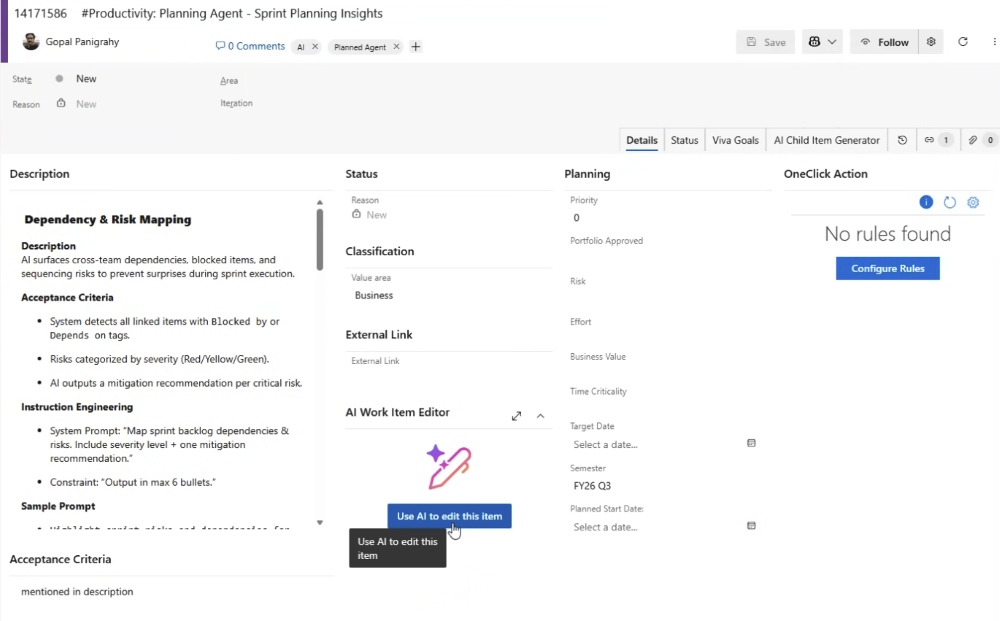
The AI Work Item Assistant is a real-time embedded experience within ADO work items. Powered by Microsoft Foundry, it helps users create and refine work items using context and business requirements.
The assistant works immersively, keeping users focused and within ADO as they structure work items or generate child items from the parent.
For product and program managers who start with high‑level ideas, the assistant understands intent. It can automatically suggest logical, sprint‑ready breakdowns, helping to dramatically reduce the time spent on planning, sorting, and prioritizing work items.
Turning newfound time into innovation
The key to reclaiming time for your workforce isn’t just the introduction of new AI-driven features. It’s using the technology to enforce structure and quality at the beginning, so that everything downstream moves faster.
Panigrahy describes the practice as three reinforcing feedback loops.
The first loop is upstream quality amplification. AI agents help consistently structure work items with clear acceptance criteria and templates. The structure then feeds other tools (such as GitHub Copilot), allowing them to generate higher-quality code and more predictable outcomes—shortening the overall software development lifecycle.
The second feedback loop is acceleration of execution. In a typical sprint planning session, a team of eight engineers might:
- Take an hour (or more) to manually break user stories into more than 100 tasks
- Create different tasks in their own style, introducing inconsistency and ambiguity
- Generate uneven details, then spend time clarifying data later
With DevOps Assistant and AI Work Item Assistant, that same task breakdown turns into a prompt-driven action that no longer requires hours of work.
“It burns a lot of time for everyone to manually create each item in their own way, making sure they’re using the correct inputs from the product manager and confirming they aren’t missing anything,” Panigrahy says. “Now, with AI magic, it takes less than three minutes.”
The third feedback loop is capacity reinvestment. Instead of spending hours on tactical DevOps mechanics, teams can now spend more time on engineering judgment, resulting in better estimation, technical decisions, and design. They can use these reclaimed hours to learn new tools, experiment with new agents, and innovate on the SDLC.
“Capacity saving keeps giving back, in a loop,” Gupta says. “You get more capacity back. You innovate. You learn. You do better.”
What’s next on the AI-in-ADO journey
The DevOps Assistant and the AI Work Item Assistant can help change user behavior, shifting from time spent doing tactical DevOps tasks to performing higher‑value, judgment-based work. These tools can help teams increase work quality and reduce wasted time.
“Our next chapter is about making AI smarter, more action-oriented, and truly agentic,” Sahoo says. “The goal is to reduce cognitive load and allow the experience to live wherever users are—from Azure DevOps to Microsoft Teams and Microsoft 365—so the agent works seamlessly across their workflow.”
AI-driven productivity gains are arguably the biggest opportunity in the industry. It’s fundamentally redefining the engineering experience at an unprecedented pace.
“While we’ve made huge strides embedding AI into the everyday Azure DevOps experience, it still feels like we’re just getting started,” Sahoo says. “Staying relevant means continuously evolving to deliver ever-greater value and efficiency to engineers.”

Key takeaways
Keep these tips in mind as you get started on your own journey with AI and Microsoft ADO:
- Treat AI as a strategic accelerator, not as an add-on. Identify where your engineering process can use AI to move from simple assistance to transforming your workflows.
- Target high-effort, high-volume tasks first. Analyze where your teams are spending significant manual time, even if AI tools are already in place in those workflows.
- Validate productivity with measurable data, not intuition. Track time reclaimed, workflow efficiency, reduction in manual steps, and user satisfaction. Tangible data can help your initiative earn trust and justify the expansion of AI tool use on your team.


Related links
